<?xml version="1.0" encoding="utf-8"?>
<feed xmlns="http://www.w3.org/2005/Atom">
  <title>Marcin Skrzyński&#39;s Blog</title>
  <subtitle></subtitle>
  <link href="https://marcin.codes/feed.xml" rel="self"/>
  <link href="https://marcin.codes/"/>
  
    <updated>2026-01-07T15:00:00+00:00</updated>
  
  <id>https://marcin.codes</id>
  <author>
    <name>Marcin Skrzyński</name>
    <email>marcin.skrzynski.7@gmail.com</email>
  </author>
  
    
    <entry>
      <title>React Query in Web Extensions</title>
      <link href="https://marcin.codes/posts/react-query-in-web-extensions/"/>
      <updated>2021-02-04T23:00:00+00:00</updated>
      <id>https://marcin.codes/posts/react-query-in-web-extensions/</id>
      <content type="html">
        <![CDATA[
      <p><img src="https://cdn-images-1.medium.com/max/1600/0*ACYe3gAx5HFwkHEA" alt=""></p>
<p><a href="https://react-query.tanstack.com/">React Query</a> is a library for fetching data from API. Is performant, manages fetched data, and what is the most important is backend agnostic — you can use it with REST or GraphQL APIs. But what about where you didn’t have API at all. Did you ever wonder “Can We use react-query when I don’t have API?”.</p>
<hr>
<p>This post was published originally on my project <a href="https://bookmarkly.app/">Bookmarkly.app</a>. Now when this project is retired I'm moving it to my blog.</p>
<hr>
<h3>TL;DR</h3>
<p><img src="https://media.giphy.com/media/5qFZ8ozwhsdsaNUsNm/source.gif" alt=""></p>
<p>A scene from Brooklyn 9–9 — great tv show :)</p>
<h3>But, how is that possible?</h3>
<p>As I mention above react query is backend agnostic. It’s mean it’s not worrying about how we obtain data from the backend. We just need a key that represents our data and the Promise that after resolving fetches our data.</p>
<p>In this example, we are using <a href="https://github.com/mozilla/webextension-polyfill" title="https://github.com/mozilla/webextension-polyfill">https://github.com/mozilla/webextension-polyfill</a> to add cross-browser support.</p>
<pre class="language-js"><code class="language-js"><span class="token keyword">import</span> browser <span class="token keyword">from</span> <span class="token string">"webextension-polyfill"</span><span class="token punctuation">;</span><br><br><span class="token keyword">export</span> <span class="token keyword">async</span> <span class="token keyword">function</span> <span class="token function">getSites</span><span class="token punctuation">(</span><span class="token punctuation">)</span> <span class="token punctuation">{</span><br>	<span class="token keyword">const</span> <span class="token punctuation">{</span> sites <span class="token punctuation">}</span> <span class="token operator">=</span> <span class="token keyword">await</span> browser<span class="token punctuation">.</span>storage<span class="token punctuation">.</span>local<span class="token punctuation">.</span><span class="token function">get</span><span class="token punctuation">(</span><span class="token punctuation">[</span><span class="token string">"sites"</span><span class="token punctuation">]</span><span class="token punctuation">)</span><span class="token punctuation">;</span><br>	<span class="token keyword">return</span> sites <span class="token operator">||</span> <span class="token punctuation">[</span><span class="token punctuation">{</span> id<span class="token operator">:</span> <span class="token number">1</span><span class="token punctuation">,</span> name<span class="token operator">:</span> <span class="token string">"sample website"</span> <span class="token punctuation">}</span><span class="token punctuation">]</span><span class="token punctuation">;</span><br><span class="token punctuation">}</span></code></pre>
<p>In react component, we can use react’s <a href="https://reactjs.org/docs/concurrent-mode-suspense.html">fetch-as-render</a> experimental functionality, that’s why we don’t bother catching errors in the component.</p>
<pre class="language-js"><code class="language-js"><span class="token keyword">import</span> <span class="token punctuation">{</span> getSites <span class="token punctuation">}</span> <span class="token keyword">from</span> '<span class="token punctuation">.</span><span class="token operator">/</span>queries<span class="token punctuation">;</span><br><br><span class="token keyword">export</span> <span class="token keyword">const</span> <span class="token function-variable function">Sites</span> <span class="token operator">=</span> <span class="token punctuation">(</span><span class="token punctuation">)</span> <span class="token operator">=></span> <span class="token punctuation">{</span><br>  <span class="token keyword">const</span> <span class="token punctuation">{</span> data <span class="token punctuation">}</span> <span class="token operator">=</span> <span class="token function">useQuery</span><span class="token punctuation">(</span><span class="token string">'sites'</span><span class="token punctuation">,</span> getSites<span class="token punctuation">)</span><span class="token punctuation">;</span><br><br>  <span class="token keyword">return</span> <span class="token punctuation">(</span><br>    <span class="token operator">&lt;</span>div<span class="token operator">></span><br>     <span class="token punctuation">{</span>data<span class="token punctuation">.</span><span class="token function">map</span><span class="token punctuation">(</span><span class="token parameter">site</span> <span class="token operator">=></span> <span class="token punctuation">(</span><br>       <span class="token operator">&lt;</span>span key<span class="token operator">=</span><span class="token punctuation">{</span>site<span class="token punctuation">.</span>id<span class="token punctuation">}</span><span class="token operator">></span><span class="token punctuation">{</span>site<span class="token punctuation">.</span>name<span class="token punctuation">}</span><span class="token operator">&lt;</span><span class="token operator">/</span>span<span class="token operator">></span><br>     <span class="token punctuation">)</span><span class="token punctuation">}</span><br>    <span class="token operator">&lt;</span><span class="token operator">/</span>div<span class="token operator">></span><br>  <span class="token punctuation">)</span><br><span class="token punctuation">}</span></code></pre>
<p>To catch errors we are using <a href="https://reactjs.org/docs/error-boundaries.html">error boundaries</a>. We can create a sample component like this:</p>
<pre class="language-js"><code class="language-js"><span class="token keyword">class</span> <span class="token class-name">ErrorBoundary</span> <span class="token keyword">extends</span> <span class="token class-name">React<span class="token punctuation">.</span>Component</span> <span class="token punctuation">{</span><br>	<span class="token function">constructor</span><span class="token punctuation">(</span><span class="token parameter">props</span><span class="token punctuation">)</span> <span class="token punctuation">{</span><br>		<span class="token keyword">super</span><span class="token punctuation">(</span>props<span class="token punctuation">)</span><span class="token punctuation">;</span><br>		<span class="token keyword">this</span><span class="token punctuation">.</span>state <span class="token operator">=</span> <span class="token punctuation">{</span> hasError<span class="token operator">:</span> <span class="token boolean">false</span> <span class="token punctuation">}</span><span class="token punctuation">;</span><br>	<span class="token punctuation">}</span><br><br>	<span class="token keyword">static</span> <span class="token function">getDerivedStateFromError</span><span class="token punctuation">(</span><span class="token parameter">error</span><span class="token punctuation">)</span> <span class="token punctuation">{</span><br>		<span class="token keyword">return</span> <span class="token punctuation">{</span> hasError<span class="token operator">:</span> <span class="token boolean">true</span> <span class="token punctuation">}</span><span class="token punctuation">;</span><br>	<span class="token punctuation">}</span><br><br>	<span class="token function">componentDidCatch</span><span class="token punctuation">(</span><span class="token parameter">error<span class="token punctuation">,</span> errorInfo</span><span class="token punctuation">)</span> <span class="token punctuation">{</span><br>		<span class="token comment">// You can also log the error to an error</span><br>		<span class="token comment">// reporting service logErrorToMyService(error, errorInfo);</span><br>	<span class="token punctuation">}</span><br><br>	<span class="token function">render</span><span class="token punctuation">(</span><span class="token punctuation">)</span> <span class="token punctuation">{</span><br>		<span class="token keyword">if</span> <span class="token punctuation">(</span><span class="token keyword">this</span><span class="token punctuation">.</span>state<span class="token punctuation">.</span>hasError<span class="token punctuation">)</span> <span class="token punctuation">{</span><br>			<span class="token keyword">return</span> <span class="token operator">&lt;</span>h1<span class="token operator">></span>Something went wrong<span class="token punctuation">.</span><span class="token operator">&lt;</span><span class="token operator">/</span>h1<span class="token operator">></span><span class="token punctuation">;</span><br>		<span class="token punctuation">}</span><br>		<span class="token keyword">return</span> <span class="token keyword">this</span><span class="token punctuation">.</span>props<span class="token punctuation">.</span>children<span class="token punctuation">;</span><br>	<span class="token punctuation">}</span><br><span class="token punctuation">}</span><br><span class="token keyword">export</span> ErrorBoundary<span class="token punctuation">;</span></code></pre>
<p>Everything is composed like that:</p>
<pre class="language-js"><code class="language-js"><span class="token keyword">import</span> <span class="token operator">*</span> <span class="token keyword">as</span> React <span class="token keyword">from</span> <span class="token string">"react"</span><span class="token punctuation">;</span><br><span class="token keyword">import</span> <span class="token operator">*</span> <span class="token keyword">as</span> ReactDOM <span class="token keyword">from</span> <span class="token string">"react-dom"</span><span class="token punctuation">;</span><br><span class="token keyword">import</span> <span class="token punctuation">{</span> ReactQueryConfigProvider <span class="token punctuation">}</span> <span class="token keyword">from</span> <span class="token string">"react-query"</span><span class="token punctuation">;</span><br><span class="token keyword">import</span> <span class="token punctuation">{</span> Sites <span class="token punctuation">}</span> <span class="token keyword">from</span> <span class="token string">"./sites"</span><span class="token punctuation">;</span><br><span class="token keyword">import</span> <span class="token punctuation">{</span> ErrorBoundary <span class="token punctuation">}</span> <span class="token keyword">from</span> <span class="token string">"./error-boundry"</span><span class="token punctuation">;</span><br><br><span class="token keyword">const</span> queryConfig <span class="token operator">=</span> <span class="token punctuation">{</span><br>	suspense<span class="token operator">:</span> <span class="token boolean">true</span><span class="token punctuation">,</span><br><span class="token punctuation">}</span><span class="token punctuation">;</span><br><br><span class="token keyword">async</span> <span class="token keyword">function</span> <span class="token function">main</span><span class="token punctuation">(</span><span class="token punctuation">)</span><span class="token operator">:</span> Promise<span class="token operator">&lt;</span>Event<span class="token operator">></span> <span class="token punctuation">{</span><br>	<span class="token keyword">return</span> <span class="token keyword">new</span> <span class="token class-name">Promise</span><span class="token punctuation">(</span><span class="token punctuation">(</span><span class="token parameter">resolve</span><span class="token punctuation">)</span> <span class="token operator">=></span><br>		window<span class="token punctuation">.</span><span class="token function">addEventListener</span><span class="token punctuation">(</span><span class="token string">"DOMContentLoaded"</span><span class="token punctuation">,</span> resolve<span class="token punctuation">)</span><br>	<span class="token punctuation">)</span><span class="token punctuation">;</span><br><span class="token punctuation">}</span><br><br><span class="token keyword">function</span> <span class="token function">render</span><span class="token punctuation">(</span><span class="token punctuation">)</span> <span class="token punctuation">{</span><br>	ReactDOM<span class="token punctuation">.</span><span class="token function">render</span><span class="token punctuation">(</span><br>		<span class="token operator">&lt;</span>ReactQueryConfigProvider config<span class="token operator">=</span><span class="token punctuation">{</span>queryConfig<span class="token punctuation">}</span><span class="token operator">></span><br>			<span class="token operator">&lt;</span>ErrorBoundary<span class="token operator">></span><br>				<span class="token operator">&lt;</span>Sites <span class="token operator">/</span><span class="token operator">></span><br>			<span class="token operator">&lt;</span><span class="token operator">/</span>ErrorBoundary<span class="token operator">></span><br>		<span class="token operator">&lt;</span><span class="token operator">/</span>ReactQueryConfigProvider<span class="token operator">></span><span class="token punctuation">,</span><br>		document<span class="token punctuation">.</span><span class="token function">getElementById</span><span class="token punctuation">(</span><span class="token string">"popup"</span><span class="token punctuation">)</span><br>	<span class="token punctuation">)</span><span class="token punctuation">;</span><br><span class="token punctuation">}</span><br><br><span class="token function">main</span><span class="token punctuation">(</span><span class="token punctuation">)</span><br>	<span class="token punctuation">.</span><span class="token function">then</span><span class="token punctuation">(</span>render<span class="token punctuation">)</span><br>	<span class="token punctuation">.</span><span class="token function">catch</span><span class="token punctuation">(</span>reportError<span class="token punctuation">)</span><span class="token punctuation">;</span></code></pre>
<h3>Summary</h3>
<p>As you see, it’s easy to use react query in web extension. React Query has fantastic developer experience. You should try it yourself.</p>

    ]]>
      </content>
    </entry>
  
    
    <entry>
      <title>Is Preact worth checking in 2021?</title>
      <link href="https://marcin.codes/posts/is-preact-worth-checking-in-2021/"/>
      <updated>2021-04-08T22:00:00+00:00</updated>
      <id>https://marcin.codes/posts/is-preact-worth-checking-in-2021/</id>
      <content type="html">
        <![CDATA[
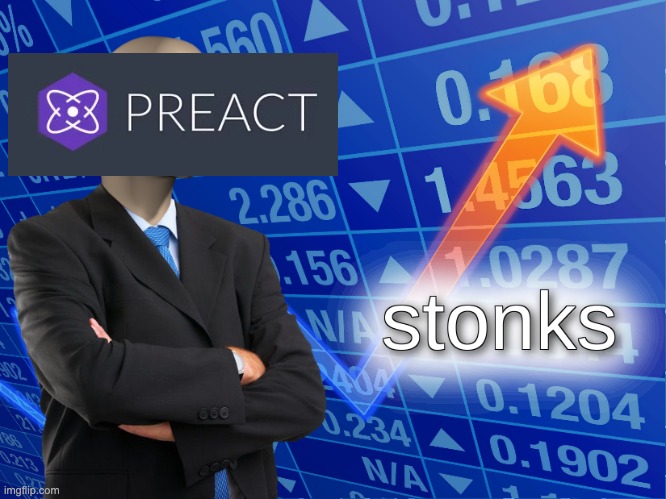
      <p><img src="/images/54uol5.jpg" alt=""></p>
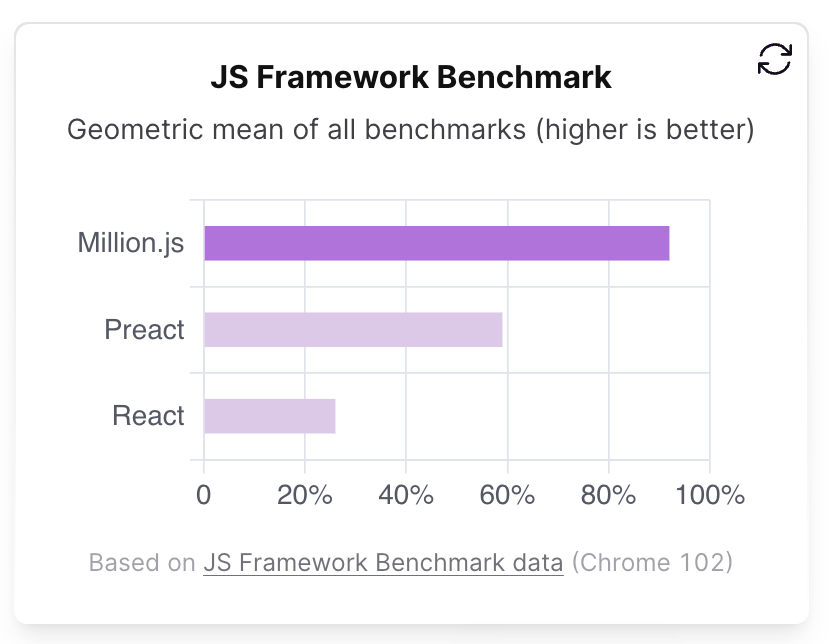
<p>Preact is a framework that aims to be fast with a smaller size alternative React with the same API. Comparing to such a giant as React isn’t easy. Let’s see if Preact should be ashamed of that comparison!</p>
<h2>Features</h2>
<p>Most of Preact features are the same as in React. Hooks, Portals, Suspense all of this are available in Preact. There are some small differences in Preact. You can read about it here <a href="https://preactjs.com/guide/v10/differences-to-react" title="https://preactjs.com/guide/v10/differences-to-react">https://preactjs.com/guide/v10/differences-to-react</a>.</p>
<p>So why you should consider picking Preact instead of React?</p>
<h3>Smaller size</h3>
<p>Preact has a smaller footprint. According to <a href="https://bundlephobia.com/">bundlephobia</a> Preact (with @preact/compat) is almost 4.5kB minified and gzipped. Comparing to React (with React DOM) which size is 42kB, Preact is <strong>90% smaller</strong>. That’s a huge difference. Here we need to remember that Preact is fully compatible with React apps and it can be replaced in most of the apps without changing the line of code.</p>
<h2>Preact is gaining popularity</h2>
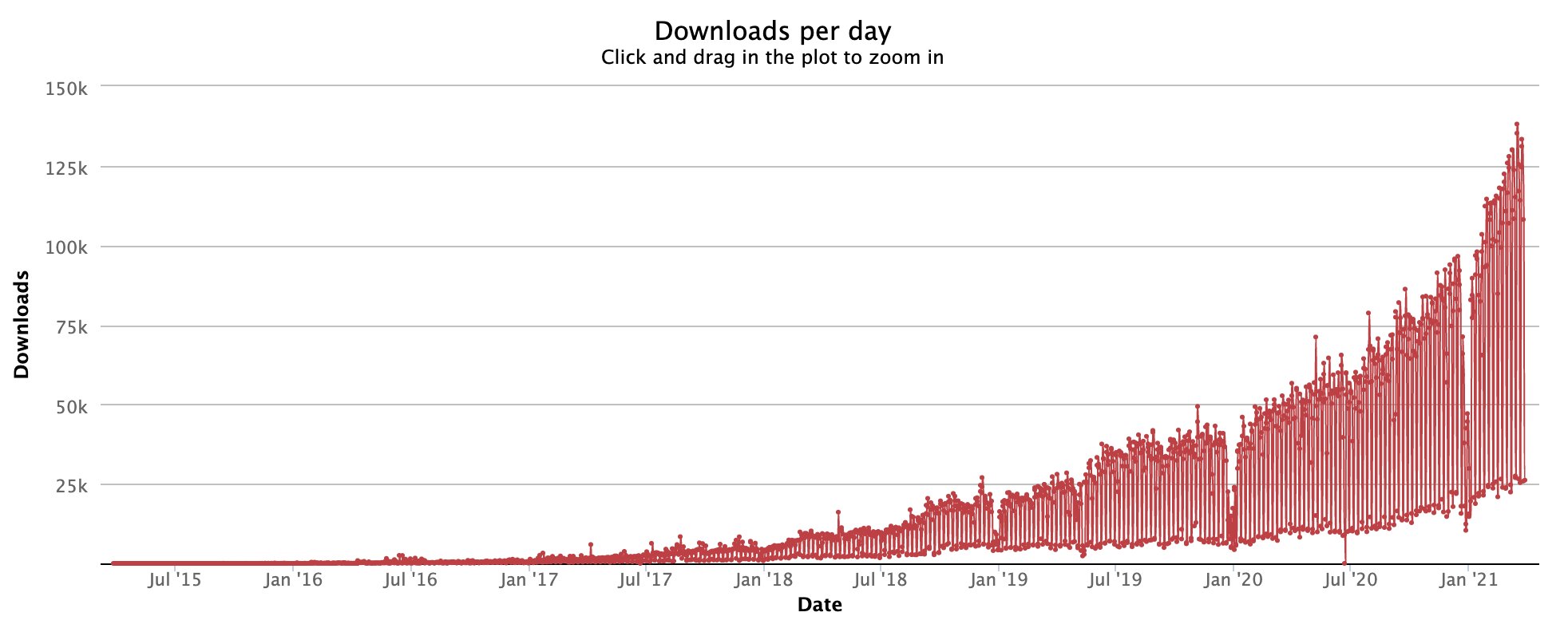
<h5><img src="/images/exp7p8bwyaahhut.jpeg" alt=""></h5>
<p>The trend is visible, people are reaching out more and more often. Wider community lead library authors to support not only react but also Preact. You can see here a community-made project using Preact.</p>
<p><a href="https://github.com/preactjs/awesome-preact" title="https://github.com/preactjs/awesome-preact">https://github.com/preactjs/awesome-preact</a></p>
<h2>Preact is simpler</h2>
<p>Look at this and see in-depth how Preact looks under the hood. This simplicity benefits!</p>
<p>This is code for <strong>useState:</strong></p>
<pre class="language-tsx"><code class="language-tsx"><span class="token keyword">export</span> <span class="token keyword">function</span> <span class="token function">useState</span><span class="token punctuation">(</span><span class="token parameter">initialState</span><span class="token punctuation">)</span> <span class="token punctuation">{</span><br>  currentHook <span class="token operator">=</span> <span class="token number">1</span><span class="token punctuation">;</span><br>  <span class="token keyword">return</span> <span class="token function">useReducer</span><span class="token punctuation">(</span>invokeOrReturn<span class="token punctuation">,</span> initialState<span class="token punctuation">)</span><span class="token punctuation">;</span><br><span class="token punctuation">}</span></code></pre>
<p>And this one is for <strong>useRef:</strong></p>
<pre class="language-tsx"><code class="language-tsx"><span class="token keyword">export</span> <span class="token keyword">function</span> <span class="token function">useRef</span><span class="token punctuation">(</span><span class="token parameter">initialValue</span><span class="token punctuation">)</span> <span class="token punctuation">{</span><br>  currentHook <span class="token operator">=</span> <span class="token number">5</span><span class="token punctuation">;</span><br>  <span class="token keyword">return</span> <span class="token function">useMemo</span><span class="token punctuation">(</span><span class="token punctuation">(</span><span class="token punctuation">)</span> <span class="token operator">=></span> <span class="token punctuation">(</span><span class="token punctuation">{</span> current<span class="token operator">:</span> initialValue <span class="token punctuation">}</span><span class="token punctuation">)</span><span class="token punctuation">,</span> <span class="token punctuation">[</span><span class="token punctuation">]</span><span class="token punctuation">)</span><span class="token punctuation">;</span><br><span class="token punctuation">}</span></code></pre>
<p>Do you see how simple it is? Re-using other parts of well-designed code has so much impact.</p>
<h2>Summary</h2>
<p>Simplicity and well-designed API are powerful. The small size means less code to run this led to faster apps. I made a chrome extension called <a href="https://github.com/ZBW-dev/pullrequests-templates">pullrequests-templates</a> using preact. The developer experience was amazing and I’m considering starting all my new projects using Preact. Definitely recommend everyone to check it.</p>
<p>Answering the question in the title: <strong>Yes!</strong></p>

    ]]>
      </content>
    </entry>
  
    
    <entry>
      <title>Astro: Meta framework of future web development</title>
      <link href="https://marcin.codes/posts/astro:-meta-framework-of-future-web-development/"/>
      <updated>2021-04-12T22:00:00+00:00</updated>
      <id>https://marcin.codes/posts/astro:-meta-framework-of-future-web-development/</id>
      <content type="html">
        <![CDATA[
      <p><img src="/images/1_zxi_xwkut9nd22pwo0lvog.png" alt=""></p>
<p>I wasn’t hyped that much for a long time. But in my opinion, something big is coming. Folks behind <a href="https://www.snowpack.dev/">Snowpack</a> and <a href="https://www.skypack.dev/">Skypack</a> presented a little sneak peek of what they are currently working on.</p>
<p>You can see the full video here: <a href="https://www.pscp.tv/w/1nAJELQkljlGL" title="https://www.pscp.tv/w/1nAJELQkljlGL">https://www.pscp.tv/w/1nAJELQkljlGL</a></p>
<h2>What is Astro?</h2>
<p>Yet, another framework for building sites. But this one is different. The first thing, Astro using opt-in hydration. So when you want to use javascript on your site you need to explicitly set that you are using it. It’s not like Vite, SvelteKit, or Next.js. It’s more like <a href="https://www.11ty.dev/">Eleventy</a> with first-class support for using your client-side code.</p>
<h3>How does this work?</h3>
<p>Astro compiles and treats your files as regular HTML. When you are using client-side libraries like React, Vue, or Svelte then those parts of the app you are using client-side code treat like, independent application and is pushing its code.</p>
<p>You have two types of serving client-side code to users:</p>
<ul>
<li><strong>Idle</strong> — serving code when the page is requested. It’s great for whole apps that have parts of the webpage statically generated.</li>
<li><strong>Visible</strong> <em>—</em> import code when the user enters a place where this code is needed. It’s great when you add a small component and don’t want to lose all benefits from static generation performance.</li>
</ul>
<h3><img src="https://cdn-images-1.medium.com/max/1600/1*GpzjSPpZhB4vMbIzN7n1cw.gif" alt=""></h3>
<h3>Why is this so needed?</h3>
<p>Most of the technologies have it’s own tools. Gatsby, Next.js, Nuxt, Gridsome, Eleventy, SvelteKit. All of them are fantastic and have some unique great features, but you are closed to use only one of them. They are not focused on their own environment and library. It’s good for them, but not for developers. When you are building a site you want to build it fast, without friction, and the best performance.<br>
Also, all of those frameworks need proper setup. With Astro, you can go to <a href="https://bit.dev/">Bit</a> pick a component, add to your site without hassle, and not sacrifice performance!</p>
<h3>Other features</h3>
<ul>
<li><strong>Transforming extended markdown files into pages</strong> — like in eleventy, we can drop in a markdown file, add layout property and build a page on that. Except for this, we can use your components in that files, similar to <a href="https://mdxjs.com/">MDX</a>.</li>
<li><strong>Files based routing</strong> — everything that is in the <code>/pages</code> directory will be transformed to page.</li>
<li><strong>Templating system</strong> — we can split code into templates and reuse them.</li>
</ul>
<h2>Summary</h2>
<p>I think it will be a game-changer in building websites. Especially those without much client-side javascript. In such a setup, performance will be high by default, with templating system and MDX-like features maintaining a codebase will be easy enough for everyone, even for those without knowledge about client-side libraries.</p>
<p><em>On</em> <a href="https://discord.gg/ynyH4BVp"><em>Astro discord</em></a><em>, you can get invited to the Astro repository and have, a chance to check yourself how Astro.</em></p>

    ]]>
      </content>
    </entry>
  
    
    <entry>
      <title>State machines for the rescue</title>
      <link href="https://marcin.codes/posts/state-machines-for-the-rescue/"/>
      <updated>2021-04-21T22:00:00+00:00</updated>
      <id>https://marcin.codes/posts/state-machines-for-the-rescue/</id>
      <content type="html">
        <![CDATA[
      <p><img src="!%5B%5D(/images/undraw_super_woman_dv0y-1.png)" alt=""></p>
<p>Most of the features we are creating in our applications can be described in finite state machines. When we think about web applications we are thinking about the state in which our application is. Then we have ways we can go and modify the state of the application.</p>
<p>The login page is a great example. When you enter valid credentials, you were transitioned from the “<em>not logged in”</em> state into the “<em>logged in</em>”. Let’s see how knowledge about that can help us create more predictable and less error-prone applications.</p>
<hr>
<h2>What exactly are finite state machines?</h2>
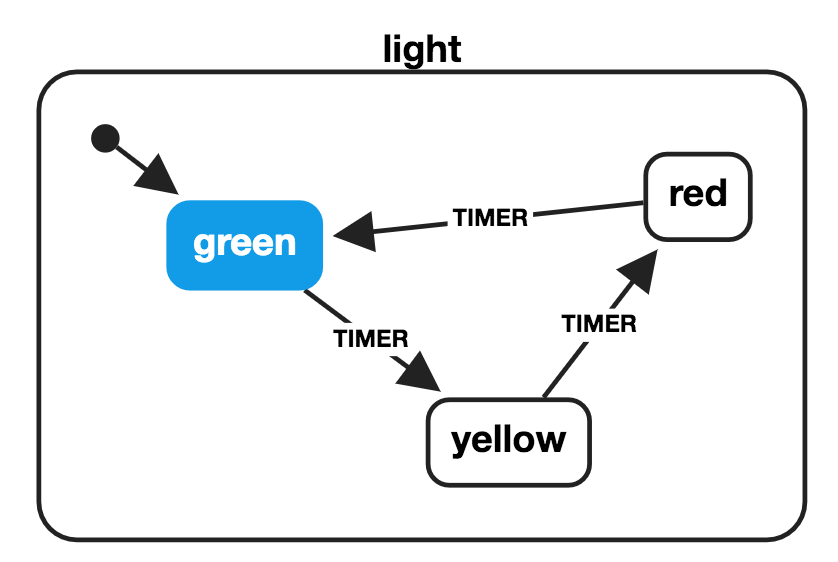
<p><img src="https://cdn-images-1.medium.com/max/1600/1*-_TLV1PxL_Cd6uK36rTggw.png" alt="">Sample finite state machine chart</p>
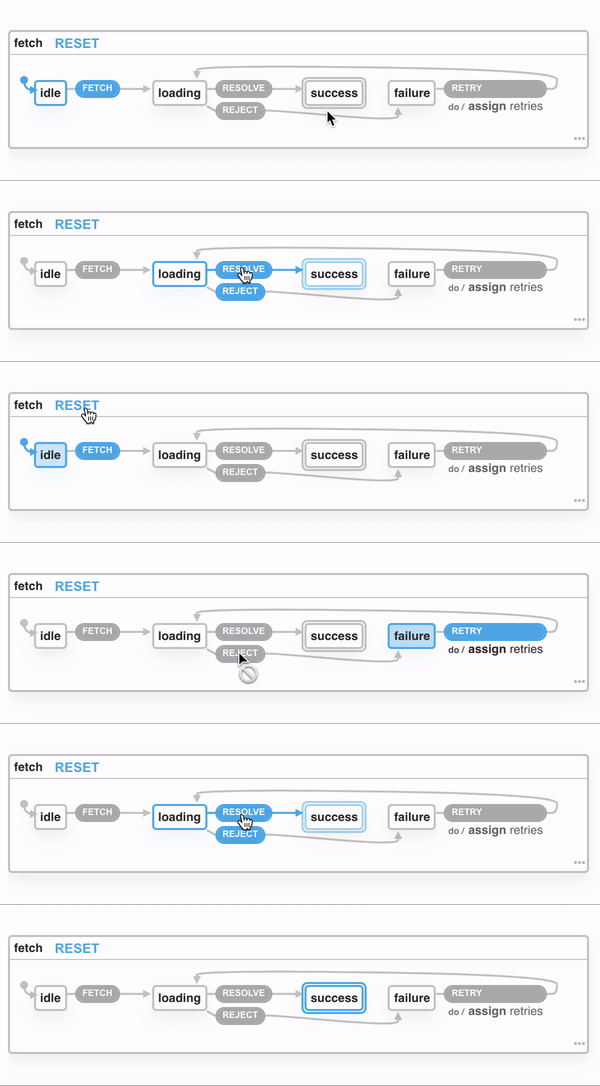
<p>Definition of this you can read on <a href="https://en.wikipedia.org/wiki/Finite-state_machine">Wikipedia page</a>. There you can find more information about how they are defined and what they really are. But to make a long story short. Your application has a current state. You can transition to other states that are available in the current state. When transition you preserve metadata why this transition happens, eg. request is <em>rejected</em> or <em>resolved</em>.</p>
<p>Let’s see it in action:</p>
<p><img src="https://cdn-images-1.medium.com/max/1600/1*tnY8fYVMBApJ5gu-SyS_4Q.gif" alt=""></p>
<h2>What is XState?</h2>
<p><a href="https://github.com/davidkpiano/xstate">XState</a> is a library to create the finite state machine for JavaScript. It can help you describe states and available transitions in your application. It can be used in plain JavaScript but also has first-class support for the most popular frontend frameworks.</p>
<h2>Why XState?</h2>
<p>It can help you describe the behavior of your application. You can restrict access to the events in a certain state. It’s easy to use and straightforward.</p>
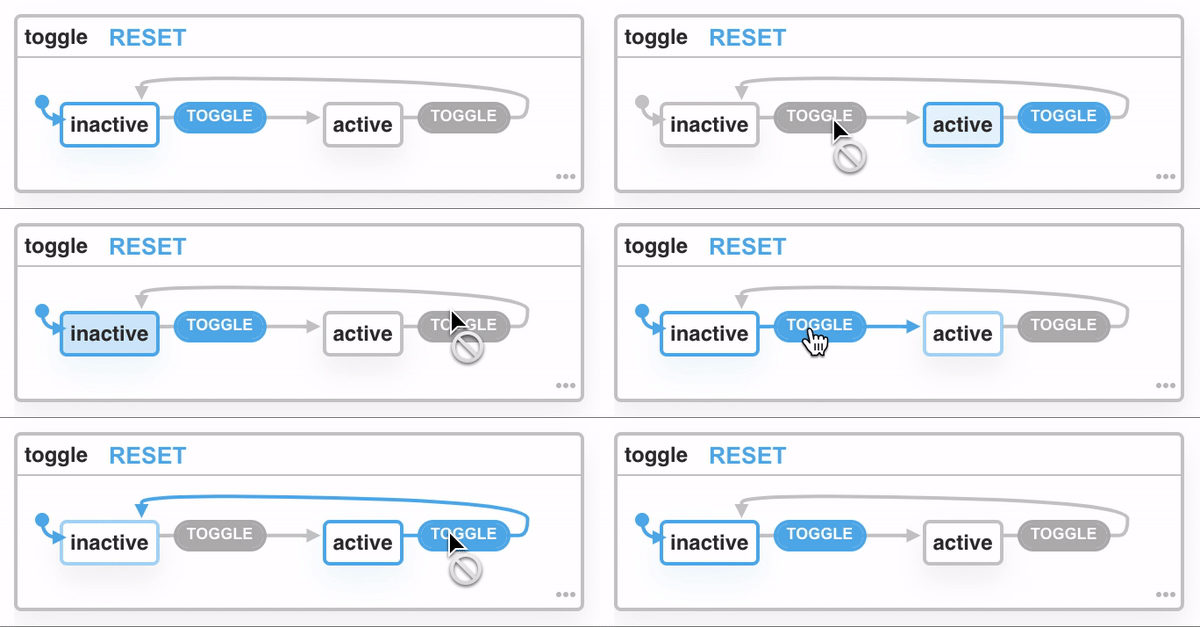
<p>When we want to create a toggle, for example when we are showing the user a <em>popover.</em></p>
<pre class="language-js"><code class="language-js"><span class="token keyword">import</span> <span class="token punctuation">{</span> createMachine <span class="token punctuation">}</span> <span class="token keyword">from</span> <span class="token string">'xstate'</span><span class="token punctuation">;</span><br><br><span class="token function">createMachine</span><span class="token punctuation">(</span><span class="token punctuation">{</span><br>  id<span class="token operator">:</span> <span class="token string">'popover-toggle'</span><span class="token punctuation">,</span><br>  initial<span class="token operator">:</span> <span class="token string">'inactive'</span><span class="token punctuation">,</span><br>  states<span class="token operator">:</span> <span class="token punctuation">{</span><br>    inactive<span class="token operator">:</span> <span class="token punctuation">{</span> on<span class="token operator">:</span> <span class="token punctuation">{</span> <span class="token constant">TOGGLE</span><span class="token operator">:</span> <span class="token string">'active'</span> <span class="token punctuation">}</span> <span class="token punctuation">}</span><span class="token punctuation">,</span><br>    active<span class="token operator">:</span> <span class="token punctuation">{</span> on<span class="token operator">:</span> <span class="token punctuation">{</span> <span class="token constant">TOGGLE</span><span class="token operator">:</span> <span class="token string">'inactive'</span> <span class="token punctuation">}</span> <span class="token punctuation">}</span><br>  <span class="token punctuation">}</span><br><span class="token punctuation">}</span><span class="token punctuation">)</span></code></pre>
<p>We need to define at least 3 fields:</p>
<ul>
<li><code>id</code> — identifier of the state machine among others, should be unique</li>
<li><code>initial</code> — initial state which will be your state machine, should be one of the defined states</li>
<li><code>states</code> — available states in which your machine can be your machine</li>
</ul>
<p><img src="https://cdn-images-1.medium.com/max/1600/1*CcoWQ_6y_uDz96GStgEPFg.gif" alt=""></p>
<p>We must be creating one small piece of application state instead of the whole application component. This state machine works only for popover, not for modals, or others components on your site. Keep it on the same level as a component that is for.</p>
<h2>Summary</h2>
<p>XState can help you with managing requests, keep states of modal, popovers, or other components in your application. Smooth transition to available state and visualizer helps you build better, more predictable, and less error-prone applications. Check more in <a href="https://xstate.js.org/docs/">XState docs</a> on how to use finite state machines.</p>

    ]]>
      </content>
    </entry>
  
    
    <entry>
      <title>You don&#39;t need a backend developer!</title>
      <link href="https://marcin.codes/posts/you-don&amp;#39;t-need-a-backend-developer!/"/>
      <updated>2021-04-29T22:00:00+00:00</updated>
      <id>https://marcin.codes/posts/you-don&amp;#39;t-need-a-backend-developer!/</id>
      <content type="html">
        <![CDATA[
      <p><img src="https://cdn-images-1.medium.com/max/1600/1*baibVIq2mCYswwl7EJ-vOA.jpeg" alt=""></p>
<p>One word: <a href="https://hasura.io/">Hasura</a>. It’s an incredible tool for bootstrapping the backend and serving data for your app. It‘s built on top of GraphQL and PostgreSQL — battle-tested tools by developers around the world.</p>
<h2>What is Hasura?</h2>
<p>Hasura is a service that manages how to serve your data. Thanks to using <a href="https://graphql.org/">GraphQL language</a> you can easily compose queries to retrieve data more efficiently. You don’t need to worry about making a backend, endpoints, writing resolvers, setting up a database — everything is managed by Hasura!</p>
<h2>Getting started</h2>
<p>You can check here how to start using it in the <a href="https://hasura.io/docs/1.0/graphql/core/getting-started/index.html">official documentation</a>. It takes less than 5 minutes to get started. Hasura is self-hosted software but also offers cloud hosting. The cloud option is free and it’s perfect for getting started.</p>
<h2>Features</h2>
<p>Hasura has so many features, it’s like a Swiss pocket knife where you can find everything you need for creating an application backend. From serving data, with relationships and subscriptions to webhooks and cron jobs.</p>
<h3>Serving data</h3>
<p>This is the most powerful functionality. Just serve data! Everything you create in the database editor is reflected in the GraphQL editor.</p>
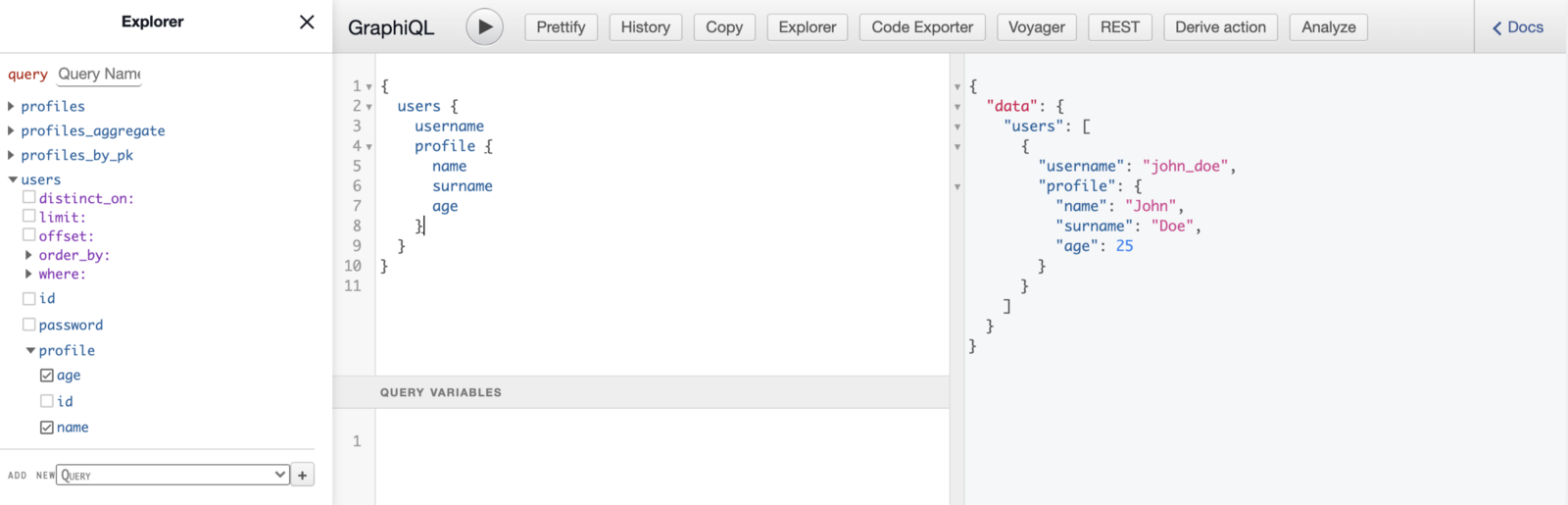
<p>When you add data and connect tables with <strong>relationships</strong> you end up with something like this.</p>
<p><img src="/images/1_woyiow-abdsyjgidhm7sfa.png" alt=""></p>
<h3>Real-time updates</h3>
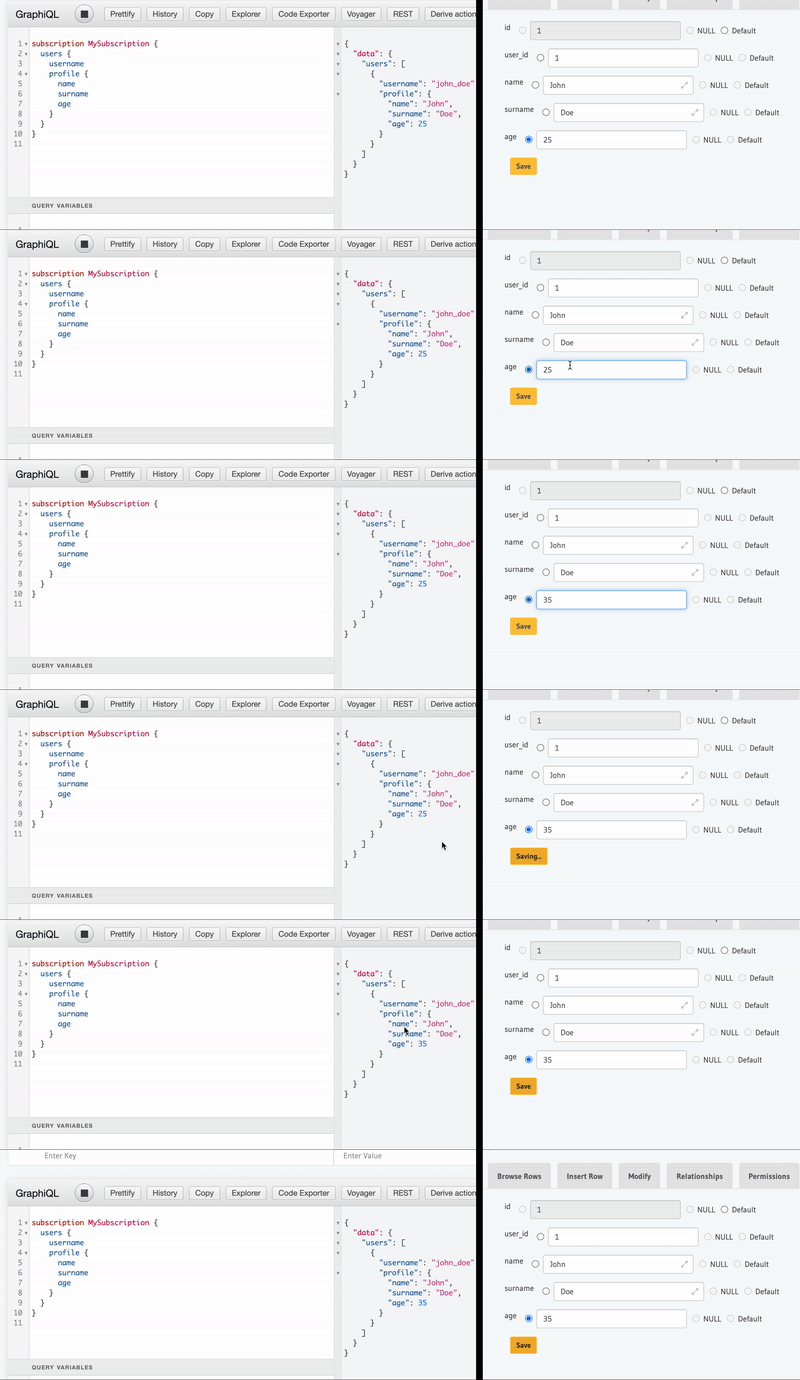
<p>In Hasura you can use GraphQL subscriptions out of the box. Subscriptions are sending data in real-time to users using web sockets. When you change something in the database, you don’t need to fetch data again. Your server (Hasura) sends new data and notifies you that something was changed.</p>
<p><img src="/images/ezgif-1-5dc57428dd53.gif" alt=""></p>
<h3>Roles</h3>
<p>In Hasura we can define a role for every action on the table. With <strong>inherited roles</strong> that are recently added, you can define global roles and assign them permissions.</p>
<p><img src="/images/1__78gffxygf5dt2pazoa0bq.png" alt=""></p>
<h3><strong>Event Triggers</strong></h3>
<p>We can react to changes made in your database. We can set up which events Hasura should react to and send a payload to a specified webhook.<br>
In advanced settings, we can pick on which column update we want to send requests to webhook and which we want to omit. Great for sending email confirmation when your email changes. Everything can be set up in Hasura!</p>
<h3>… and much more</h3>
<p>Besides that, I wrote before we can use <strong>Remote schemas</strong> to connect more GraphQL schemas into single endpoints. It’s great when you have microservices architecture. You can connect it into a single endpoint! Also, there are:</p>
<ul>
<li><strong>One-off Scheduled Events</strong> helps us create an event that will fire once at a specified timestamp.</li>
<li>Also, Hasura has <strong>Cron jobs,</strong> the possibility to requests a webhook periodically with a custom payload.</li>
<li>With <strong>Actions,</strong> we can extend Hasura logic to add data validations.</li>
<li><strong>Monitoring</strong> helps us get to know your database usage, active connection or restrict API limit.</li>
</ul>
<h2>Conclusions</h2>
<p>I mean that! You don’t need a backend developer, at least for serving data. Hasura is making this pleasant to work with the data we have defined in the database editor. Helps us make relations, permissions and add some other useful features. More information you will find on <a href="https://hasura.io/learn/">their website</a>.</p>

    ]]>
      </content>
    </entry>
  
    
    <entry>
      <title>Free private npm package using GitHub</title>
      <link href="https://marcin.codes/posts/free-private-npm-package-using-github/"/>
      <updated>2021-05-05T22:00:00+00:00</updated>
      <id>https://marcin.codes/posts/free-private-npm-package-using-github/</id>
      <content type="html">
        <![CDATA[
      <p><img src="https://cdn-images-1.medium.com/max/1600/1*hfyVyb61AYGW7Wv7VvPLWQ.jpeg" alt=""></p>
<p>Sharing logic between more than one application is crucial for creating scalable architecture. We can move some logic, UI components into a separate package. Next, this package can be shared between different applications. When we don’t want to open source your code we can use <a href="https://github.com/features/packages">Github packages</a>.</p>
<p><em>Don’t get me wrong. There is nothing wrong with open-sourcing your work. Probably anyone notices that you open-sourced your UI components. But if in your project it’s prohibited in this article I will cover how to make a private package.</em></p>
<hr>
<p>This post was published originally on my project <a href="https://bookmarkly.app/">Bookmarkly.app</a>. Now when this project is retired I'm moving it to my blog.</p>
<hr>
<h4>Github Packages overview</h4>
<p>Github provides free options in offering package hosting. There are two main constraints:</p>
<ul>
<li>First is available space for packages or packages. You can use only 500MB of storage.</li>
<li>The second is “Data transfer out outside of Actions” and it’s 1GB.<br>
This means that downloading packages for local development is limited to 1GB bandwidth per month.<br>
<em>Downloading the package in Github Actions doesn’t count.</em></li>
</ul>
<h3>Preparing</h3>
<p>You can make it in the monorepo repository, it will work just fine. In our case, we make a new repository, just for the GitHub package.</p>
<h4>Codebase</h4>
<p>First, we need to run <code>npm init</code> to create a package.json file. What’s important here you need to make a scoped package name. Scoped package names start with “@” and contain your username and package name. In my case is “@perfect7m/package-name”. <a href="https://docs.github.com/en/packages/working-with-a-github-packages-registry/working-with-the-npm-registry#publishing-a-package">Github only supports only scoped packages</a>. The scope should be the username or organization name where the repository exists.</p>
<p>I‘m using <a href="https://github.com/developit/microbundle">Microbundle</a> for creating package files in different formats, for server and browser. It’s made by <a href="https://twitter.com/_developit">Developit</a> creator of <a href="https://preactjs.com/">PreactJS</a>. I wrote recently an article about <a href="https://marcin.codes/posts/is-preact-worth-checking-in-2021/">why preact is worth checking in 2021</a>. Follow the installation instruction in the Microbundle repository.<br>
Feel free to use Webpack, Rollup, or any bundler that works for you.</p>
<p>The last thing that needs to change is to add <code>publishConfig</code> in package.json. Everything setup should look like this:</p>
<pre class="language-json"><code class="language-json"><span class="token punctuation">{</span><br>  <span class="token property">"name"</span><span class="token operator">:</span> <span class="token string">"@perfect7m/package-name"</span><span class="token punctuation">,</span><br>  <span class="token property">"version"</span><span class="token operator">:</span> <span class="token string">"0.1.0"</span><span class="token punctuation">,</span><br>  <span class="token property">"description"</span><span class="token operator">:</span> <span class="token string">""</span><span class="token punctuation">,</span><br>  <span class="token property">"source"</span><span class="token operator">:</span> <span class="token string">"src/package-name.js"</span><span class="token punctuation">,</span><br>  <span class="token property">"main"</span><span class="token operator">:</span> <span class="token string">"dist/package-name.js"</span><span class="token punctuation">,</span><br>  <span class="token property">"exports"</span><span class="token operator">:</span> <span class="token string">"./dist/package-name.modern.js"</span><span class="token punctuation">,</span><br>  <span class="token property">"module"</span><span class="token operator">:</span> <span class="token string">"dist/package-name.module.js"</span><span class="token punctuation">,</span><br>  <span class="token property">"unpkg"</span><span class="token operator">:</span> <span class="token string">"dist/package-name.umd.js"</span><span class="token punctuation">,</span><br>  <span class="token property">"scripts"</span><span class="token operator">:</span> <span class="token punctuation">{</span><br>    <span class="token property">"build"</span><span class="token operator">:</span> <span class="token string">"microbundle"</span><span class="token punctuation">,</span><br>    <span class="token property">"dev"</span><span class="token operator">:</span> <span class="token string">"microbundle watch"</span><br>  <span class="token punctuation">}</span><span class="token punctuation">,</span><br>  <span class="token property">"publishConfig"</span><span class="token operator">:</span> <span class="token punctuation">{</span><br>    <span class="token property">"registry"</span><span class="token operator">:</span><span class="token string">"https://npm.pkg.github.com"</span><br>  <span class="token punctuation">}</span><span class="token punctuation">,</span><br>  <span class="token property">"author"</span><span class="token operator">:</span> <span class="token string">"Perfect7M"</span><span class="token punctuation">,</span><br>  <span class="token property">"license"</span><span class="token operator">:</span> <span class="token string">"MIT"</span><span class="token punctuation">,</span><br>  <span class="token property">"devDependencies"</span><span class="token operator">:</span> <span class="token punctuation">{</span><br>    <span class="token property">"microbundle"</span><span class="token operator">:</span> <span class="token string">"^0.13.0"</span><br>  <span class="token punctuation">}</span><br><span class="token punctuation">}</span></code></pre>
<p>When you create <code>package-name.js</code> in <code>/src</code> directory and run <code>npm run build</code> you get all the needed files built.</p>
<h4>Package</h4>
<p>To publish the package we need to create a <code>.npmrc</code> file where we will keep access to the Github npm registry. Add the following to your <code>.npmrc</code> file:</p>
<pre><code>//npm.pkg.github.com/:_authToken=TOKEN
@OWNER:registry=https://npm.pkg.github.com
</code></pre>
<ul>
<li><em>TOKEN</em> is your Github Personal Token. You can obtain it from <a href="https://github.com/settings/tokens" title="https://github.com/settings/tokens">https://github.com/settings/tokens</a>.<br>
<strong>Make sure that</strong> <code>write:packages</code> <strong>permission is checked!</strong></li>
<li><em>OWNER</em> is your Github username.</li>
</ul>
<p><strong>Create</strong> <code>.gitignore</code> <strong>file in your project and add there</strong> <code>.npmrc</code><strong>. Don’t push it with your code. It’s dangerous to show unauthorized people tokens, this token can uploads packages on your behalf!</strong></p>
<p>Also, consider creating</p>
<h3>Publishing</h3>
<p>When we want to publish a package to the Github npm registry we need to authorize ourselves. To make that happen you need to run the following command and provide data:</p>
<pre><code>npm login --scope=@OWNER --registry=https://npm.pkg.github.com

&gt; Username: GITHUB USERNAME
&gt; Password: GITHUB PERSONAL TOKEN
&gt; Email: GITHUB EMAIL ADDRESS
</code></pre>
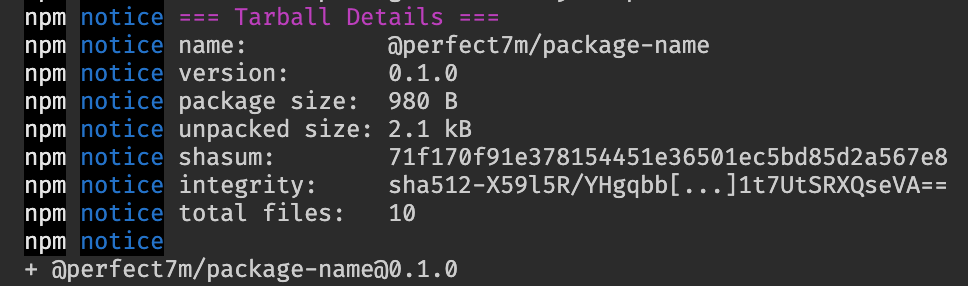
<p>When you are logged in you can submit the package to the registry. To do that run <code>npm publish</code> and see the result. You should see this with your package data.</p>
<p><img src="https://cdn-images-1.medium.com/max/1600/1*SB7ZeOhfQEZNt69VkHDgdA.png" alt=""></p>
<h3>Installing</h3>
<p>In every repository, we want to use this package we need to add <code>.npmrc</code>. By default, npm is configured only to search for packages in the official package registry.</p>
<pre><code>@OWNER:registry=https://npm.pkg.github.com
</code></pre>
<p>As previously, <em>OWNER</em> is your Github username or organization.</p>
<p>Then you need to run as normal install command:</p>
<pre class="language-bash"><code class="language-bash"><span class="token function">npm</span> <span class="token function">install</span> @OWNER/package-name</code></pre>
<p>That’s it. You can use your package code in the project codebase. It’s up to you how you set up your package, what you are exporting, and which platform you support.</p>
<h3>Summary</h3>
<p>That’s how you can set up a small private package. For medium-size organizations or personal projects, this is a great option to distribute codebases. You can read more in <a href="https://docs.github.com/en/packages/working-with-a-github-packages-registry/working-with-the-npm-registry">official documentation</a>, Github packages are not limited to npm but support others packages registry for Docker or Gradle.</p>

    ]]>
      </content>
    </entry>
  
    
    <entry>
      <title>Write better code with AI</title>
      <link href="https://marcin.codes/posts/write-better-code-with-ai/"/>
      <updated>2021-05-09T22:00:00+00:00</updated>
      <id>https://marcin.codes/posts/write-better-code-with-ai/</id>
      <content type="html">
        <![CDATA[
      <p><img src="https://cdn-images-1.medium.com/max/1600/0*YZc_39TdcSS441wl" alt=""></p>
<p>Artificial intelligence is most of the significant technology nowadays. It opens new ways on how we look at the data.</p>
<p>It can:</p>
<ul>
<li>categorizing user’s messages to check the intention of the writer</li>
<li>writing an article for us</li>
<li>creating a whole application from mock-ups</li>
</ul>
<p><strong>So, why we don’t use them to write review code written by us?</strong></p>
<h2>Deepcode meets those needs</h2>
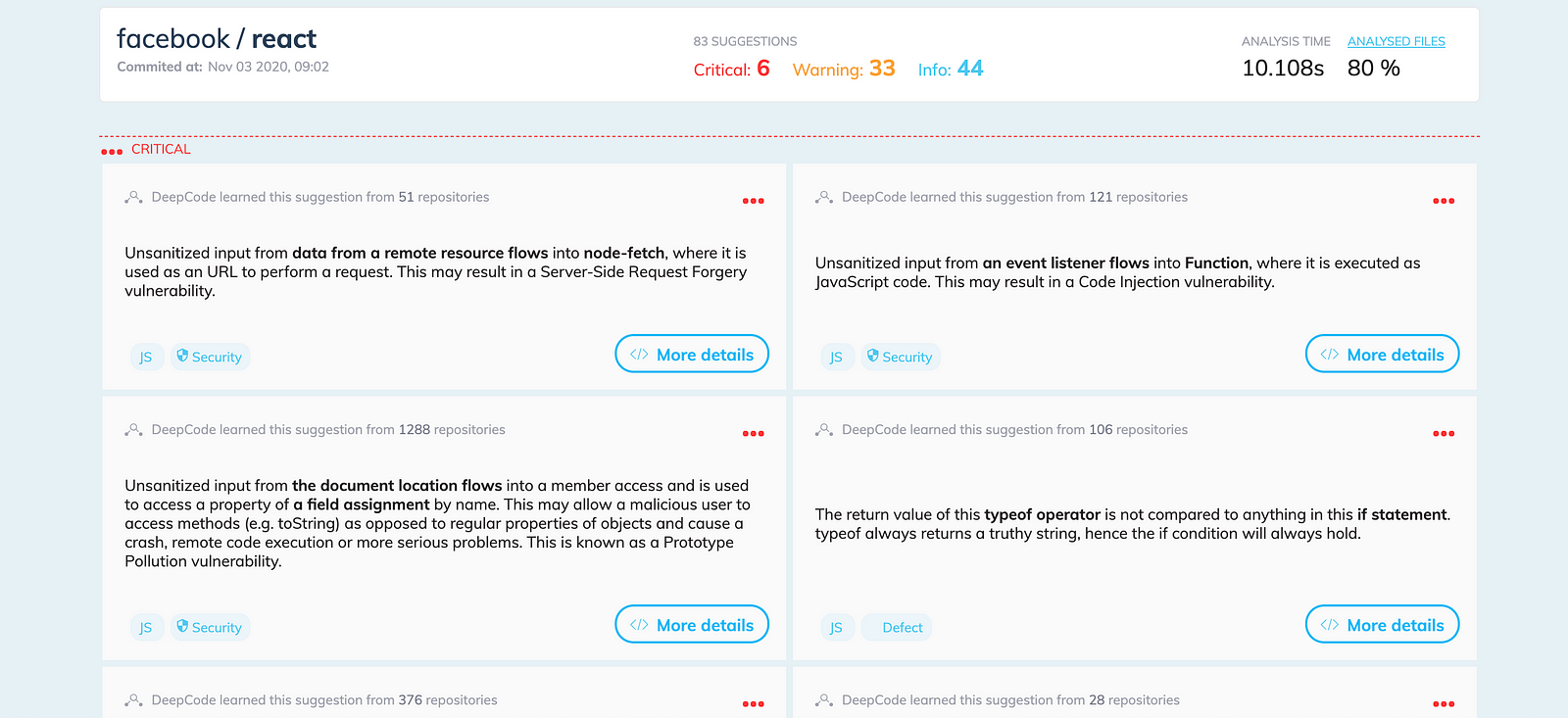
<p><a href="https://www.deepcode.ai/">Deepcode</a> is “The first real-time semantic code analysis — powered by AI” as it’s stated on their website. It’s created by <a href="https://snyk.io/">Snyk</a>. They take care of scanning your code in search of vulnerabilities. That’s why Deepcode has a strong background in scanning and analyzing the codebase.</p>
<p><img src="https://cdn-images-1.medium.com/max/1600/1*pB9Y3m2nVl8QzJLVvSZ7TQ.png" alt=""></p>
<p>Deepcode not only points code that can lead to bugs or vulnerabilities but also gives you a hint on how to solve it. It’s a quick and effective way how we can improve our codebase.</p>
<p>Deepcode support 6 different languages:</p>
<ul>
<li>JavaScript/TypeScript</li>
<li>Java</li>
<li>Python</li>
<li>C/C++</li>
<li>C#</li>
<li>PHP</li>
</ul>
<p>and that’s everything for free.</p>
<h2>Using Deepcode</h2>
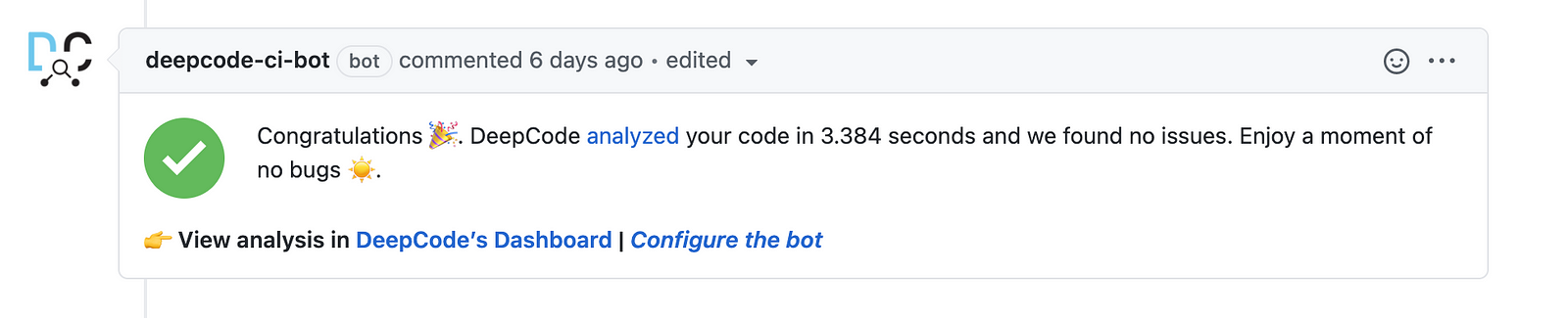
<p>We can integrate deepcode with several IDE. We can use extensions for VS Code, Sublime Text, IntelliJ, and Atom. Also, we can integrate Deepcode’s bot into our repository. Bot is leaving comments about code analysis and bugs founded in opened pull requests.</p>
<p><img src="https://cdn-images-1.medium.com/max/1600/1*QTEfYoWq1yYjrzpOSKf1cw.png" alt=""></p>
<p>More information about where and how you can use this you can find on the <a href="https://www.deepcode.ai/integrations">Deepcode integrations</a> page.</p>
<h2>Where to use it?</h2>
<p>I realize that’s not every project can take benefits from using Deepcode. Not in every project, you can use a tool that scans your whole codebase. It’s great for projects that have only one dev. The second pair of eyes is always at a premium. Deepcode can replace the second developer for finding minor bugs and common mistakes.</p>
<h2>Summary</h2>
<p>Artificial intelligence is amazing. Helps in more and more ways. Deepcode is perfect for side projects without many developers. It can help you assure that your code doesn’t contain common mistakes. But it’s not limited to that, it can help also you in big projects where complement developer code review. Try <a href="https://www.deepcode.ai/">Deepcode</a> yourself and let me know your thoughts.</p>

    ]]>
      </content>
    </entry>
  
    
    <entry>
      <title>Technical Failure #1: React hooks dependencies</title>
      <link href="https://marcin.codes/posts/technical-failure-1:-react-hooks-dependencies/"/>
      <updated>2021-05-26T22:00:00+00:00</updated>
      <id>https://marcin.codes/posts/technical-failure-1:-react-hooks-dependencies/</id>
      <content type="html">
        <![CDATA[
      <p><a href="https://reactjs.org/blog/2019/02/06/react-v16.8.0.html">React introduces hooks in 16.8</a> and everything changed. Hooks provided an opportunity to make functional components with state and lifecycles. The new approach required redefined mental models of how to write code in React. Not fully switching to a new approach lead to issues.</p>
<hr>
<p>The work of a technical leader is full of decisions. You need to make them at the start and they can have an impact on the project even on the finish line. This series of article is for people who want to learn from my mistakes:</p>
<ol>
<li>React hooks dependencies</li>
</ol>
<hr>
<h3>Situation</h3>
<p>Let’s imagine we have a root component with a state that changes frequently and a component connected to the backend.</p>
<script src="https://gist.github.com/Perfect7M/345ac41d2e24baec28b4ee93392cbe1b.js"></script>
<p>This code update <code>Root</code> component state every 3s. Every time counter is incremented <code>ArticlesWithMutipleRerenders</code> component is re-rendered. This leads to the calling <code>getArticles</code> method every time the counter is changing.</p>
<h3>Why is this happen?</h3>
<p>React uses reference equality when comparing dependencies to figure out it should run <code>useEffect</code> callback or not. In this case the following assign:</p>
<pre class="language-js"><code class="language-js"><span class="token keyword">const</span> db <span class="token operator">=</span> <span class="token function">DBConnection</span><span class="token punctuation">(</span><span class="token punctuation">)</span><span class="token punctuation">;</span></code></pre>
<p>every render <code>db</code> changes its reference, even if the value of this variable is the same as before.</p>
<p>That’s why <code>useEffect</code> callback runs every time component is rendered:</p>
<pre class="language-js"><code class="language-js"><span class="token function">useEffect</span><span class="token punctuation">(</span><span class="token punctuation">(</span><span class="token punctuation">)</span> <span class="token operator">=></span> <span class="token punctuation">{</span><br>  console<span class="token punctuation">.</span><span class="token function">count</span><span class="token punctuation">(</span><span class="token string">"get articles"</span><span class="token punctuation">)</span><span class="token punctuation">;</span><br>  db<span class="token punctuation">.</span><span class="token function">getArticles</span><span class="token punctuation">(</span><span class="token punctuation">)</span><span class="token punctuation">.</span><span class="token function">then</span><span class="token punctuation">(</span>setArticles<span class="token punctuation">)</span><span class="token punctuation">;</span><br><span class="token punctuation">}</span><span class="token punctuation">,</span> <span class="token punctuation">[</span>db<span class="token punctuation">]</span><span class="token punctuation">)</span><span class="token punctuation">;</span></code></pre>
<h3>Bad decision</h3>
<p>My decision seemed the easiest one and the simplest. When I was using <code>db</code> with <code>useEffect</code> or any hook, I just omitted this dependency. Code looked like this and everything was fine at the beginning:</p>
<pre class="language-js"><code class="language-js"><span class="token keyword">const</span> db <span class="token operator">=</span> <span class="token function">DBConnection</span><span class="token punctuation">(</span><span class="token punctuation">)</span><span class="token punctuation">;</span><br><span class="token function">useEffect</span><span class="token punctuation">(</span><span class="token punctuation">(</span><span class="token punctuation">)</span> <span class="token operator">=></span> <span class="token punctuation">{</span><br>  console<span class="token punctuation">.</span><span class="token function">count</span><span class="token punctuation">(</span><span class="token string">"get articles"</span><span class="token punctuation">)</span><span class="token punctuation">;</span><br>  db<span class="token punctuation">.</span><span class="token function">getArticles</span><span class="token punctuation">(</span><span class="token punctuation">)</span><span class="token punctuation">.</span><span class="token function">then</span><span class="token punctuation">(</span>setArticles<span class="token punctuation">)</span><span class="token punctuation">;</span><br><span class="token punctuation">}</span><span class="token punctuation">,</span> <span class="token punctuation">[</span><span class="token punctuation">]</span><span class="token punctuation">)</span><span class="token punctuation">;</span></code></pre>
<h3>The worst decision</h3>
<p>One thing still bothered me. I got a warning from eslint that <code>db</code> dependency should be included in the dependency array.</p>
<p><img src="https://cdn-images-1.medium.com/max/1600/1*JHzmWoNs_tXQXEyNdXS88A.png" alt="">Eslint rule warning</p>
<p>After the bad decision, there was an even worse one. I suppressed all of that in-place with <code>eslint-disable-next-line</code>. This led me to make it in every file multiple times and code loose much readability.</p>
<h3>The right way</h3>
<p>Everything we need to do is memoize <code>db</code> and add it to the dependency array.</p>
<p>Why is this the best way?</p>
<ul>
<li><code>DBConnection</code> can make multiple instances of the database connection. We want to keep as few connections as possible. That’s why we are creating one instance of the database connection.</li>
<li>Passing <code>db</code> instance ensure that when instance changes we fetch articles again.</li>
</ul>
<pre class="language-js"><code class="language-js"><span class="token keyword">const</span> db <span class="token operator">=</span> <span class="token function">useMemo</span><span class="token punctuation">(</span><span class="token punctuation">(</span><span class="token punctuation">)</span> <span class="token operator">=></span> <span class="token function">DBConnection</span><span class="token punctuation">(</span><span class="token punctuation">)</span><span class="token punctuation">,</span> <span class="token punctuation">[</span><span class="token punctuation">]</span><span class="token punctuation">)</span><span class="token punctuation">;</span><br><span class="token function">useEffect</span><span class="token punctuation">(</span><span class="token punctuation">(</span><span class="token punctuation">)</span> <span class="token operator">=></span> <span class="token punctuation">{</span><br>  console<span class="token punctuation">.</span><span class="token function">count</span><span class="token punctuation">(</span><span class="token string">"get articles"</span><span class="token punctuation">)</span><span class="token punctuation">;</span><br>  db<span class="token punctuation">.</span><span class="token function">getArticles</span><span class="token punctuation">(</span><span class="token punctuation">)</span><span class="token punctuation">.</span><span class="token function">then</span><span class="token punctuation">(</span>setArticles<span class="token punctuation">)</span><span class="token punctuation">;</span><br><span class="token punctuation">}</span><span class="token punctuation">,</span> <span class="token punctuation">[</span>db<span class="token punctuation">]</span><span class="token punctuation">)</span><span class="token punctuation">;</span></code></pre>
<h3>Conclusion</h3>
<p>The right code you can check on <a href="https://codesandbox.io/s/blue-shadow-72mhw?file=/src/App.js:556-690">codesandbox</a>. Making mistakes is the way we learn. Development is making decisions and draws conclusions based on results.</p>
<p>Let me know in the comments below if you have any questions. <a href="https://twitter.com/Perfect7M">You can find me on Twitter.</a></p>

    ]]>
      </content>
    </entry>
  
    
    <entry>
      <title>Typescript hints in your code samples</title>
      <link href="https://marcin.codes/posts/typescript-hints-in-your-code-samples/"/>
      <updated>2021-06-09T22:00:00+00:00</updated>
      <id>https://marcin.codes/posts/typescript-hints-in-your-code-samples/</id>
      <content type="html">
        <![CDATA[
      <p><img src="https://cdn-images-1.medium.com/max/1600/0*8wTfYp69q00bpfcw" alt=""></p>
<p>Adding code samples to your website is an excellent idea. It shows how the code should look like. It's hard to image npm package docs without code samples.</p>
<p>Existing solutions are good when we want to show JavaScript code samples. But what, when we want to show TypeScript code, types alongside with code?</p>
<p>… <a href="https://github.com/shikijs/twoslash">Shiki Twoslash</a> is the library you are looking for.</p>
<h3>What is Shiki?</h3>
<p><a href="https://github.com/shikijs/shiki">Shiki</a> is a syntax highlighter. Is based on text mate grammar. The same technology that powers <a href="https://code.visualstudio.com/">VS Code</a> syntax highlighting.</p>
<p><img src="https://cdn-images-1.medium.com/max/1600/1*1reV249DP4NRz3QzRyFIHQ.png" alt=""></p>
<h3>What is Twoslash?</h3>
<p><a href="https://github.com/shikijs/twoslash">Twoslash</a> is a Shiki addon. It’s adding TypeScript compiler hints. Same as we can see in VS Code. You can check which</p>
<p>You can display typescript hints in two types.</p>
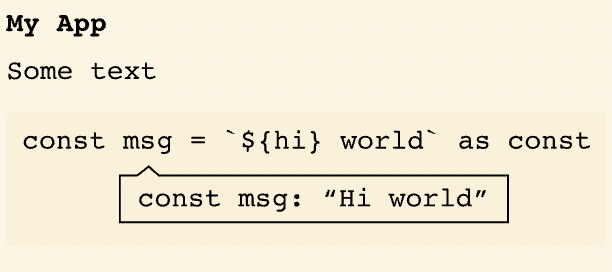
<p><strong>Static:</strong></p>
<pre class="language-ts"><code class="language-ts"><span class="token keyword">const</span> msg <span class="token operator">=</span> <span class="token string">"Hi world"</span> <span class="token keyword">as</span> <span class="token keyword">const</span><span class="token punctuation">;</span><br><span class="token comment">//    ^?</span></code></pre>
<p><img src="https://cdn-images-1.medium.com/max/1600/1*JyjpO0K5zqT9z9WgK3xScg.png" alt=""></p>
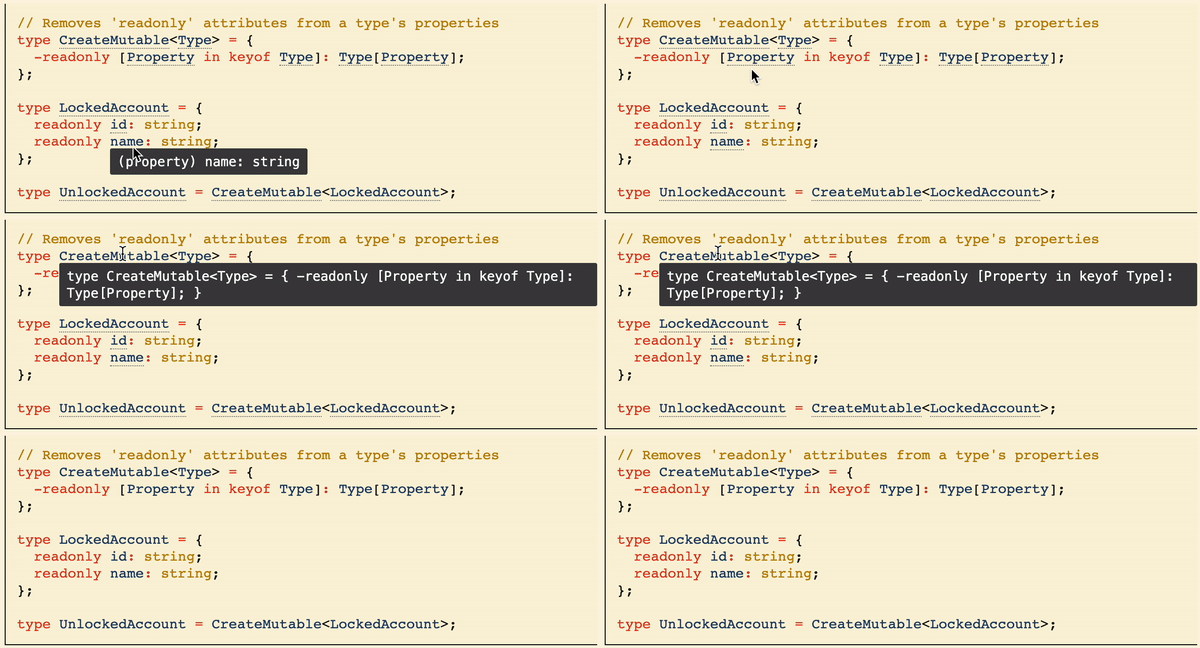
<p><strong>Dynamic:</strong></p>
<pre class="language-ts"><code class="language-ts">ts twoslash<br><span class="token comment">// Removes 'readonly' attributes from a type's properties</span><br><span class="token keyword">type</span> <span class="token class-name">CreateMutable<span class="token operator">&lt;</span>Type<span class="token operator">></span></span> <span class="token operator">=</span> <span class="token punctuation">{</span><br>  <span class="token operator">-</span><span class="token keyword">readonly</span> <span class="token punctuation">[</span>Property <span class="token keyword">in</span> <span class="token keyword">keyof</span> Type<span class="token punctuation">]</span><span class="token operator">:</span> Type<span class="token punctuation">[</span>Property<span class="token punctuation">]</span><span class="token punctuation">;</span><br><span class="token punctuation">}</span><span class="token punctuation">;</span><br><span class="token keyword">type</span> <span class="token class-name">LockedAccount</span> <span class="token operator">=</span> <span class="token punctuation">{</span><br>  <span class="token keyword">readonly</span> id<span class="token operator">:</span> <span class="token builtin">string</span><span class="token punctuation">;</span><br>  <span class="token keyword">readonly</span> name<span class="token operator">:</span> <span class="token builtin">string</span><span class="token punctuation">;</span><br><span class="token punctuation">}</span><span class="token punctuation">;</span><br><span class="token keyword">type</span> <span class="token class-name">UnlockedAccount</span> <span class="token operator">=</span> CreateMutable<span class="token operator">&lt;</span>LockedAccount<span class="token operator">></span><span class="token punctuation">;</span></code></pre>
<p><img src="https://cdn-images-1.medium.com/max/1600/1*xArLCxPJk0JmggJqP-LEpw.gif" alt=""></p>
<p>Note: You need to attach JavaScript code to have interactive code hints.</p>
<h3>There is more</h3>
<p>Shiki Twoslash supports more functionalities:</p>
<ul>
<li>mixing static with dynamic mode</li>
<li>showing typescript errors</li>
<li>vs code themes</li>
</ul>
<p>Also, we come with plugins for the most popular tools: Eleventy, Docusaurus, Gatsby, and more.</p>
<p>You can read more about all options on <a href="https://shikijs.github.io/twoslash/">shiki twoslash website</a>.</p>
<hr>
<p>To get in touch with me <a href="https://twitter.com/Perfect7M">you can find me on Twitter.</a></p>

    ]]>
      </content>
    </entry>
  
    
    <entry>
      <title>Rapid API: Home for your SaaS</title>
      <link href="https://marcin.codes/posts/rapid-api:-home-for-your-saas/"/>
      <updated>2021-08-12T22:00:00+00:00</updated>
      <id>https://marcin.codes/posts/rapid-api:-home-for-your-saas/</id>
      <content type="html">
        <![CDATA[
      <p>It’s incredible how easy you can to make your SaaS these days. We get everything we need for SaaS applications on platforms like <a href="https://vercel.com/">Vercel</a> or <a href="https://www.netlify.com/">Netlify</a> out of the box.</p>
<p>That’s great but what about when you are making your product around API. You need to make a dashboard for your application and giving access tokens for API usage. With all these hassles you don’t have time for creating features in your product.</p>
<h3>Rapid API advantages</h3>
<p>When you are creating a product, it’s important to confront users’ needs. It’s hard to make features that support your customers and at the same time create a platform for managing access to your product.</p>
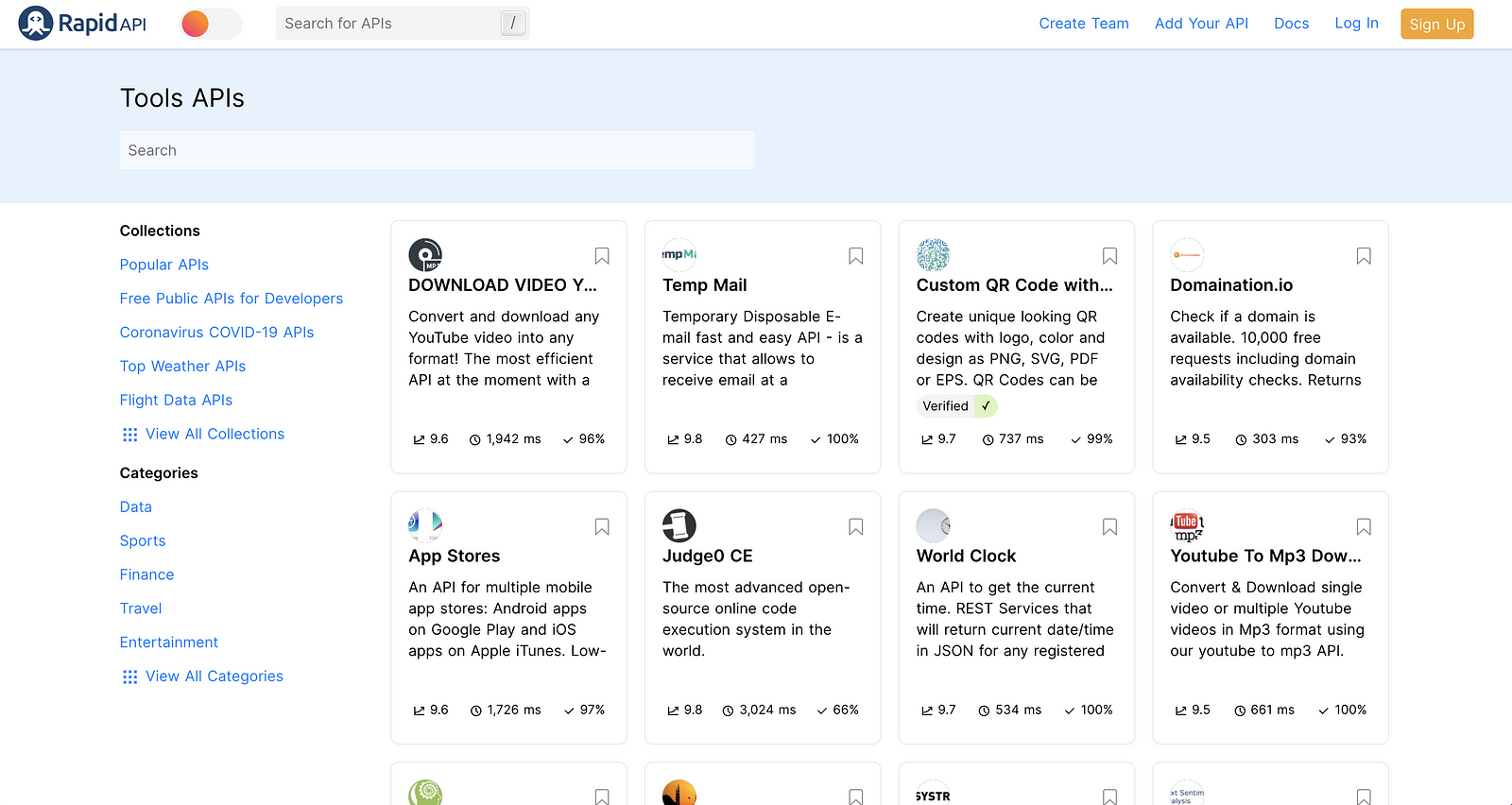
<p><a href="https://rapidapi.com/">Rapid API</a> gives you spaces for creating API and then shows it on a special marketplace.</p>
<p><img src="https://cdn-images-1.medium.com/max/1600/1*msbBCcQFYQhULA41AhFC4g.png" alt=""></p>
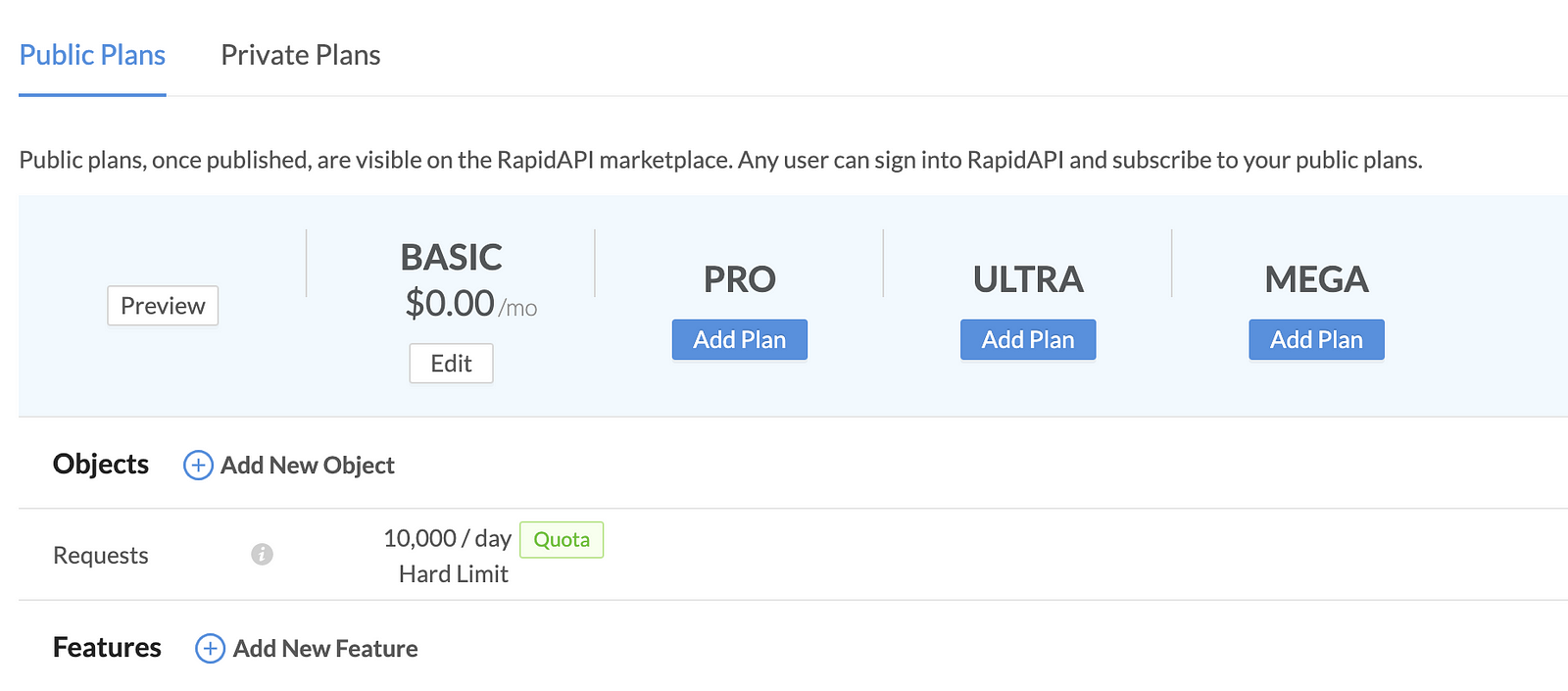
<p>When you add your API, you can define plans and pricing. Add endpoints and define features. Rapid API comes with requests limits:</p>
<ul>
<li>Hard limit — user has defined amount of requests and nothing more</li>
<li>Soft limit — user has defined amount of requests and above that need to pay an extra fee</li>
</ul>
<p><img src="https://cdn-images-1.medium.com/max/1600/1*WOmFDssunV-_1SxMh9khEA.png" alt=""></p>
<p>There are more features:</p>
<ul>
<li>Built-in support and announcements</li>
<li>API analytics and alerts</li>
<li>Transactions</li>
</ul>
<h3>The product stays yours!</h3>
<p>It’s not like that you need to give your product to Rapid API and it’s not yours anymore. Rapid API proxy requests to your product API, manage subscription plans, and access to it. You still need to host your API and manage its infrastructure. Rapid API doesn’t have access to your code, only to the server where are you hosting it.</p>
<p>You have all control over your product. You can make changes, add features or remove endpoints. But bear in mind that you should that are using your product with Rapid API.</p>
<h3>So, who’s it for?</h3>
<p>In my opinion, Rapid API is great for two options:</p>
<ul>
<li>Early product development and focus to provide as much support for the clients as possible. Rapid API can help validate your idea and make a profit for future development.</li>
<li>Expanding on the market and gain new users. Rapid API marketplace can help you get new clients.</li>
</ul>
<p>Even if you are neither of these two, you can try it. It can be a solid market for your product, who knows.</p>

    ]]>
      </content>
    </entry>
  
    
    <entry>
      <title>Happy React: Reactions on your website for free</title>
      <link href="https://marcin.codes/posts/happy-react:-reactions-on-your-website-for-free/"/>
      <updated>2022-04-07T22:00:00+00:00</updated>
      <id>https://marcin.codes/posts/happy-react:-reactions-on-your-website-for-free/</id>
      <content type="html">
        <![CDATA[
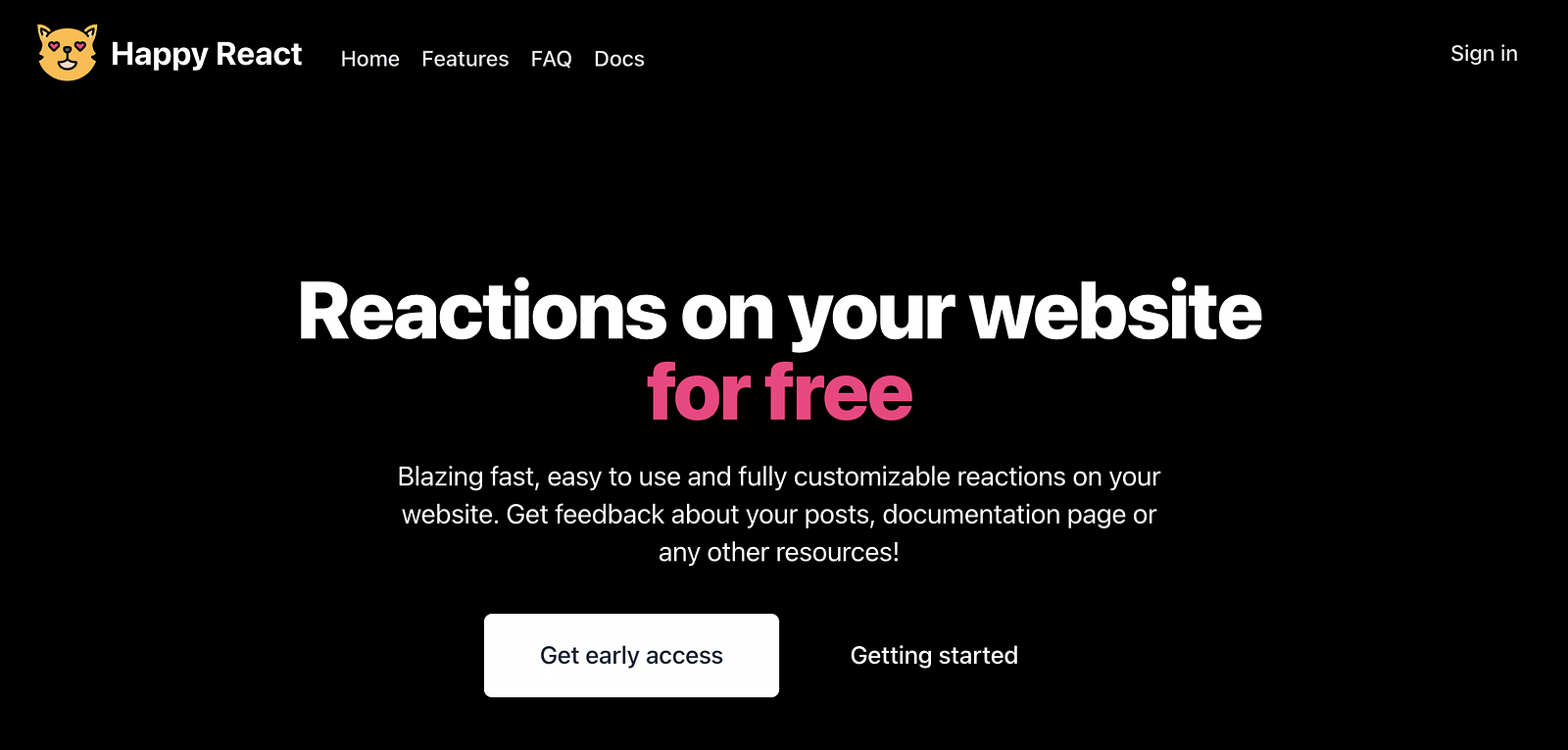
      <p><img src="https://cdn-images-1.medium.com/max/1600/1*zW7wdQojbD8Eo90kpr6a1w.png" alt="Happy React website screenshot"></p>
<p>I created a SaaS product to add reactions to your website. It’s free and very performant. You can use it on your blogs, documentation pages, or inside applications.</p>
<h3>🚀 What?</h3>
<p><a href="https://happyreact.com/">Happy React</a> provides a widget on your website for adding reactions. You can attach it to your blog post, so you can get reactions to see how people react to your content. This way you find out what your readers like and how your content performs. Also, it’s adding social proof of your content for other readers.</p>
<p>It’s not limited to posts or articles. You can add widget to documentation pages or any part of your application. Get feedback about how your users appreciate your work!</p>
<p>The widget is lightweight. Only ~<strong>1kb</strong> size of initial load. Widget is lazy-loaded by default. It has <strong>ZERO</strong> negative impact on Lighthouse scores!</p>
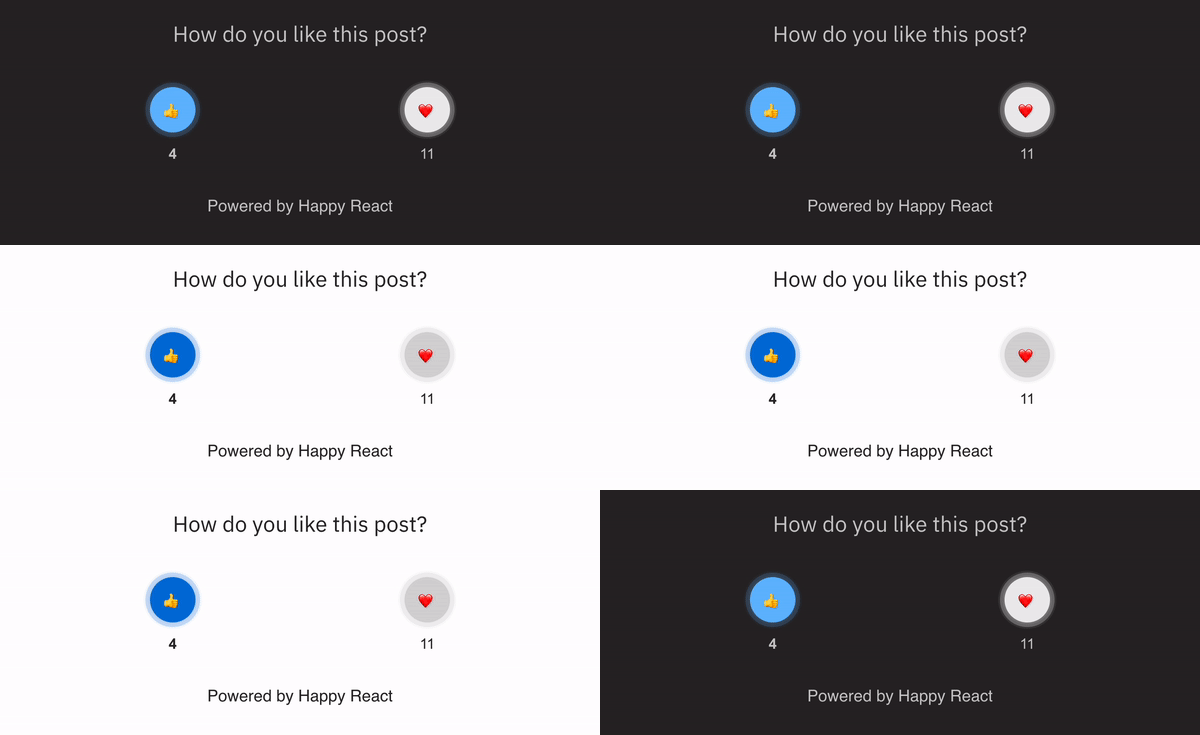
<p><img src="https://cdn-images-1.medium.com/max/1600/1*WF9D-JMqW02pnvhxqCKNzg.gif" alt=""></p>
<p>You can customize the styles including the light and dark versions of your reactions. Also, you can customize what reactions and how many of them are displayed in your widget.</p>
<blockquote>
<p><strong>You can see how a widget is working under this post. Give it a try and leave your reaction!</strong></p>
</blockquote>
<h3>🤔 Why?</h3>
<p>I wanted to add reactions to my blog. When I was searching for a solution I found many services offering ugly, heavy widgets to gather feedback about your website. I didn’t want to go that way. I wanted to integrate it with my current blog, which is minimal and without heavy JS loading.</p>
<p>I made the decision. I’m making my custom reactions widget! But there was another problem. I can make it within a weekend for my blog but I have other projects where I can use it too. That’s how the idea for Happy React begins!</p>
<h3>💅 How?</h3>
<p>That’s my favorite part of every application. How is it built? It’s built with <a href="https://nextjs.org/">NextJs</a>, <a href="https://tailwindcss.com/">Tailwind</a>, and <a href="https://supabase.com/">Supabase</a>.</p>
<p>That’s not the end, I made a widget to attach to the website with <a href="https://svelte.dev/">Svelte</a>. It’s incredibly performant and has a small footprint out of the box.</p>
<p>Lastly, there are other tools complete the whole development: <a href="https://turborepo.org/">TruboRepo</a> and <a href="https://github.com/shuding/nextra">Nextra</a>.</p>
<h3>👀 When?</h3>
<p>Now! If you find it can be a good fit for your website, please <a href="https://happyreact.com/early-access">join the waitlist</a>. I’m collecting feedback about it, squashing bugs, and adding more features.</p>
<p>Let me know in the comments or on <a href="https://twitter.com/marcin_codes">Twitter</a> what you think about it!</p>
<h3>📋 Summary</h3>
<p>Happy React is for every developer that wants to seamlessly add a reactions widget to its website. You can check <a href="https://docs.happyreact.com/get-started">documentation</a> pages on how to add them to your project. I’m super excited about this project 🤩</p>

    ]]>
      </content>
    </entry>
  
    
    <entry>
      <title>3 Things you should know BEFORE you start with Supabase</title>
      <link href="https://marcin.codes/posts/3-things-you-should-know-before-you-start-with-supabase/"/>
      <updated>2022-05-04T22:00:00+00:00</updated>
      <id>https://marcin.codes/posts/3-things-you-should-know-before-you-start-with-supabase/</id>
      <content type="html">
        <![CDATA[
      <p><img src="https://cdn-images-1.medium.com/max/1600/1*_5tHd45wRjtvRjmbGw8arQ.jpeg" alt=""></p>
<p><a href="https://supabase.com/">Supabase</a> is powerful and gaining much popularity. It’s a free and simple great alternative for Firebase. Even if you are not familiar with Firebase. Supabase has everything that you need. A database with real-time subscriptions, Authentication, and Storage.</p>
<hr>
<p><img src="https://cdn-images-1.medium.com/max/800/1*oxbkuJQrSHWgmv7Z9GWNfw.png" alt=""></p>
<p>Hi, I created <a href="https://happyreact.com/">Happy React</a>. Service for adding reactions widgets on your website for free. I took care of performance and ease of using it. You can add reactions to your blog or documentation pages! It’s still in early access, let me know what you think about it and join the <a href="https://happyreact.com/early-access">waiting list</a>. Learn more on <a href="https://happyreact.com/" title="https://happyreact.com/">https://happyreact.com/</a></p>
<hr>
<h3>About Supabase</h3>
<p>Supabase is built on top of open-source technologies. <a href="https://www.postgresql.org/">PostgreSQL</a>, <a href="https://postgrest.org/en/stable/">PostgREST</a>, <a href="https://github.com/netlify/gotrue">gotrue</a>, and many many others. It’s a great idea. There are a lot of great libraries and technologies out there. Smart using established tools can be better than spending time reinventing the wheel.</p>
<p>The free plan has all functionality you need to build an application. The best part of that is you are not locked in. You can dump your database data and move it to another provider or custom server. There is no lock-in!</p>
<p>On top of all these features, there is a dashboard that lets you manage your project.</p>
<h4>Supabase features</h4>
<ul>
<li>Auth</li>
<li>Storage</li>
<li>Database with real-time subscriptions</li>
</ul>
<h3>Supabase isn’t perfect but it’s powerful</h3>
<p>What is the greatest strength is the biggest downfall. I repeat myself but Supabase is built on top of PostgreSQL. You need to know SQL, how to create queries and what PostgreSQL features have. Below are common gotchas about supabase you can have after starting.</p>
<h4>Creating a view for complex queries</h4>
<p>Supabase query builder is flexible. It can make basic selects, count rows, or join queries but you sometimes need more advanced usage of SQL. <a href="https://www.postgresql.org/docs/9.2/sql-createview.html">Postgres views</a> can help you with that.</p>
<pre><code>drop view if exists sold_products;
create
or replace VIEW public.sold_products AS (
  select
    DISTINCT ON (orders.product_id) product_id,
    products.name as name
  from
    orders
    inner join products on orders.product_id = products.id
);
</code></pre>
<p>This little snippet gets all orders and excludes repeated products so we get a list of all sold products.</p>
<blockquote>
<p>⚠️ Note that view inherits permissions of creator. When you are creating it as admin it will have same permissions (bypass RLS) as admin. Create views with caution.</p>
</blockquote>
<h4>Adding cascading on delete</h4>
<p>When you delete one record from a table and has a foreign key column on another table, you get an error. To delete a record and other records with foreign keys you need to add cascading delete.</p>
<pre><code>CREATE OR REPLACE FUNCTION 
    replace_foreign_key(f_table VARCHAR, f_column VARCHAR, new_options VARCHAR) 
RETURNS VARCHAR
AS $$
DECLARE constraint_name varchar;
DECLARE reftable varchar;
DECLARE refcolumn varchar;
BEGIN
SELECT tc.constraint_name, ccu.table_name AS foreign_table_name, ccu.column_name AS foreign_column_name 
FROM 
    information_schema.table_constraints AS tc 
    JOIN information_schema.key_column_usage AS kcu
      ON tc.constraint_name = kcu.constraint_name
    JOIN information_schema.constraint_column_usage AS ccu
      ON ccu.constraint_name = tc.constraint_name
WHERE constraint_type = 'FOREIGN KEY' 
   AND tc.table_name= f_table AND kcu.column_name= f_column
INTO constraint_name, reftable, refcolumn;
EXECUTE 'alter table ' || f_table || ' drop constraint ' || constraint_name || 
', ADD CONSTRAINT ' || constraint_name || ' FOREIGN KEY (' || f_column || ') ' ||
' REFERENCES ' || reftable || '(' || refcolumn || ') ' || new_options || ';';
RETURN 'Constraint replaced: ' || constraint_name || ' (' || f_table || '.' || f_column ||
 ' -&gt; ' || reftable || '.' || refcolumn || '); New options: ' || new_options;
END;
$$ LANGUAGE plpgsql
</code></pre>
<p>Then you need to invoke a function like this:</p>
<pre><code>select replace_foreign_key('user_rates_posts', 'post_id', 'ON DELETE CASCADE');
</code></pre>
<h4>Row-level security</h4>
<p>Protecting your database from unauthorized access is by using RLS. Those special “checks” are run before the query to make sure the person who is running it has the rights to do so.</p>
<p>You can reference <code>uid()</code> which will be replaced with a user id that is currently authorized. You can compare if the record that is currently processed belongs to the authorized user.</p>
<p>All values that you are sending using Supbase SDK will be replaced inside the RLS policy.</p>
<p>Next, you need to add RLS. A good idea is to keep it clean and create a Postgres function where you can pass all variables and make the query:</p>
<pre><code>CREATE
OR REPLACE FUNCTION can_insert_post(_user_id uuid) RETURNS bool AS $$
SELECT EXISTS (
  SELECT
      1
    FROM
      posts
      INNER JOIN users ON users.id = posts.user_id
    GROUP BY
      users.id,
      posts.user_id
    HAVING
      COUNT(posts.id) &lt; users.post_limit
      AND _user_id = posts.user_id
);
$$ LANGUAGE sql SECURITY DEFINER;
</code></pre>
<p>This function will check if the user doesn’t exceed the posts limit. Next, you need to reference it in RLS insert policy.</p>
<pre><code>can_insert_post(uid())
</code></pre>
<h3>Summary</h3>
<p>Supabase is a great tool but it’s requiring some Postgres knowledge. Keep in mind that it is only the tip of the iceberg. The more you dive into Supabase you will need more Postgres knowledge.</p>

    ]]>
      </content>
    </entry>
  
    
    <entry>
      <title>Feedback widget in Docusaurus</title>
      <link href="https://marcin.codes/posts/feedback-widget-in-docusaurus/"/>
      <updated>2022-07-19T22:00:00+00:00</updated>
      <id>https://marcin.codes/posts/feedback-widget-in-docusaurus/</id>
      <content type="html">
        <![CDATA[
      <p>Feedback is essential to improve any product. The documentation page is nothing different apart from other parts of the product. It’s crucial to product growth to collect user feedback. This post will help you add a feedback widget to your docusaurus documentation.</p>
<hr>
<p><img src="https://cdn-images-1.medium.com/max/1600/0*M7eKPbe0nCIXP0wF.png" alt=""></p>
<p>Hi, I created <a href="https://happyreact.com/">Happy React</a>. Happy React is a multi-purpose feedback widget. Using it you can add widgets to your documentation pages. I took care of performance and ease of using it.</p>
<p>Main features:</p>
<ul>
<li>Free (soon open-source)</li>
<li>Headless styling</li>
<li>Lightweight &amp; Blazing fast widget</li>
<li>Analytics</li>
</ul>
<p><img src="https://cdn-images-1.medium.com/max/1600/1*zCfeTz7YNkPQb-hZ3dlAyA.png" alt=""></p>
<hr>
<h3>Let’s start</h3>
<p>First, we need to eject <code>DocItemFooter</code> using <a href="https://docusaurus.io/docs/swizzling">Swizzle</a>. Run the swizzle command:</p>
<pre class="language-bash"><code class="language-bash"><span class="token function">npm</span> run swizzle</code></pre>
<p>Then, choose <code>@docusaurus/theme-classic</code> and from a dropdown list pick <code>DocItemFooter</code>.</p>
<p>After this operation, we should have <code>DocItemFooter</code> in <code>src/theme</code> directory. From now on, Docusaurus will be importing this component instead original one.</p>
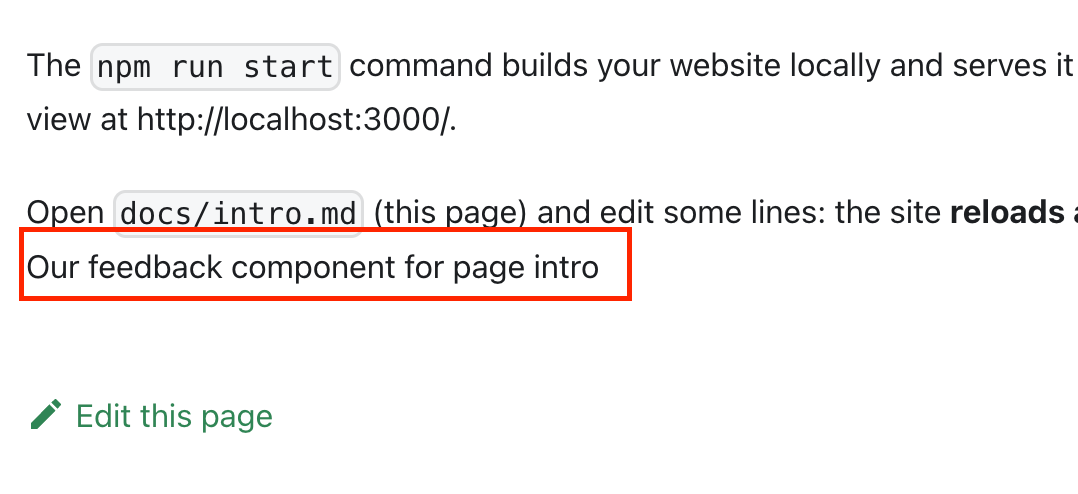
<p>Next, we need to create our <code>Feedback</code>component and attach it in <code>DocItemFooter</code>.</p>
<pre class="language-jsx"><code class="language-jsx"><span class="token comment">// src/components/Feedback/index.js</span><br><span class="token keyword">import</span> React <span class="token keyword">from</span> <span class="token string">'react'</span><span class="token punctuation">;</span><br><span class="token keyword">export</span> <span class="token keyword">default</span> <span class="token keyword">function</span> <span class="token function">Feedback</span><span class="token punctuation">(</span><span class="token parameter"><span class="token punctuation">{</span> resource <span class="token punctuation">}</span></span><span class="token punctuation">)</span> <span class="token punctuation">{</span><br>  <span class="token keyword">return</span> <span class="token punctuation">(</span><br>    <span class="token tag"><span class="token tag"><span class="token punctuation">&lt;</span>div</span><span class="token punctuation">></span></span><span class="token plain-text"><br>      Our feedback component for page </span><span class="token punctuation">{</span>resource<span class="token punctuation">}</span><span class="token plain-text"><br>    </span><span class="token tag"><span class="token tag"><span class="token punctuation">&lt;/</span>div</span><span class="token punctuation">></span></span><br>  <span class="token punctuation">)</span><span class="token punctuation">;</span><br><span class="token punctuation">}</span></code></pre>
<p>Then we need to use this component:</p>
<pre class="language-jsx"><code class="language-jsx"><span class="token keyword">import</span> React <span class="token keyword">from</span> <span class="token string">'react'</span><span class="token punctuation">;</span><br><span class="token punctuation">[</span><span class="token operator">...</span><span class="token punctuation">]</span><br><span class="token keyword">import</span> Feedback <span class="token keyword">from</span> <span class="token string">'../../components/Feedback'</span><span class="token punctuation">;</span><br><span class="token keyword">export</span> <span class="token keyword">default</span> <span class="token keyword">function</span> <span class="token function">DocItemFooter</span><span class="token punctuation">(</span><span class="token parameter">props</span><span class="token punctuation">)</span> <span class="token punctuation">{</span><br><span class="token punctuation">[</span><span class="token operator">...</span><span class="token punctuation">]</span><br>  <span class="token keyword">const</span> <span class="token punctuation">{</span><br>    editUrl<span class="token punctuation">,</span><br>    lastUpdatedAt<span class="token punctuation">,</span><br>    formattedLastUpdatedAt<span class="token punctuation">,</span><br>    lastUpdatedBy<span class="token punctuation">,</span><br>    tags<span class="token punctuation">,</span><br>    unversionedId<span class="token punctuation">,</span> <span class="token comment">// You need to get current page id </span><br>  <span class="token punctuation">}</span> <span class="token operator">=</span> metadata<span class="token punctuation">;</span><br><span class="token punctuation">[</span><span class="token operator">...</span><span class="token punctuation">]</span><br><span class="token keyword">return</span> <span class="token punctuation">(</span><br>    <span class="token tag"><span class="token tag"><span class="token punctuation">&lt;</span></span><span class="token punctuation">></span></span><span class="token plain-text"><br>      </span><span class="token tag"><span class="token tag"><span class="token punctuation">&lt;</span><span class="token class-name">Feedback</span></span> <span class="token attr-name">resource</span><span class="token script language-javascript"><span class="token script-punctuation punctuation">=</span><span class="token punctuation">{</span>unversionedId<span class="token punctuation">}</span></span> <span class="token punctuation">/></span></span><span class="token plain-text"><br>      </span><span class="token tag"><span class="token tag"><span class="token punctuation">&lt;</span>footer</span><br>        <span class="token attr-name">className</span><span class="token script language-javascript"><span class="token script-punctuation punctuation">=</span><span class="token punctuation">{</span><span class="token function">clsx</span><span class="token punctuation">(</span>ThemeClassNames<span class="token punctuation">.</span>docs<span class="token punctuation">.</span>docFooter<span class="token punctuation">,</span> <span class="token string">'docusaurus-mt-lg'</span><span class="token punctuation">)</span><span class="token punctuation">}</span></span><br>      <span class="token punctuation">></span></span><span class="token plain-text"><br>        </span><span class="token punctuation">{</span>canDisplayTagsRow <span class="token operator">&amp;&amp;</span> <span class="token tag"><span class="token tag"><span class="token punctuation">&lt;</span><span class="token class-name">TagsRow</span></span> <span class="token attr-name">tags</span><span class="token script language-javascript"><span class="token script-punctuation punctuation">=</span><span class="token punctuation">{</span>tags<span class="token punctuation">}</span></span> <span class="token punctuation">/></span></span><span class="token punctuation">}</span><span class="token plain-text"><br>        </span><span class="token punctuation">{</span>canDisplayEditMetaRow <span class="token operator">&amp;&amp;</span> <span class="token punctuation">(</span><br>          <span class="token tag"><span class="token tag"><span class="token punctuation">&lt;</span><span class="token class-name">EditMetaRow</span></span><br>            <span class="token attr-name">editUrl</span><span class="token script language-javascript"><span class="token script-punctuation punctuation">=</span><span class="token punctuation">{</span>editUrl<span class="token punctuation">}</span></span><br>            <span class="token attr-name">lastUpdatedAt</span><span class="token script language-javascript"><span class="token script-punctuation punctuation">=</span><span class="token punctuation">{</span>lastUpdatedAt<span class="token punctuation">}</span></span><br>            <span class="token attr-name">lastUpdatedBy</span><span class="token script language-javascript"><span class="token script-punctuation punctuation">=</span><span class="token punctuation">{</span>lastUpdatedBy<span class="token punctuation">}</span></span><br>            <span class="token attr-name">formattedLastUpdatedAt</span><span class="token script language-javascript"><span class="token script-punctuation punctuation">=</span><span class="token punctuation">{</span>formattedLastUpdatedAt<span class="token punctuation">}</span></span><br>          <span class="token punctuation">/></span></span><br>        <span class="token punctuation">)</span><span class="token punctuation">}</span><span class="token plain-text"><br>      </span><span class="token tag"><span class="token tag"><span class="token punctuation">&lt;/</span>footer</span><span class="token punctuation">></span></span><span class="token plain-text"><br>    </span><span class="token tag"><span class="token tag"><span class="token punctuation">&lt;/</span></span><span class="token punctuation">></span></span><br>  <span class="token punctuation">)</span><span class="token punctuation">;</span><br><span class="token punctuation">}</span></code></pre>
<p>After that, we should get our feedback component below the content on every documentation page.</p>
<p><img src="https://cdn-images-1.medium.com/max/1600/1*XoWkeJ41rq4Vuf3nDOGnNg.png" alt="">The effect after properly adding the Feedback component</p>
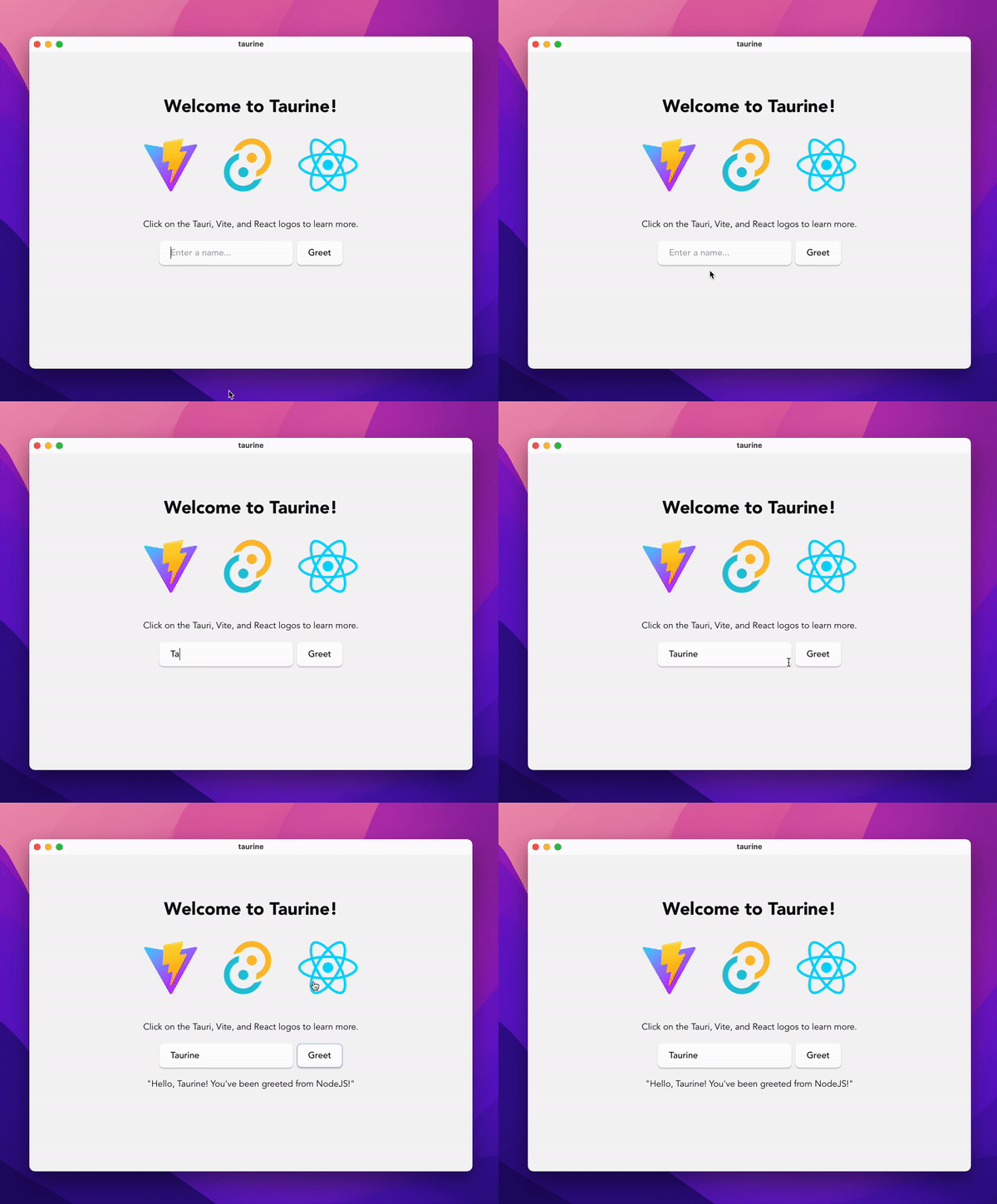
<p>We are all set! We can use this component to set up your feedback widget. Here is a <a href="https://stackblitz.com/edit/happy-react-docusaurus?file=src/theme/DocItemFooter/index.js">StackBlitz</a> where you can see all code.</p>
<p>In the next part of this post, I will show you how to set up Happy React to collect feedback. <strong>Although, if you don’t want to use it you can check the</strong> <a href="https://github.com/facebook/react-native-website/blob/main/website/core/DocsRating.js"><strong>React Native docs feedback componen</strong></a><strong>t for reference.</strong></p>
<h3>What’s next?</h3>
<p>Check <a href="https://happyreact.com/docs/recipes/docusaurus">Happy React docusaurus integration</a> for a blazing fast and robust feedback widget integration with analytics.</p>

    ]]>
      </content>
    </entry>
  
    
    <entry>
      <title>Tauri + NodeJS: Alternative to Electron</title>
      <link href="https://marcin.codes/posts/tauri-+-nodejs:-alternative-to-electron/"/>
      <updated>2022-11-09T22:00:00+00:00</updated>
      <id>https://marcin.codes/posts/tauri-+-nodejs:-alternative-to-electron/</id>
      <content type="html">
        <![CDATA[
      <p><img src="/images/taurine-demo.gif" alt="Taurine screenshot"></p>
<p>Tauri is a framework for building binaries for all major desktop systems. The main advantage <strong>is using Rust under the hood and webview for serving our frontend app</strong>. Thanks to such a setup apps produced by Tauri are fast and small. But it couldn’t fully replace the electron — until now!</p>
<h2>Start with NodeJS then move to Rust</h2>
<p>The learning curve of Rust can be overwhelming. That was my case. I made 3 tries to start writing some basic code in rust. I’m getting better and better every time but I can’t be that productive as I’m in NodeJS.</p>
<p><strong>Tauri has a sidecar, a way to embed external binary running with your app.</strong> Thanks to this we can run node binary alongside our app and communicate with it!</p>
<p>Here are <a href="https://tauri.app/v1/guides/building/sidecar">Tauri sidecar docs</a> if you want to know more about how it works.</p>
<h2>Taurine</h2>
<p>Although it’s not straightforward how to make it sidecar work with node.<br>
I made small starter repo. You can find it here <a href="https://github.com/Perfect7M/taurine" title="https://github.com/Perfect7M/taurine">https://github.com/Perfect7M/taurine</a>.</p>
<h3>How does it work?</h3>
<p>To run NodeJS as a sidecar we need to pack it into binary. <strong>Taurine is bundling your server code and preparing it for packing into a single binary.</strong> Using Vercel’s <a href="https://github.com/vercel/pkg">pkg</a> CLI tool we can compile it into a single executable binary. That binary is running with the Tauri application.</p>
<p>Wait… there are more. Taurine comes also with support for <a href="https://github.com/fastify/fastify">Fastify</a> and <a href="https://github.com/trpc/trpc">tRPC</a>.</p>
<p>In development, taurine will reload binary when you save server-related files.</p>
<h3>Comparison with Electron</h3>
<p>Tauri has a small footprint by default but what about when we pack NodeJS binary with our app? The result of this is surprising. <strong>Taurine app is 3 times smaller than</strong> <a href="https://github.com/electron/electron-quick-start"><strong>electron app</strong></a><strong>.</strong> Compiled the Tauri app in <code>.app</code> the format has <strong>63MB</strong> and the electron app in the same format has <strong>205MB</strong>.</p>
<p>Learn more about the <a href="https://github.com/Perfect7M/taurine#comparison-with-electron">comparison of Taurine and electron</a>.</p>
<h2>Roadmap</h2>
<p>Taurine is more like PoC and supports only React. I want to extend taurine further. I want to make it frontend agnostic, the same as Tauri is now. Also, comparison to Electron is not enough. There are other alternative interesting libraries like <a href="https://sockets.sh/">Socket SDK</a>.</p>
<p>Let me know what you think about Taurine! You can find me on Twitter: <a href="https://twitter.com/marcin_codes">https://twitter.com/marcin_codes</a></p>

    ]]>
      </content>
    </entry>
  
    
    <entry>
      <title>Integration testing Passwordless authentication with Playwright</title>
      <link href="https://marcin.codes/posts/integration-testing-passwordless-authentication-with-playwright/"/>
      <updated>2022-12-30T22:00:00+00:00</updated>
      <id>https://marcin.codes/posts/integration-testing-passwordless-authentication-with-playwright/</id>
      <content type="html">
        <![CDATA[
      <p><img src="https://cdn-images-1.medium.com/max/3200/1*gAU848RTheGKT9eu6m07mQ.png" alt=""></p>
<p>Passwordless authentication is becoming more and more popular. <strong>It’s an easy way to have authentication functionality. The main advantage of having magic links is better security.</strong> One password to remember less — avoid reuse passwords by users. Additionally, <strong>you make sure the user confirms their account with email.</strong></p>
<p>The pain point of using email authentication is testing. Not anymore!</p>
<h3>Table of contest</h3>
<ul>
<li>
<p><a href="#lets-start">Let’s start</a></p>
</li>
<li>
<p><a href="#tldr">TL;DR;</a></p>
</li>
<li>
<p><a href="#setting-up-an-email-provider">Setting up an email provider</a></p>
</li>
<li>
<p><a href="#testing-login-form">Testing login form</a></p>
</li>
<li>
<p><a href="#wrapping-up">Wrapping up</a></p>
</li>
</ul>
<hr>
<p><img src="https://cdn-images-1.medium.com/max/5344/1*wou8Cy22lSgdM5Iefco6ng.png" alt="Feedback widget for your docs"></p>
<p>This post is inspired by work on my project <a href="https://happyreact.com/">https://happyreact.com/</a>. Add a feedback widget to your product documentation. Built a better product, avoid user churn and drive more sales!</p>
<hr>
<p><a name="lets-start"></a></p>
<h2>Let’s start</h2>
<p>We will use NextAuth.js bootstrapped from <a href="https://github.com/nextauthjs/next-auth/tree/main/apps/example-nextjs">this example</a> with an email provider turned on. It will be a great and easy-to-use playground for our testing.</p>
<p>As stated in the title, our testing framework will be <a href="https://playwright.dev/">Playwright</a>. I’m using it in my projects and it has excellent developer experience.</p>
<p>Complementary packages:</p>
<ul>
<li>
<p><a href="https://github.com/deitch/smtp-tester">smtp-tester</a> for starting the SMTP local server</p>
</li>
<li>
<p><a href="https://cheerio.js.org/">cheerio</a> for finding the link in the email’s HTML</p>
</li>
<li>
<p><a href="https://github.com/nodemailer/nodemailer">nodemailer</a> for sending emails</p>
</li>
</ul>
<p>I configured the email provider and added <a href="https://playwright.dev/">Playwright</a>. Nothing more than following standard installation from Playwright and NextAuth email adapter setup. <strong>Follow <a href="https://next-auth.js.org/providers/email">the next auth email provider guide</a> on how to set it up.</strong></p>
<p><a name="tldr"></a></p>
<h2>TL;DR;</h2>
<p>Install these packages:</p>
<pre class="language-bash"><code class="language-bash"><span class="token function">yarn</span> <span class="token function">add</span> smtp-tester cheerio --dev</code></pre>
<p>Import smtp-tester and cheerio:</p>
<pre class="language-tsx"><code class="language-tsx"><span class="token keyword">import</span> <span class="token punctuation">{</span> test <span class="token punctuation">}</span> <span class="token keyword">from</span> <span class="token string">'@playwright/test'</span><span class="token punctuation">;</span><br> <span class="token keyword">import</span> smtpTester <span class="token keyword">from</span> <span class="token string">'smtp-tester'</span><span class="token punctuation">;</span><br> <span class="token keyword">import</span> <span class="token punctuation">{</span> load <span class="token keyword">as</span> cheerioLoad <span class="token punctuation">}</span> <span class="token keyword">from</span> <span class="token string">'cheerio'</span><span class="token punctuation">;</span></code></pre>
<p>Your test should look like this:</p>
<pre class="language-ts"><code class="language-ts">test<span class="token punctuation">.</span><span class="token function">describe</span><span class="token punctuation">(</span><span class="token string">'authenticated'</span><span class="token punctuation">,</span> <span class="token punctuation">(</span><span class="token punctuation">)</span> <span class="token operator">=></span> <span class="token punctuation">{</span><br>  <span class="token keyword">let</span> mailServer<span class="token punctuation">;</span><br>  <br>  test<span class="token punctuation">.</span><span class="token function">beforeAll</span><span class="token punctuation">(</span><span class="token punctuation">(</span><span class="token punctuation">)</span> <span class="token operator">=></span> <span class="token punctuation">{</span><br>    mailServer <span class="token operator">=</span> smtpTester<span class="token punctuation">.</span><span class="token function">init</span><span class="token punctuation">(</span><span class="token number">4025</span><span class="token punctuation">)</span><span class="token punctuation">;</span><br>  <span class="token punctuation">}</span><span class="token punctuation">)</span><span class="token punctuation">;</span><br><br>  test<span class="token punctuation">.</span><span class="token function">afterAll</span><span class="token punctuation">(</span><span class="token punctuation">(</span><span class="token punctuation">)</span> <span class="token operator">=></span> <span class="token punctuation">{</span><br>    mailServer<span class="token punctuation">.</span><span class="token function">stop</span><span class="token punctuation">(</span><span class="token punctuation">)</span><span class="token punctuation">;</span><br>  <span class="token punctuation">}</span><span class="token punctuation">)</span><span class="token punctuation">;</span><br><br>  <span class="token function">test</span><span class="token punctuation">(</span><span class="token string">'login to app'</span><span class="token punctuation">,</span> <span class="token keyword">async</span> <span class="token punctuation">(</span><span class="token punctuation">{</span> page<span class="token punctuation">,</span> context <span class="token punctuation">}</span><span class="token punctuation">)</span> <span class="token operator">=></span> <span class="token punctuation">{</span><br>    <span class="token keyword">await</span> page<span class="token punctuation">.</span><span class="token function">goto</span><span class="token punctuation">(</span><span class="token string">'/login'</span><span class="token punctuation">)</span><span class="token punctuation">;</span><br>    <br>    <span class="token comment">// your login page test logic</span><br>    <span class="token keyword">await</span> page<br>      <span class="token punctuation">.</span><span class="token function">locator</span><span class="token punctuation">(</span><span class="token string">'input[name="email"]'</span><span class="token punctuation">)</span><br>      <span class="token punctuation">.</span><span class="token keyword">type</span><span class="token punctuation">(</span><span class="token string">'test@example.com'</span><span class="token punctuation">,</span> <span class="token punctuation">{</span> delay<span class="token operator">:</span> <span class="token number">100</span> <span class="token punctuation">}</span><span class="token punctuation">)</span><span class="token punctuation">;</span><br>    <span class="token keyword">await</span> page<span class="token punctuation">.</span><span class="token function">locator</span><span class="token punctuation">(</span><span class="token string">'text=Request magic link'</span><span class="token punctuation">)</span><span class="token punctuation">.</span><span class="token function">click</span><span class="token punctuation">(</span><span class="token punctuation">{</span> delay<span class="token operator">:</span> <span class="token number">100</span> <span class="token punctuation">}</span><span class="token punctuation">)</span><span class="token punctuation">;</span><br>  <br>    <span class="token keyword">await</span> page<span class="token punctuation">.</span><span class="token function">waitForSelector</span><span class="token punctuation">(</span><br>      <span class="token template-string"><span class="token template-punctuation string">`</span><span class="token string">text=Check your e-mail inbox for further instructions</span><span class="token template-punctuation string">`</span></span><br>    <span class="token punctuation">)</span><span class="token punctuation">;</span><br>  <br>    <span class="token keyword">let</span> emailLink <span class="token operator">=</span> <span class="token keyword">null</span><span class="token punctuation">;</span><br>  <br>    <span class="token keyword">try</span> <span class="token punctuation">{</span><br>      <span class="token keyword">const</span> <span class="token punctuation">{</span> email <span class="token punctuation">}</span> <span class="token operator">=</span> <span class="token keyword">await</span> mailServer<span class="token punctuation">.</span><span class="token function">captureOne</span><span class="token punctuation">(</span><span class="token string">'test@example.com'</span><span class="token punctuation">,</span> <span class="token punctuation">{</span><br>        wait<span class="token operator">:</span> <span class="token number">1000</span><br>      <span class="token punctuation">}</span><span class="token punctuation">)</span><span class="token punctuation">;</span><br>  <br>      <span class="token keyword">const</span> $ <span class="token operator">=</span> <span class="token function">cheerioLoad</span><span class="token punctuation">(</span>email<span class="token punctuation">.</span>html<span class="token punctuation">)</span><span class="token punctuation">;</span><br>  <br>      emailLink <span class="token operator">=</span> <span class="token function">$</span><span class="token punctuation">(</span><span class="token string">'#magic-link'</span><span class="token punctuation">)</span><span class="token punctuation">.</span><span class="token function">attr</span><span class="token punctuation">(</span><span class="token string">'href'</span><span class="token punctuation">)</span><span class="token punctuation">;</span><br>  <br>    <span class="token punctuation">}</span> <span class="token keyword">catch</span> <span class="token punctuation">(</span>cause<span class="token punctuation">)</span> <span class="token punctuation">{</span><br>      <span class="token builtin">console</span><span class="token punctuation">.</span><span class="token function">error</span><span class="token punctuation">(</span><br>        <span class="token string">'No message delivered to test@example.com in 1 second.'</span><span class="token punctuation">,</span><br>        cause<br>      <span class="token punctuation">)</span><span class="token punctuation">;</span><br>    <span class="token punctuation">}</span><br>  <br>    <span class="token function">expect</span><span class="token punctuation">(</span>emailLink<span class="token punctuation">)</span><span class="token punctuation">.</span>not<span class="token punctuation">.</span><span class="token function">toBeFalsy</span><span class="token punctuation">(</span><span class="token punctuation">)</span><span class="token punctuation">;</span><br>  <br>    <span class="token keyword">const</span> res <span class="token operator">=</span> <span class="token keyword">await</span> page<span class="token punctuation">.</span><span class="token function">goto</span><span class="token punctuation">(</span>emailLink<span class="token punctuation">)</span><span class="token punctuation">;</span><br>    <span class="token function">expect</span><span class="token punctuation">(</span>res<span class="token operator">?.</span><span class="token function">url</span><span class="token punctuation">(</span><span class="token punctuation">)</span><span class="token operator">?.</span><span class="token function">endsWith</span><span class="token punctuation">(</span><span class="token string">'/dashboard'</span><span class="token punctuation">)</span><span class="token punctuation">)</span><span class="token punctuation">.</span><span class="token function">toBeTruthy</span><span class="token punctuation">(</span><span class="token punctuation">)</span><span class="token punctuation">;</span><br>  <br>    <span class="token keyword">await</span> context<span class="token punctuation">.</span><span class="token function">storageState</span><span class="token punctuation">(</span><span class="token punctuation">{</span><br>      path<span class="token operator">:</span> path<span class="token punctuation">.</span><span class="token function">resolve</span><span class="token punctuation">(</span><span class="token string">'tests'</span><span class="token punctuation">,</span> <span class="token string">'test-results'</span><span class="token punctuation">,</span> <span class="token string">'state.json'</span><span class="token punctuation">)</span><br>    <span class="token punctuation">}</span><span class="token punctuation">)</span><span class="token punctuation">;</span><br>  <span class="token punctuation">}</span><br><span class="token punctuation">}</span><span class="token punctuation">)</span><span class="token punctuation">;</span></code></pre>
<p>Sent emails through our created server:</p>
<pre class="language-js"><code class="language-js"><span class="token comment">// This check will work when you pass NODE_ENV with 'test' value</span><br><span class="token comment">// when running your e2e tests</span><br><span class="token keyword">const</span> transport <span class="token operator">=</span> process<span class="token punctuation">.</span>env<span class="token punctuation">.</span><span class="token constant">NODE_ENV</span> <span class="token operator">===</span> <span class="token string">'test'</span><br>  <span class="token operator">?</span> nodemailer<span class="token punctuation">.</span><span class="token function">createTransport</span><span class="token punctuation">(</span><span class="token punctuation">{</span> port<span class="token operator">:</span> <span class="token number">4025</span> <span class="token punctuation">}</span><span class="token punctuation">)</span><br>  <span class="token operator">:</span> nodemailer<span class="token punctuation">.</span><span class="token function">createTransport</span><span class="token punctuation">(</span><span class="token punctuation">{</span><br>      host<span class="token operator">:</span> process<span class="token punctuation">.</span>env<span class="token punctuation">.</span><span class="token constant">SMTP_HOST</span><span class="token punctuation">,</span><br>      port<span class="token operator">:</span> process<span class="token punctuation">.</span>env<span class="token punctuation">.</span><span class="token constant">SMTP_PORT</span><span class="token punctuation">,</span><br>      auth<span class="token operator">:</span> <span class="token punctuation">{</span><br>        user<span class="token operator">:</span> process<span class="token punctuation">.</span>env<span class="token punctuation">.</span><span class="token constant">SMTP_USER</span><span class="token punctuation">,</span><br>        pass<span class="token operator">:</span> process<span class="token punctuation">.</span>env<span class="token punctuation">.</span><span class="token constant">SMTP_PASSWORD</span><br>      <span class="token punctuation">}</span><br>    <span class="token punctuation">}</span><span class="token punctuation">)</span><span class="token punctuation">;</span></code></pre>
<p><strong>⚠️ Make sure to send emails through this SMTP server ONLY in testing!</strong></p>
<p><a name="setting-up-an-email-provider"></a></p>
<h2>Setting up an email provider</h2>
<p>At this point, I assume you have set up an SMTP provider and you are familiar with that matter. <strong>When you need a guide, please see “<a href="https://marcin.codes/snippets/setting-smtp-locally-for-testing-in-playwright-or-cypress/">How to set up an SMTP provider for testing</a>” on my blog.</strong></p>
<p>Let’s make our authenticated test. Create authenticated.spec.ts a file in our tests directory with an empty describe block. We want to use beforeAll and afterAll hooks.</p>
<pre class="language-ts"><code class="language-ts"><span class="token comment">// authenticated.spec.ts</span><br><br><span class="token keyword">import</span> <span class="token punctuation">{</span> test <span class="token punctuation">}</span> <span class="token keyword">from</span> <span class="token string">'@playwright/test'</span><span class="token punctuation">;</span><br><br>test<span class="token punctuation">.</span><span class="token function">describe</span><span class="token punctuation">(</span><span class="token string">'authenticated'</span><span class="token punctuation">,</span> <span class="token punctuation">(</span><span class="token punctuation">)</span> <span class="token operator">=></span> <span class="token punctuation">{</span><br>  test<span class="token punctuation">.</span><span class="token function">beforeAll</span><span class="token punctuation">(</span><span class="token punctuation">(</span><span class="token punctuation">)</span> <span class="token operator">=></span> <span class="token punctuation">{</span><span class="token punctuation">}</span><span class="token punctuation">)</span><span class="token punctuation">;</span><br><br>  test<span class="token punctuation">.</span><span class="token function">afterAll</span><span class="token punctuation">(</span><span class="token punctuation">(</span><span class="token punctuation">)</span> <span class="token operator">=></span> <span class="token punctuation">{</span><span class="token punctuation">}</span><span class="token punctuation">)</span><span class="token punctuation">;</span><br><span class="token punctuation">}</span><span class="token punctuation">)</span></code></pre>
<p>Next, install smtp-tester package and import it into our created test. Run the following command:</p>
<pre class="language-bash"><code class="language-bash"><span class="token function">yarn</span> <span class="token function">add</span> smtp-tester cheerio --dev </code></pre>
<p>and add a start/stop SMTP server</p>
<pre class="language-ts"><code class="language-ts"><span class="token keyword">import</span> <span class="token punctuation">{</span> test <span class="token punctuation">}</span> <span class="token keyword">from</span> <span class="token string">'@playwright/test'</span><span class="token punctuation">;</span><br><span class="token keyword">import</span> smtpTester <span class="token keyword">from</span> <span class="token string">'smtp-tester'</span><span class="token punctuation">;</span><br><span class="token keyword">import</span> <span class="token punctuation">{</span> load <span class="token keyword">as</span> cheerioLoad <span class="token punctuation">}</span> <span class="token keyword">from</span> <span class="token string">'cheerio'</span><span class="token punctuation">;</span><br><br>test<span class="token punctuation">.</span><span class="token function">describe</span><span class="token punctuation">(</span><span class="token string">'authenticated'</span><span class="token punctuation">,</span> <span class="token punctuation">(</span><span class="token punctuation">)</span> <span class="token operator">=></span> <span class="token punctuation">{</span><br>  <span class="token keyword">let</span> mailServer<span class="token operator">:</span> <span class="token builtin">any</span><span class="token punctuation">;</span><br>  <br>  test<span class="token punctuation">.</span><span class="token function">beforeAll</span><span class="token punctuation">(</span><span class="token punctuation">(</span><span class="token punctuation">)</span> <span class="token operator">=></span> <span class="token punctuation">{</span><br>    mailServer <span class="token operator">=</span> smtpTester<span class="token punctuation">.</span><span class="token function">init</span><span class="token punctuation">(</span><span class="token number">4025</span><span class="token punctuation">)</span><span class="token punctuation">;</span><br>  <span class="token punctuation">}</span><span class="token punctuation">)</span><span class="token punctuation">;</span><br><br>  test<span class="token punctuation">.</span><span class="token function">afterAll</span><span class="token punctuation">(</span><span class="token punctuation">(</span><span class="token punctuation">)</span> <span class="token operator">=></span> <span class="token punctuation">{</span><br>    mailServer<span class="token punctuation">.</span><span class="token function">stop</span><span class="token punctuation">(</span><span class="token punctuation">)</span><span class="token punctuation">;</span><br>  <span class="token punctuation">}</span><span class="token punctuation">)</span><span class="token punctuation">;</span><br><span class="token punctuation">}</span><span class="token punctuation">)</span><span class="token punctuation">;</span></code></pre>
<p>What is happening here?</p>
<ul>
<li>
<p><strong>Before all</strong> tests, we are <strong>starting the SMTP server</strong></p>
</li>
<li>
<p><strong>After all</strong> tests, we are <strong>stopping this service</strong></p>
</li>
</ul>
<p>The important part is that we are creating our SMTP server on port <strong>4025</strong>. We will use this port later to send emails.</p>
<p><a name="testing-login-form"></a></p>
<h2>Testing login form</h2>
<p>Now let’s write some test logic. You should adjust texts to what you show in your application after certain actions. <a href="https://happyreact.com/">HappyReact</a> texts are as follows.</p>
<pre class="language-ts"><code class="language-ts"><span class="token comment">// authenticated.spec.ts</span><br><br><span class="token function">test</span><span class="token punctuation">(</span><span class="token string">'login to app'</span><span class="token punctuation">,</span> <span class="token keyword">async</span> <span class="token punctuation">(</span><span class="token punctuation">{</span> page<span class="token punctuation">,</span> context <span class="token punctuation">}</span><span class="token punctuation">)</span> <span class="token operator">=></span> <span class="token punctuation">{</span><br>  <span class="token keyword">await</span> page<span class="token punctuation">.</span><span class="token function">goto</span><span class="token punctuation">(</span><span class="token string">'/login'</span><span class="token punctuation">)</span><span class="token punctuation">;</span><br>  <br>  <span class="token comment">// your login page test logic</span><br>  <span class="token keyword">await</span> page<br>    <span class="token punctuation">.</span><span class="token function">locator</span><span class="token punctuation">(</span><span class="token string">'input[name="email"]'</span><span class="token punctuation">)</span><br>    <span class="token punctuation">.</span><span class="token keyword">type</span><span class="token punctuation">(</span><span class="token string">'test@example.com'</span><span class="token punctuation">,</span> <span class="token punctuation">{</span> delay<span class="token operator">:</span> <span class="token number">100</span> <span class="token punctuation">}</span><span class="token punctuation">)</span><span class="token punctuation">;</span><br>  <span class="token keyword">await</span> page<span class="token punctuation">.</span><span class="token function">locator</span><span class="token punctuation">(</span><span class="token string">'text=Request magic link'</span><span class="token punctuation">)</span><span class="token punctuation">.</span><span class="token function">click</span><span class="token punctuation">(</span><span class="token punctuation">{</span> delay<span class="token operator">:</span> <span class="token number">100</span> <span class="token punctuation">}</span><span class="token punctuation">)</span><span class="token punctuation">;</span><br><br>  <span class="token keyword">await</span> page<span class="token punctuation">.</span><span class="token function">waitForSelector</span><span class="token punctuation">(</span><br>    <span class="token template-string"><span class="token template-punctuation string">`</span><span class="token string">text=Check your e-mail inbox for further instructions</span><span class="token template-punctuation string">`</span></span><br>  <span class="token punctuation">)</span><span class="token punctuation">;</span><br><br>  <span class="token keyword">let</span> emailLink <span class="token operator">=</span> <span class="token keyword">null</span> <span class="token keyword">as</span> <span class="token builtin">any</span><span class="token punctuation">;</span><br><br>  <span class="token keyword">try</span> <span class="token punctuation">{</span><br>    <span class="token keyword">const</span> <span class="token punctuation">{</span> email <span class="token punctuation">}</span> <span class="token operator">=</span> <span class="token keyword">await</span> mailServer<span class="token punctuation">.</span><span class="token function">captureOne</span><span class="token punctuation">(</span><span class="token string">'test@example.com'</span><span class="token punctuation">,</span> <span class="token punctuation">{</span><br>      wait<span class="token operator">:</span> <span class="token number">1000</span><br>    <span class="token punctuation">}</span><span class="token punctuation">)</span><span class="token punctuation">;</span><br><br>    <span class="token keyword">const</span> $ <span class="token operator">=</span> <span class="token function">cheerioLoad</span><span class="token punctuation">(</span>email<span class="token punctuation">.</span>html<span class="token punctuation">)</span><span class="token punctuation">;</span><br><br>    emailLink <span class="token operator">=</span> <span class="token function">$</span><span class="token punctuation">(</span><span class="token string">'#magic-link'</span><span class="token punctuation">)</span><span class="token punctuation">.</span><span class="token function">attr</span><span class="token punctuation">(</span><span class="token string">'href'</span><span class="token punctuation">)</span><span class="token punctuation">;</span><br><br>  <span class="token punctuation">}</span> <span class="token keyword">catch</span> <span class="token punctuation">(</span>cause<span class="token punctuation">)</span> <span class="token punctuation">{</span><br>    <span class="token builtin">console</span><span class="token punctuation">.</span><span class="token function">error</span><span class="token punctuation">(</span><br>      <span class="token string">'No message delivered to test@example.com in 1 second.'</span><span class="token punctuation">,</span><br>      cause<br>    <span class="token punctuation">)</span><span class="token punctuation">;</span><br>  <span class="token punctuation">}</span><br><br>  <span class="token function">expect</span><span class="token punctuation">(</span>emailLink<span class="token punctuation">)</span><span class="token punctuation">.</span>not<span class="token punctuation">.</span><span class="token function">toBeFalsy</span><span class="token punctuation">(</span><span class="token punctuation">)</span><span class="token punctuation">;</span><br><br>  <span class="token keyword">const</span> res <span class="token operator">=</span> <span class="token keyword">await</span> page<span class="token punctuation">.</span><span class="token function">goto</span><span class="token punctuation">(</span>emailLink<span class="token punctuation">)</span><span class="token punctuation">;</span><br>  <span class="token function">expect</span><span class="token punctuation">(</span>res<span class="token operator">?.</span><span class="token function">url</span><span class="token punctuation">(</span><span class="token punctuation">)</span><span class="token operator">?.</span><span class="token function">endsWith</span><span class="token punctuation">(</span><span class="token string">'/dashboard'</span><span class="token punctuation">)</span><span class="token punctuation">)</span><span class="token punctuation">.</span><span class="token function">toBeTruthy</span><span class="token punctuation">(</span><span class="token punctuation">)</span><span class="token punctuation">;</span><br><br>  <span class="token keyword">await</span> context<span class="token punctuation">.</span><span class="token function">storageState</span><span class="token punctuation">(</span><span class="token punctuation">{</span><br>    path<span class="token operator">:</span> path<span class="token punctuation">.</span><span class="token function">resolve</span><span class="token punctuation">(</span><span class="token string">'tests'</span><span class="token punctuation">,</span> <span class="token string">'test-results'</span><span class="token punctuation">,</span> <span class="token string">'state.json'</span><span class="token punctuation">)</span><br>  <span class="token punctuation">}</span><span class="token punctuation">)</span><span class="token punctuation">;</span><br><span class="token punctuation">}</span></code></pre>
<p>What is happening here?</p>
<ul>
<li>
<p>Going to the login page and filling out our email address</p>
</li>
<li>
<p>Capturing email sent to our email address</p>
</li>
<li>
<p>Loading HTML from the email into cheerio and finding a login link</p>
</li>
<li>
<p>Checking if the link is present and visiting it</p>
</li>
<li>
<p>Saving auth cookies to use them later in tests (optional)</p>
</li>
</ul>
<p>💡 It’s a good idea to add id to link with a URL in the email template. This will let you find it much easier.</p>
<p>Remember about our SMTP server is running on port 4025? <strong>We need to instruct nodemailer to send emails using this server instead standard one.</strong> It’s the only way to capture email in tests and prevent it from being sent to a real e-mail address. Be sure that you are using it only in testing.</p>
<pre class="language-ts"><code class="language-ts"><span class="token comment">// This check will work when you pass NODE_ENV with 'test' value</span><br><span class="token comment">// when running your e2e tests</span><br><span class="token keyword">const</span> transport <span class="token operator">=</span> process<span class="token punctuation">.</span>env<span class="token punctuation">.</span><span class="token constant">NODE_ENV</span> <span class="token operator">===</span> <span class="token string">'test'</span><br>  <span class="token operator">?</span> nodemailer<span class="token punctuation">.</span><span class="token function">createTransport</span><span class="token punctuation">(</span><span class="token punctuation">{</span> port<span class="token operator">:</span> <span class="token number">4025</span> <span class="token punctuation">}</span><span class="token punctuation">)</span><br>  <span class="token operator">:</span> nodemailer<span class="token punctuation">.</span><span class="token function">createTransport</span><span class="token punctuation">(</span><span class="token punctuation">{</span><br>      host<span class="token operator">:</span> process<span class="token punctuation">.</span>env<span class="token punctuation">.</span><span class="token constant">SMTP_HOST</span><span class="token punctuation">,</span><br>      port<span class="token operator">:</span> process<span class="token punctuation">.</span>env<span class="token punctuation">.</span><span class="token constant">SMTP_PORT</span><span class="token punctuation">,</span><br>      auth<span class="token operator">:</span> <span class="token punctuation">{</span><br>        user<span class="token operator">:</span> process<span class="token punctuation">.</span>env<span class="token punctuation">.</span><span class="token constant">SMTP_USER</span><span class="token punctuation">,</span><br>        pass<span class="token operator">:</span> process<span class="token punctuation">.</span>env<span class="token punctuation">.</span><span class="token constant">SMTP_PASSWORD</span><br>      <span class="token punctuation">}</span><br>    <span class="token punctuation">}</span><span class="token punctuation">)</span><span class="token punctuation">;</span></code></pre>
<p><strong>⚠️ Make sure to send emails through this SMTP server ONLY in testing!</strong></p>
<p><a name="wrapping-up"></a></p>
<h2>Wrapping up</h2>
<p>Testing sending emails was always a pain. This technique can be extended. Alongside authentication, you can test other functionalities like invoices or team invites. Results with the better application.</p>

    ]]>
      </content>
    </entry>
  
    
    <entry>
      <title>Email frameworks comparison in 2023</title>
      <link href="https://marcin.codes/posts/email-frameworks-comparison-in-2023/"/>
      <updated>2023-01-30T22:00:00+00:00</updated>
      <id>https://marcin.codes/posts/email-frameworks-comparison-in-2023/</id>
      <content type="html">
        <![CDATA[
      <p><img src="https://cdn-images-1.medium.com/max/3400/1*6MWis7CYTj85YTo38nBuUg.png" alt=""></p>
<p>Email templates are what every app needs to have. Invite users, and send reminders or invoices. Brandable and elegant mailing increases your site’s credibility. **Some tools for a modern web application are Maizzle, Mailing, and react-email. **I tried all and see what I pick at the end.</p>
<h2>Let’s start</h2>
<p><a href="https://happyreact.com/">HappyReact.com</a> is my testing playground. I have a small number of e-mail templates. Under the hood, it’s a NextJS monorepo application with <a href="https://tailwindcss.com/">Tailwind CSS</a> used for styling.
My criteria to choose the best tool is:</p>
<ul>
<li>
<p>Decoupling from the main app and live as a package</p>
</li>
<li>
<p>Components editor with good DX</p>
</li>
<li>
<p>Easy plug-into application</p>
</li>
<li>
<p>Robust syntax</p>
</li>
</ul>
<p><img src="https://cdn-images-1.medium.com/max/3400/1*CXqvFgBnPZ028gT-yOr3Fg.png" alt=""></p>
<h2>Maizzle</h2>
<p><a href="https://maizzle.com/">Maizzle</a> is a tool for creating e-mail templates based on <a href="https://tailwindcss.com/">Tailwind CSS</a>. The approach of using tailwind got me in.</p>
<blockquote>
<p>I used Maizzle v3. The newest version is v4 so not everything can be relevant anymore</p>
</blockquote>
<h3>Decoupling from the main app and live as a package</h3>
<p>Maizzle has its own CLI so we can work on e-mail templates in separation.</p>
<p><em>+1 point</em></p>
<h3>Components editor with good DX</h3>
<p>Maizzle creates a <a href="https://browsersync.io/">Browsersync</a> local instance and serves our templates in HTML form. Development in that form is okayish.
<em>+0,5 point</em></p>
<h3>Easy plug-into application</h3>
<p>Using it with the application wasn’t easy. I needed to build them as handlebars templates so I can inject variables into templates. In the application, I needed to add a new webpack loader for a new type of file.
The whole time I have this feeling that I made it the wrong way but there wasn’t any right one I found.</p>
<p><em>+0 point</em></p>
<h3>Robust syntax</h3>
<p>I’m already using Tailwind for styling so I’m familiar with it. Unfortunately, the syntax still needs many table, tr and td.</p>
<p><em>+0 point</em></p>
<p><strong>Score:</strong> 1,5 points</p>
<p><img src="https://cdn-images-1.medium.com/max/3400/1*bpsD3YUOnk_j0XxaNrfYTg.png" alt=""></p>
<h2>Mailing</h2>
<p><a href="https://www.mailing.run/">Mailing</a> is a new tool based on <a href="https://reactjs.org/">React</a> components to create templates. Under the hood, it uses <a href="https://github.com/wix-incubator/mjml-react">mjml-react</a>. A package, that is porting <a href="https://mjml.io/">mjml</a> markup language into React component. Thanks to this, we can use render e-mail templates using React.</p>
<h3>Decoupling from the main app and live as a package</h3>
<p>Mailing has its own CLI to build email templates and support sending e-mails as a separate module.</p>
<p><em>+1 point</em></p>
<h3>Components editor with good DX</h3>
<p>Mailing comes with an excellent editor for previewing and developing templates. It has an option can send test e-mails from inside of it. Also, you can preview e-mails both on desktop and mobile.</p>
<p><em>+1 point</em></p>
<h3>Easy plug-into application</h3>
<p>My application is built using React, so it wasn’t difficult to import and use a React component. Every tooling was set in place. Also, Mailing offers e-mail interception. You can see email without sending it —don’t worry you can still force to send it!</p>
<p><em>+1 point</em></p>
<h3>Robust syntax</h3>
<p>Mailing uses mjml-react a package to make your own component. You can use React component syntax to configure <a href="https://mjml.io/">mjml.io</a> components.</p>
<p><em>+1 point</em></p>
<p><strong>Score:</strong> 4 points</p>
<p><img src="https://cdn-images-1.medium.com/max/3400/1*1tf51HFjSYbisSn22xZrGg.png" alt=""></p>
<h2>react-email</h2>
<p><a href="https://react.email/">React-email</a> is making components primitives and encapsulating them in React components. This helps create email templates with syntax tested with all major email clients.</p>
<h3>Decoupling from the main app and live as a package</h3>
<p>It’s living as a separate package. Also every component it’s a separate package. It can be cumbersome to add so many packages to your project. Also when you run the server it’s installing dependencies on its own which is not a great DX.</p>
<p><em>+0.5 point</em></p>
<h3>Components editor with good DX</h3>
<p>React-email has its own component editor. **There is a lack of mobile view. Sending test templates is by <a href="https://resend.com/">Resend</a>. **Which is a SaaS solution from the creators of react-email.</p>
<p><em>+0.5 point</em></p>
<h3>Easy plug-into application</h3>
<p>I couldn't manage to add it to my application. CLI didn’t work with my turborepo monorepo tool*</p>
<p><em>+0 point</em></p>
<p>* This doesn’t mean that turborepo or react-email is bad. It means that I couldn't make it work. Maybe I didn’t do it properly or overlooked some important docs information.</p>
<h3>Robust syntax</h3>
<p>Under the hood react-email uses React. **You can use components created by the react-email team. Also, you can use mjml-react or make your own React component, **and use standard “email tables” syntax.
<em>+1 point</em></p>
<p><strong>Score:</strong> 2 points</p>
<h2>The winner: Mailing</h2>
<p><strong>I used Maizzle for some time and it wasn’t the best experience.</strong> I made one small template and procrastinated every time I needed to make another one. Development was cumbersome and building templates using maizzle often makes my build fail. <strong>I tried react-email and is not mature enough.</strong> Had several problems with it:</p>
<ul>
<li>
<p>weird dependency installing</p>
</li>
<li>
<p>cannot add it to my application</p>
</li>
<li>
<p>components divided into packages aren’t the best DX.</p>
</li>
</ul>
<p>I picked Mailing and I’m very happy about it. <strong>Great editor with support for mobile and desktop views. It’s easy to integrate with the application. Even you can mock sending in your e2e tests. I highly recommend trying it!</strong></p>

    ]]>
      </content>
    </entry>
  
    
    <entry>
      <title>Catch up on JavaScript: Cookie-es, TW Classed, Devalue, and more</title>
      <link href="https://marcin.codes/posts/catch-up-on-javascript:-cookie-es-tw-classed-devalue-and-more/"/>
      <updated>2023-02-24T22:00:00+00:00</updated>
      <id>https://marcin.codes/posts/catch-up-on-javascript:-cookie-es-tw-classed-devalue-and-more/</id>
      <content type="html">
        <![CDATA[
      <p><img src="https://cdn-images-1.medium.com/max/16384/0*j5_4FPJDrdeawCiV" alt=""></p>
<h2><a href="https://github.com/unjs/cookie-es">Cookie-es</a></h2>
<p>Hell freezes over before we get the easy native way of manipulating cookies. But if you need to pick something, I recommend this less than 1kb (min + gz) alternative for the most popular js-cookie.</p>
<p><img src="https://cdn-images-1.medium.com/max/2400/0*-_gVNW5YkxWXgj8H" alt="https://github.com/unjs/cookie-es"></p>
<h2><a href="https://github.com/sannajammeh/tw-classed">TW Classed</a></h2>
<p>TW Classed lets you create a primitive component on top of the <a href="undefined">Tailwind CSS</a> but in a variant-oriented way. Produced components are type safety.</p>
<p><img src="https://cdn-images-1.medium.com/max/2400/0*edFgXfMf1njMAlj6" alt="https://github.com/sannajammeh/tw-classed"></p>
<h2><a href="https://github.com/Rich-Harris/devalue">Devalue</a></h2>
<p>JSON serializer that supports more Maps, Sets, and BigInt. JSON spec should catch up with the development of the specification. Such libraries shouldn’t be needed but here we are.</p>
<p><img src="https://cdn-images-1.medium.com/max/2400/0*VjoR-FjV48W_VIfi" alt="https://github.com/Rich-Harris/devalue"></p>
<h2><a href="https://github.com/shuding/nextra">Nextra</a></h2>
<p>Docusaurus has serious competition in React world. Nextra is fast, based on the next.js documentation generator. I’m using it personally and cannot recommend it more.</p>
<p><img src="https://cdn-images-1.medium.com/max/2400/0*N5hxZzA8ak7xFZH_" alt="https://github.com/shuding/nextra"></p>
<h2><a href="https://github.com/bvaughn/react-resizable-panels">react-resizable-panels</a></h2>
<p>react-resizable-panels let you create sidebars or split views a delightful experience. Easy to use with tons of customization options.</p>
<p><img src="https://cdn-images-1.medium.com/max/2400/0*fqFjx-DGEmEr87gw" alt="https://github.com/bvaughn/react-resizable-panels"></p>
<p>Please react to this post or leave a comment and let me know what you think. Check <a href="https://twitter.com/marcin_codes">my Twitter</a> where I post these libraries daily.</p>
<h2>Stay up to date with my writing</h2>
<p>You can stay up to date by following me in one of these ways:</p>
<ul>
<li>
<p>Follow me on <a href="https://medium.com/@marcin-codes">Medium</a></p>
</li>
<li>
<p>Follow me on <a href="https://twitter.com/marcin_codes">Twitter</a></p>
</li>
<li>
<p>Follow me on <a href="https://dev.to/marcin_codes">Dev.to</a></p>
</li>
<li>
<p>Follow me on <a href="https://mas.to/@marcin_codes">Mastodon</a></p>
</li>
<li>
<p>Add <a href="https://marcin.codes/">my blog</a> to the <a href="https://marcin.codes/feed.xml">RSS feed</a> reader</p>
</li>
</ul>

    ]]>
      </content>
    </entry>
  
    
    <entry>
      <title>What the fuss is about RPC</title>
      <link href="https://marcin.codes/posts/what-the-fuss-is-about-rpc/"/>
      <updated>2023-03-02T16:00:00+00:00</updated>
      <id>https://marcin.codes/posts/what-the-fuss-is-about-rpc/</id>
      <content type="html">
        <![CDATA[
      <p><img src="https://cdn-images-1.medium.com/max/2000/0*sPbfswnEX382xvcG.png" alt="https://dev.to/karankumarshreds/go-rpc-implementation-4731">
<em>https://dev.to/karankumarshreds/go-rpc-implementation-4731</em></p>
<p>RPC (<strong>R</strong>emote <strong>P</strong>rocedure <strong>C</strong>all) — is a protocol to call servers and invoke some defined code on them. In comparison to <strong>REST</strong> or <strong>GraphQL</strong> RPC requests don’t need to return anything. <strong>RPC is oriented toward invoking arbitrary logic on the server.</strong> Instead of sending and receiving resources like in REST. On top of that, you can use it for this also.</p>
<h2>What are the benefits of RPC?</h2>
<ul>
<li>
<p>Granularity</p>
</li>
<li>
<p>Independent</p>
</li>
<li>
<p>Batching</p>
</li>
</ul>
<p>Let’s stop here and expand on these concepts:</p>
<p><strong>Granularity</strong> — You can use these commands separately even if they share a common code or do almost the same. In REST we write logic around resources. It needs to be unified for all use cases but not all are the same.</p>
<p><strong>Independent</strong> — command acts on their own.</p>
<p><strong>Batching</strong> — Helps with sending commands in one network request. This can help avoid the waterfall requests problem.</p>
<h2>Why is RPC brought now?</h2>
<p>Some time ago <a href="https://www.youtube.com/watch?v=G5vwaoXck_g">Ryan Carniato introduced Solid Start on Vite Conf</a>. He introduced <a href="https://start.solidjs.com/api/server"><code>server$</code></a> function. Using it you can turn any function async function into an RPC function that is executed on the server. This is huge!</p>
<p>Imagine building a client component. Next to it function that will be executed on the server. Then call that function inside of this client-side component and get results.</p>
<p>RPC also was introduced in <a href="https://qwik.builder.io/">Qwik</a>. It can do the same as what is done in Solid but it goes even further. It enables us to make RPC from the closures function and derive closure variables.</p>
<p><img src="https://cdn-images-1.medium.com/max/2400/0*ZI17UGTf2h2PsSM3" alt="https://twitter.com/mhevery/status/1630413469139996672">

<em>https://twitter.com/mhevery/status/1630413469139996672</em></p>
<p>These solutions are great but they are coupled with their frameworks.</p>
<h3><a href="https://github.com/TanStack/bling/">Bling</a> enters the chat</h3>
<p>As we can read in the repo. <a href="https://github.com/TanStack/bling/">Bling</a> is a “framework agnostic transpilation utilities for client/server RPCs, env isolation, islands, module splitting, and more.” <strong>It brings function colocation to every framework and open-up possibilities for island architecture.</strong></p>
<h2>What is Island Architecture?</h2>
<p>Imagine your website as an ocean. You are sailing  through it and only a certain part of it is interactive. Like comments section or like/dislike button. The interactive parts of a website are called islands.</p>
<p><img src="https://cdn-images-1.medium.com/max/5984/0*uYw5RcD_PLUXfQUz" alt="Photo by Denys Nevozhai on Unsplash">
<em>Photo by  Denys Nevozhai on https://unsplash.com</em></p>

<h2>Credits</h2>
<p>I want to give credit to the people that were involved in creating or shaping it.</p>
<p>About RPC I read in <a href="https://start.solidjs.com/api/server">Solid Start docs</a> and stumbled upon Qwik's showcase from Steve, something <a href="https://twitter.com/Steve8708/status/1629206231364808705">like this one</a>. Then I learn that <a href="https://www.youtube.com/watch?v=G5vwaoXck_g">Ryan Carniato</a> introduced a solid start on vite conf. The latest library <a href="https://github.com/TanStack/bling/">Bling</a> is inspired by all the previous works of Solid and Qwik.</p>
<p>I first heard about islands' architecture when <a href="https://astro.build/">Astro</a> came out. They wrote about that in <a href="https://docs.astro.build/en/concepts/islands/">their docs</a>. They mention <a href="https://twitter.com/ksylor">Katie Sylor-Miller</a> and <a href="https://jasonformat.com/islands-architecture/">Jason Miller's post</a>.</p>
<h2>Further reading</h2>
<p>I strongly recommend reading <a href="https://start.solidjs.com/getting-started/what-is-solidstart">Solid Start’s docs</a> and <a href="https://qwik.builder.io/docs/overview/">Qwik docs</a>. There are a lot of ideas and fresh looks at building apps. Not only connected with RPC or Islands Architecture. Also, take a look at Tanner Linsley <a href="https://github.com/TanStack/bling/">Bling</a> and join his <a href="https://tlinz.com/discord">discord server</a> to be up to date.</p>

    ]]>
      </content>
    </entry>
  
    
    <entry>
      <title>Catch up on JavaScript 2: Easepick, magic-regexp, Token CSS, and more</title>
      <link href="https://marcin.codes/posts/catch-up-on-javascript-2:-easepick-magic-regexp-token-css-and-more/"/>
      <updated>2023-03-06T12:00:00+00:00</updated>
      <id>https://marcin.codes/posts/catch-up-on-javascript-2:-easepick-magic-regexp-token-css-and-more/</id>
      <content type="html">
        <![CDATA[
      <p><img src="https://cdn-images-1.medium.com/max/12000/0*pU6YNdAqkHinHnKz" alt="Photo by Windows on Unsplash"></p>
<h2><a href="https://github.com/easepick/easepick/">Easepick</a></h2>
<p>Adding a date picker to an application is always a pain. Recently I found this library and its react wrapper — it’s amazing. Easy to use and customize also have an excellent design out of the box.</p>
<p><img src="https://cdn-images-1.medium.com/max/2660/0*WdzMMLNJasxdPm9F" alt="https://github.com/easepick/easepick"></p>
<h2><a href="https://github.com/szhsin/react-transition-state">React-Transition-State</a></h2>
<p>react-transition-group is a known library to add enter/exit transitions to components. Today’s library wants to give you similar functionality. It’s tiny and gives you to granularly control the state of transition.</p>
<p><img src="https://cdn-images-1.medium.com/max/2400/0*1ul22ANv6Tdx_t7n" alt="https://github.com/szhsin/react-transition-state"></p>
<h2><a href="https://github.com/danielroe/magic-regexp">🦄 magic-regexp</a></h2>
<p>Create regexp in a more functional style. magic-regexp supports grouping and has excellent typing that lets you preview the final expression.</p>
<p><img src="https://cdn-images-1.medium.com/max/2400/0*px7pB9mjkromYxwU" alt="https://github.com/danielroe/magic-regexp"></p>
<h2><a href="https://github.com/tokencss/tokencss">Token CSS</a></h2>
<p>Generate tokens based on the config you define and then use them in your CSS. These tokens then will be replaced by PostCSS and replaced with defined values. Stay in sync with the defined project design.</p>
<p><img src="https://cdn-images-1.medium.com/max/2400/0*u9Sn-uBmcyLQvg0W" alt="https://github.com/tokencss/tokencss"></p>
<h2><a href="https://github.com/TanStack/bling/">Bling</a></h2>
<p>Create RPC functions from inside your client-side code.</p>
<p><img src="https://cdn-images-1.medium.com/max/2400/0*6-ynYirMMO6RVCFL" alt="https://github.com/TanStack/bling/"></p>
<p>Want to read more about RPC? I made a short <a href="https://marcin.codes/posts/what-the-fuss-is-about-rpc/">post about RPC and what the fuss is about it</a>. Covered <a href="https://start.solidjs.com/getting-started/what-is-solidstart">Solid Start</a>’s RPC, <a href="https://qwik.builder.io/">Qwik</a>’s version, and what they are doing.</p>
<p>Please react to this post or leave a comment and let me know what you think. Check <a href="https://twitter.com/marcin_codes">my Twitter</a> where I post these libraries daily.</p>
<h2>Stay up to date with my writing</h2>
<p>You can stay up to date by following me in one of these ways:</p>
<ul>
<li>
<p>Follow me on <a href="https://medium.com/@marcin-codes">Medium</a></p>
</li>
<li>
<p>Follow me on <a href="https://twitter.com/marcin_codes">Twitter</a></p>
</li>
<li>
<p>Follow me on <a href="https://dev.to/marcin_codes">Dev.to</a></p>
</li>
<li>
<p>Follow me on <a href="https://mas.to/@marcin_codes">Mastodon</a></p>
</li>
<li>
<p>Add <a href="https://marcin.codes/">my blog</a> to the <a href="https://marcin.codes/feed.xml">RSS feed</a> reader</p>
</li>
</ul>

    ]]>
      </content>
    </entry>
  
    
    <entry>
      <title>Catch up on JavaScript 3: Clack, ipx, smtp-tester, and much more</title>
      <link href="https://marcin.codes/posts/catch-up-on-javascript-3:-clack-ipx-smtp-tester-and-much-more/"/>
      <updated>2023-03-13T12:00:00+00:00</updated>
      <id>https://marcin.codes/posts/catch-up-on-javascript-3:-clack-ipx-smtp-tester-and-much-more/</id>
      <content type="html">
        <![CDATA[
      <p><img src="https://cdn-images-1.medium.com/max/10368/0*BBYTDRghfTkFkJVO" alt="Photo by Brett Jordan on Unsplash"></p>
<h2><a href="https://github.com/natemoo-re/clack">Clack</a></h2>
<p>Elegant CLI primitives and ready-to-use CLI components.</p>
<p><img src="https://cdn-images-1.medium.com/max/2400/0*vtHiTCTGlbPgpEaJ" alt="https://github.com/natemoo-re/clack"></p>
<h2><a href="https://github.com/unjs/ipx">ipx</a></h2>
<p>Ever wanted to create an endpoint for manipulating images? It’s easy with the package below.</p>
<p><img src="https://cdn-images-1.medium.com/max/2400/0*eRMALNK4ZxJAExaI" alt="https://github.com/unjs/ipx"></p>
<h2><a href="https://github.com/deitch/smtp-tester">smtp-tester</a></h2>
<p>SMTP Tester creates the SMTP server locally you can use to send e-mails during tests. This way you can catch these e-mails and test them or retrieve information like magic-link for integration testing</p>
<p><img src="https://cdn-images-1.medium.com/max/2400/0*g9vMXzur5xhrXS0I" alt="https://github.com/deitch/smtp-tester"></p>
<h2><a href="https://github.com/bdsqqq/try">Try™</a></h2>
<p>Get away from try-catch hell with this simple lib.</p>
<p><img src="https://cdn-images-1.medium.com/max/2400/0*-SNHT4aqWg6VlfeP" alt="https://github.com/bdsqqq/try"></p>
<h2><a href="https://github.com/crutchcorn/houseform">HouseForm</a></h2>
<p>If Formik and hooks have a baby it will be house form. Made on top of these libraries, supporting validation as first-class</p>
<p><img src="https://cdn-images-1.medium.com/max/2400/0*IEkpMy21aOFIZIR-" alt="https://github.com/crutchcorn/houseform"></p>
<p>Please react to this post or leave a comment and let me know what you think. Check <a href="https://twitter.com/marcin_codes">my Twitter</a> where I post these libraries daily.</p>
<h2>Stay up to date with my writing</h2>
<p>You can stay up to date by following me in one of these ways:</p>
<ul>
<li>
<p>Follow me on <a href="https://medium.com/@marcin-codes">Medium</a></p>
</li>
<li>
<p>Follow me on <a href="https://twitter.com/marcin_codes">Twitter</a></p>
</li>
<li>
<p>Follow me on <a href="https://dev.to/marcin_codes">Dev.to</a></p>
</li>
<li>
<p>Follow me on <a href="https://mas.to/@marcin_codes">Mastodon</a></p>
</li>
<li>
<p>Add <a href="https://marcin.codes/">my blog</a> to the <a href="https://marcin.codes/feed.xml">RSS feed</a> reader</p>
</li>
</ul>

    ]]>
      </content>
    </entry>
  
    
    <entry>
      <title>Create up-to-date screenshots of your application</title>
      <link href="https://marcin.codes/posts/create-up-to-date-screenshots-of-your-application/"/>
      <updated>2023-09-15T15:00:00+00:00</updated>
      <id>https://marcin.codes/posts/create-up-to-date-screenshots-of-your-application/</id>
      <content type="html">
        <![CDATA[
      <hr>
<p>Are you interested in making your documentation better? Check the <a href="https://happyreact.com/">feedback widget</a> for documentation. It’s simple, features rich with well well-crafted dashboard. Control every aspect of customer feedback you want to collect. Flexible and adjustable to your application. Check it out on <a href="https://happyreact.com/">happyreact.com</a>.</p>
<hr>
<p>Every product needs to document its features. This will lead us to question. Do we want to add screenshots to our documentation?</p>
<p>Let’s write down the advantages and disadvantages of adding screenshots to our documentation:</p>
<p><strong>Pros</strong></p>
<ul>
<li>
<p>Illustrating application interface</p>
</li>
<li>
<p>Highlighting important parts</p>
</li>
<li>
<p>Application showcase</p>
</li>
</ul>
<p><strong>Cons</strong></p>
<ul>
<li>
<p>Misleading outdated screenshots</p>
</li>
<li>
<p>Processing in external tools (and by designer)</p>
</li>
</ul>
<p>As we see, adding screenshots to docs is time-consuming. We need to make them, process and keep them up-to-date. It’s cumbersome, but there is a solution for that.</p>
<h2><a href="https://scrshot.dev/">Make up-to-date screenshots</a></h2>
<p><a href="https://scrshot.dev/">Scrshot</a> — lets us create screenshots from our application and make them up-to-date with our application. **It’s working both with web and mobile apps. **Also, Scrshot is authentication agnostic—which means we don’t need to worry about what auth we are using. <strong>Working with passwords, magic links, or social auth</strong>.</p>
<p>But, there is more — <strong>it’s completely free to use.</strong></p>
<p><img src="https://cdn-images-1.medium.com/max/3264/1*Vm0N-kY_rILkygeDaH5z8w.gif" alt="Scrshot taking a screenshot of the part of an app"></p>
<h3>Scrshot solve docs screenshot issues?</h3>
<p>Scrshot is a tool that help you make easier to add screenshot documentation by solving all pain points:</p>
<ul>
<li><strong>Misleading outdated screenshots</strong></li>
</ul>
<p>Scrshot is a CLI tool that runs every time your components have changed. This way you always have <a href="https://scrshot.dev/">up-to-date screenshots </a>in your project. Manual/auto single run command at the end of your work and commit generated screenshots.</p>
<ul>
<li><strong>Processing in external tools (and by designer)</strong></li>
</ul>
<p>Adding background, rounding corners, changing size — everything is doable using <a href="https://scrshot.dev/docs/cli/config/">Scrshot config</a>. <strong>Non-designers friendly!</strong> You can make presets and have every screenshot processed the same way.</p>
<h2>How does it work?</h2>
<p>Scrshot consists of 3 parts that work together to bring up-to-date screenshots to our application.</p>
<p><img src="https://cdn-images-1.medium.com/max/2000/1*kpsUWOvkcgmGsl8gd37ahw.png" alt=""></p>
<h3>First part: <a href="https://scrshot.dev/docs/cli/">CLI</a></h3>
<p>It’s responsible for creating screenshots of our application, processing them, and saving them to our destination. We need to define the <a href="https://scrshot.dev/docs/cli/config/">scrshot config</a> for CLI to work.</p>
<p>Here is a screenshot that was taken and processed by Scrshot:</p>
<p><img src="https://cdn-images-1.medium.com/max/2000/1*pdD9H_UgJ23CPh92kVRfTg.png" alt="Screenshot taken using Scrshot"></p>
<h3>Second part: <a href="https://scrshot.dev/docs/components/">Components</a></h3>
<p>They let us define screenshots as part of a page. Speeding up collecting perfect screenshots by previewing screenshots before taking them. We can highlight elements or hide irrelevant ones to focus the user on what’s important.</p>
<p>For now, we support only React. Yet the plans are to support all the web frameworks and React Native (+ Expo).</p>
<p><img src="https://cdn-images-1.medium.com/max/3920/1*QoEhX3pV8lABLn66TA_YbA.png" alt="Mark important part of screenshot with Scrshot"></p>
<h3>Third part: <a href="https://scrshot.dev/docs/build/">Build</a></h3>
<p>Thanks to build plugins we can get rid of Scrshot components at build time. This way we have full control over what’s in the production build of our application. No need to worry about bloat application bundles with components that are used only for creating docs.</p>
<p>Scrshot supports all major build systems: Webpack, Vite, Rollup, and more. And frameworks: Next and Nuxt.</p>
<pre class="language-js"><code class="language-js"><span class="token comment">// next.config.js</span><br><span class="token keyword">const</span> withScrshot <span class="token operator">=</span> <span class="token function">require</span><span class="token punctuation">(</span><span class="token string">'@scrshot/build/next'</span><span class="token punctuation">)</span><span class="token punctuation">(</span><span class="token punctuation">)</span><span class="token punctuation">;</span><br><br><span class="token comment">/** @type {import('next').NextConfig} */</span><br><span class="token keyword">const</span> nextConfig <span class="token operator">=</span> <span class="token punctuation">{</span><br>  reactStrictMode<span class="token operator">:</span> <span class="token boolean">true</span><span class="token punctuation">,</span><br><span class="token punctuation">}</span><br><br>module<span class="token punctuation">.</span>exports <span class="token operator">=</span> <span class="token function">withScrshot</span><span class="token punctuation">(</span>nextConfig<span class="token punctuation">)</span></code></pre>
<h2>How to set up Scrshot in project?</h2>
<p>Follow these <a href="https://github.com/Perfect7M/scrshot/tree/main/examples">examples in the scrshot repository</a> to have up-to-date working different applications. You can follow this 4-step guide:</p>
<br />
<ol>
<li><strong>Install dependencies</strong></li>
</ol>
<p>Install with command below:</p>
<pre class="language-bash"><code class="language-bash"><span class="token function">npm</span> <span class="token function">install</span> @scrshot/cli @scrshot/react @scrshot/build --save-dev</code></pre>
<br />
<ol start="2">
<li><strong>Add <a href="https://scrshot.dev/docs/cli/config/">scrshot config</a></strong></li>
</ol>
<br />
<pre><code>// .scrshotrc
{
  &quot;url&quot;: &quot;http://localhost:5173&quot;,
  &quot;dest&quot;: &quot;src/assets&quot;,
  &quot;screenshots&quot;: {
    &quot;homepage&quot;: {
      &quot;path&quot;: &quot;/&quot;
    }
  },
}
</code></pre>
<p><strong>Remember to change <code>url</code> and <code>dest</code> directory!</strong></p>
<br />
<ol start="3">
<li><strong>Add <a href="https://scrshot.dev/docs/components/">scrshot components</a></strong></li>
</ol>
<br />
<pre><code>// 
import { defineCustomElements, ScrshotArea } from '@scrshot/react';


defineCustomElements();

function Component() {
  return (
    &lt;div&gt;
      This won't be on screenshot
      &lt;ScrshotArea&gt;
        &lt;div&gt;This will be on screenshot&lt;/div&gt;
      &lt;/ScrshotArea&gt;
    &lt;/div&gt;
  )
}
</code></pre>
<br />
<ol start="4">
<li><strong>Run <a href="https://scrshot.dev/docs/cli/dev/">scrshot command</a></strong></li>
</ol>
<br />
<pre class="language-bash"><code class="language-bash"><span class="token function">npm</span> run scrshot dev</code></pre>
<p>You can learn more about how to add output, change size, create screenshot on mobile in <a href="https://scrshot.dev/docs/">scrshot docs</a>.</p>
<h2>Summary</h2>
<p>You can <a href="https://scrshot.dev/">create up-to-date screenshots for free</a>. This way your documentation will always be paired with the look of the application. It will make your users happy to use your product.</p>
<p>Speaking of which… I’m building a <a href="https://happyreact.com/">feedback widget for documentation.</a> You can measure how happy your users are and what they think about your app.</p>

    ]]>
      </content>
    </entry>
  
    
    <entry>
      <title>Speed up your React application</title>
      <link href="https://marcin.codes/posts/speed-up-your-react-application/"/>
      <updated>2023-09-15T15:00:00+00:00</updated>
      <id>https://marcin.codes/posts/speed-up-your-react-application/</id>
      <content type="html">
        <![CDATA[
      <p><img src="https://cdn-images-1.medium.com/max/2000/0*_e3CcxnmdtyG5d5m.jpg" alt=""></p>
<p>We are known that <a href="https://react.dev/">React</a> is not focusing on performance. <strong>In new React Server Component architecture nobody is talking about re-renders and optimizing client rendering.</strong> When everything will be rendered and streamed from the server it doesn’t matter anymore.</p>
<p>But is it true? No, ongoing and mature project won’t switch to RSC for a long time. Maybe even they will never be on RSC architecture. So how to speed up your project?</p>
<h2><em>Million enters the chat</em></h2>
<p><a href="https://million.dev/">Million</a> is a project that can help you speed up your application. Compiler that will let you gain of performance up to 70%.</p>
<p><img src="https://cdn-images-1.medium.com/max/2000/1*95eY_AHsHx1atxIwdtBGQQ.png" alt="Web frameworks benchmarks"></p>
<h2>How does it work?</h2>
<p>It’s wrapping our component in special block() function that is supposed to make rendering this component significantly faster. It’s doing so by optimizing and fine-tuning Virtual DOM. Virtual DOM is responsible for rendering and discovering changes in our application.</p>
<p>Learn more about <a href="https://million.dev/blog/virtual-dom">how is Million working under the hood</a>.</p>
<h3>Rules of Blocks</h3>
<p>There are some rules that we need to know. Using Million is not plug-n-play. We need to prepare our code — but we can do it incremental. Apply block() to the place where we will benefit from it.</p>
<p>Rules that you need to know:</p>
<ul>
<li>
<p>You must assign block() to variable</p>
</li>
<li>
<p>You must call block() on function reference rather than JSX element</p>
</li>
<li>
<p>.map() functions must be switched to use <For /> element</p>
</li>
<li>
<p>You must use deterministic returns — no conditional returns in component</p>
</li>
<li>
<p>Spreading attributes that are not immutable — this you shouldn’t be doing this at all</p>
</li>
</ul>
<p>Also, Million <a href="https://million.dev/docs/rules#ui-component-libraries-%EF%B8%8F">is not well suited with UI Component libraries</a>. For some projects this will be no-go.</p>
<p>You can <a href="https://million.dev/docs/rules">see all the rules here</a>. It’s worth noting that these rule can change in the feature. Some of them can be mitigated by using compiler. Speaking of which…</p>
<h2>Million’s compiler</h2>
<p>For most of the user there is an automatic mode with a compiler that will determine what components should be wrapped in block() function for you.</p>
<p>There are installation instruction for most of the popular frameworks. It supports also RSC clients component if you want extra speed in Next.js new architecture.</p>
<h2>Summary</h2>
<p>Million.js is great library with little to no installing effort. Every app can benefit from using it. It could be event 70% performance boost. <a href="https://million.dev/">Try it yourself</a> and share your results!</p>

    ]]>
      </content>
    </entry>
  
    
    <entry>
      <title>You SHOULD derive your state in React</title>
      <link href="https://marcin.codes/posts/you-should-derive-your-state-in-react/"/>
      <updated>2025-11-05T12:00:00+00:00</updated>
      <id>https://marcin.codes/posts/you-should-derive-your-state-in-react/</id>
      <content type="html">
        <![CDATA[
      <p><img src="https://cdn-images-1.medium.com/max/1600/1*Gov9-lphCB_TtMnO175mNg.jpeg" alt=""></p>
<p>Topic is not new but the more I work this concept is forgotten and rediscovered all over again. Your component can be small and swift, but it becomes doing more and more. Apply now this easy rules and thanks me later.</p>
<h3>What is deriving state?</h3>
<p>Deriving state is computing value based on the data we already have. This means figuring out a value based on props or state we already have.</p>
<p><img src="https://cdn-images-1.medium.com/max/1600/1*oBfycOcfoLd-BOBetJgmFg.png" alt=""></p>
<p><strong>Good</strong>, deriving value from data</p>
<h4>How that differs from setting state?</h4>
<p>When you're setting state you manage multiple source of data. This involves syncing the value and state between each other. <strong>You doing ping-pong game to reflect user changes into data and data into interface.</strong></p>
<p><img src="https://cdn-images-1.medium.com/max/1600/1*Yp9hc9Gba3VeavFe4PMjZw.png" alt=""></p>
<p><strong>Bad</strong>, setting value independently</p>
<h3>How to derive state in React?</h3>
<p>Let’s see how state is usually set and how we can avoid such situation in React.</p>
<p>Sample setting state react code:</p>
<pre class="language-tsx"><code class="language-tsx"><span class="token comment">// ❌ Bad! Setting state  </span><br><span class="token keyword">function</span> <span class="token function">Component</span><span class="token punctuation">(</span><span class="token parameter">props</span><span class="token punctuation">)</span> <span class="token punctuation">{</span>  <br>  <span class="token keyword">const</span> <span class="token punctuation">[</span>values<span class="token punctuation">,</span> setValues<span class="token punctuation">]</span> <span class="token operator">=</span> <span class="token function">useState</span><span class="token punctuation">(</span><span class="token keyword">null</span><span class="token punctuation">)</span><span class="token punctuation">;</span>  <br>  <span class="token keyword">const</span> <span class="token punctuation">[</span>isOptionalSet<span class="token punctuation">,</span> setIsOptionalSet<span class="token punctuation">]</span> <span class="token operator">=</span> <span class="token function">useState</span><span class="token punctuation">(</span><span class="token keyword">null</span><span class="token punctuation">)</span><span class="token punctuation">;</span>  <br>  <br>  <span class="token function">useEffect</span><span class="token punctuation">(</span><span class="token punctuation">(</span><span class="token punctuation">)</span> <span class="token operator">=></span> <span class="token punctuation">{</span>  <br>    <span class="token keyword">if</span> <span class="token punctuation">(</span><span class="token operator">!</span><span class="token operator">!</span>values<span class="token punctuation">.</span>optional<span class="token punctuation">)</span> <span class="token punctuation">{</span>  <br>      <span class="token function">setIsOptionalSet</span><span class="token punctuation">(</span><span class="token boolean">true</span><span class="token punctuation">)</span><span class="token punctuation">;</span>  <br>    <span class="token punctuation">}</span> <span class="token keyword">else</span> <span class="token punctuation">{</span>  <br>      <span class="token function">setIsOptionalSet</span><span class="token punctuation">(</span><span class="token boolean">false</span><span class="token punctuation">)</span><span class="token punctuation">;</span>  <br>    <span class="token punctuation">}</span>  <br>  <span class="token punctuation">}</span><span class="token punctuation">,</span> <span class="token punctuation">[</span>values<span class="token punctuation">,</span> setIsOptionalSet<span class="token punctuation">]</span><span class="token punctuation">)</span><span class="token punctuation">;</span>  <br>  <br>  <span class="token keyword">return</span> <span class="token punctuation">(</span>  <br>    <span class="token tag"><span class="token tag"><span class="token punctuation">&lt;</span>div</span><span class="token punctuation">></span></span><span class="token plain-text">  <br>      </span><span class="token tag"><span class="token tag"><span class="token punctuation">&lt;</span><span class="token class-name">FormComponent</span></span> <span class="token attr-name">onSubmit</span><span class="token script language-javascript"><span class="token script-punctuation punctuation">=</span><span class="token punctuation">{</span><span class="token punctuation">(</span><span class="token parameter">values</span><span class="token punctuation">)</span> <span class="token operator">=></span> <span class="token function">setValues</span><span class="token punctuation">(</span>values<span class="token punctuation">)</span><span class="token punctuation">}</span></span> <span class="token punctuation">/></span></span><span class="token plain-text">  <br>      </span><span class="token punctuation">{</span>isOptionalSet <span class="token operator">&amp;&amp;</span> <span class="token punctuation">(</span>  <br>        <span class="token tag"><span class="token tag"><span class="token punctuation">&lt;</span><span class="token class-name">OptionalFormComponent</span></span> <span class="token punctuation">/></span></span>  <br>      <span class="token punctuation">)</span><span class="token punctuation">}</span><span class="token plain-text">  <br>    </span><span class="token tag"><span class="token tag"><span class="token punctuation">&lt;/</span>div</span><span class="token punctuation">></span></span>  <br>  <span class="token punctuation">)</span>  <br><span class="token punctuation">}</span></code></pre>
<p>This example can be trivial, but I saw similar examples in codebases I worked on. Example code is checking form values when optional value is present, or not. Then, setting flag to show optional form component. Seems like straightforward code, but beware, it will re-render every time values change.</p>
<p>Above code can be refactored to derive state from values instead of setting new state.</p>
<pre class="language-tsx"><code class="language-tsx"><span class="token comment">// ✅ Good! Deriving state from values  </span><br><span class="token keyword">function</span> <span class="token function">Component</span><span class="token punctuation">(</span><span class="token parameter">props</span><span class="token punctuation">)</span> <span class="token punctuation">{</span>  <br>  <span class="token keyword">const</span> <span class="token punctuation">[</span>values<span class="token punctuation">,</span> setValues<span class="token punctuation">]</span> <span class="token operator">=</span> <span class="token function">useState</span><span class="token punctuation">(</span><span class="token keyword">null</span><span class="token punctuation">)</span><span class="token punctuation">;</span>  <br>  <span class="token keyword">const</span> isOptionalSet <span class="token operator">=</span> <span class="token operator">!</span><span class="token operator">!</span>values<span class="token operator">?.</span>optional<span class="token punctuation">;</span>  <br>  <br>  <span class="token keyword">return</span> <span class="token punctuation">(</span>  <br>    <span class="token tag"><span class="token tag"><span class="token punctuation">&lt;</span>div</span><span class="token punctuation">></span></span><span class="token plain-text">  <br>      </span><span class="token tag"><span class="token tag"><span class="token punctuation">&lt;</span><span class="token class-name">FormComponent</span></span> <span class="token attr-name">onSubmit</span><span class="token script language-javascript"><span class="token script-punctuation punctuation">=</span><span class="token punctuation">{</span><span class="token punctuation">(</span><span class="token parameter">values</span><span class="token punctuation">)</span> <span class="token operator">=></span> <span class="token function">setValues</span><span class="token punctuation">(</span>values<span class="token punctuation">)</span><span class="token punctuation">}</span></span> <span class="token punctuation">/></span></span><span class="token plain-text">  <br>      </span><span class="token punctuation">{</span>isOptionalSet <span class="token operator">&amp;&amp;</span> <span class="token punctuation">(</span>  <br>        <span class="token tag"><span class="token tag"><span class="token punctuation">&lt;</span><span class="token class-name">OptionalFormComponent</span></span> <span class="token punctuation">/></span></span>  <br>      <span class="token punctuation">)</span><span class="token punctuation">}</span><span class="token plain-text">  <br>    </span><span class="token tag"><span class="token tag"><span class="token punctuation">&lt;/</span>div</span><span class="token punctuation">></span></span>  <br>  <span class="token punctuation">)</span>  <br><span class="token punctuation">}</span></code></pre>
<p>Much better, simpler without additional re-render when <code>values</code> change. This code derive <code>isOptionalSet</code> from <code>values</code> in rendering phase. Meaning is always up-to-date with <code>values</code>. No need for <code>useEffect</code> to sync state!</p>
<h3>Summary</h3>
<p>Deriving simplify your code. It’s faster, easier and less error-prone. You should use deriving technique always when possible.</p>

    ]]>
      </content>
    </entry>
  
    
    <entry>
      <title>Motia: make backend development boring (and that&#39;s the point)</title>
      <link href="https://marcin.codes/posts/motia:-make-backend-development-boring-(and-that&amp;#39;s-the-point)/"/>
      <updated>2026-01-07T15:00:00+00:00</updated>
      <id>https://marcin.codes/posts/motia:-make-backend-development-boring-(and-that&amp;#39;s-the-point)/</id>
      <content type="html">
        <![CDATA[
      <p><img src="https://cdn-images-1.medium.com/max/1600/1*IhWiDw-nePpRZxV6C9ScYQ.png" alt=""></p>
<p>Most teams stick to the backend framework they already know — until scaling pain hits. I’ll show you Motia patterns that save your future self (you’ll sleep better).</p>
<p><strong>Typical stack (gets painful at scale)</strong></p>
<ul>
<li>API framework (Express/Nest)</li>
<li>queue/workers (BullMQ/Celery)</li>
<li>cron scheduler</li>
<li>workflow/orchestration</li>
<li>state/cache (Redis)</li>
<li>realtime layer (WebSocket/SSE)</li>
<li>logging/observability glue</li>
</ul>
<p><strong>With Motia:</strong> API routes, background/cron jobs, workflows, events, shared state, and streams — all built in.</p>
<h2>What is Motia?</h2>
<p><img src="https://cdn-images-1.medium.com/max/1600/0*7Vv2FtrqHoQ5bywk.png" alt=""></p>
<p>It’s unified, composable, and intelligent by default. At least that’s how they put it in their manifesto. Motia has api routes, durable workflows, background and cron jobs, shared state, and events — <strong>the whole package.</strong></p>
<p><img src="https://cdn-images-1.medium.com/max/1600/0*AsMEmUA-Mny4d9_A" alt=""></p>
<center>Motia flow editor</center>
<p>And if you’re on the fence: Motia lets you build in both TypeScript and Python — <strong>under the same backend model</strong>. Yes: one framework, two languages.</p>
<p>Defining config object —Motia turns it into an API route.</p>
<pre class="language-tsx"><code class="language-tsx"><span class="token keyword">export</span> <span class="token keyword">const</span> config<span class="token operator">:</span> ApiRouteConfig <span class="token operator">=</span> <span class="token punctuation">{</span>  <br>  name<span class="token operator">:</span> <span class="token string">'HelloStep'</span><span class="token punctuation">,</span>  <br>  <span class="token keyword">type</span><span class="token operator">:</span> <span class="token string">'api'</span><span class="token punctuation">,</span>  <br>  path<span class="token operator">:</span> <span class="token string">'/hello'</span><span class="token punctuation">,</span>  <br>  method<span class="token operator">:</span> <span class="token string">'GET'</span><span class="token punctuation">,</span>  <br>  emits<span class="token operator">:</span> <span class="token punctuation">[</span><span class="token punctuation">]</span>  <br><span class="token punctuation">}</span><span class="token punctuation">;</span>  <br>   <br><span class="token keyword">export</span> <span class="token keyword">const</span> handler<span class="token operator">:</span> Handlers<span class="token punctuation">[</span><span class="token string">'HelloStep'</span><span class="token punctuation">]</span> <span class="token operator">=</span> <span class="token keyword">async</span> <span class="token punctuation">(</span><span class="token parameter">req<span class="token punctuation">,</span> <span class="token punctuation">{</span> logger <span class="token punctuation">}</span></span><span class="token punctuation">)</span> <span class="token operator">=></span> <span class="token punctuation">{</span>  <br>  logger<span class="token punctuation">.</span><span class="token function">info</span><span class="token punctuation">(</span><span class="token string">'Hello endpoint called'</span><span class="token punctuation">)</span><span class="token punctuation">;</span>  <br>  <span class="token keyword">return</span> <span class="token punctuation">{</span> status<span class="token operator">:</span> <span class="token number">200</span><span class="token punctuation">,</span> body<span class="token operator">:</span> <span class="token punctuation">{</span> message<span class="token operator">:</span> <span class="token string">'Hello world!'</span> <span class="token punctuation">}</span> <span class="token punctuation">}</span><span class="token punctuation">;</span>  <br><span class="token punctuation">}</span><span class="token punctuation">;</span></code></pre>
<p>One more thing: <code>logger</code> produces structured logs and attaches runtime context, which makes debugging <strong><em>way</em></strong> less painful.</p>
<h3>Wait, there is more</h3>
<p>At the heart of Motia is a single primitive: <strong>the step</strong>. If you’ve used tools like Inngest or Trigger.dev, the concept will feel familiar. Think of a step as <strong>a unit of work</strong> — one discrete thing your backend does. A step runs, produces an output, and that output can either be returned or passed into the next step to build a workflow.</p>
<p><strong>Splitting steps</strong><br>
By <strong>emitting a topic</strong>, you can defer sending emails to another step. This is a common practice: we typically rely on a third-party SMTP provider, and we want the registration flow to feel snappy — without slowing down the endpoint response.</p>
<pre class="language-tsx"><code class="language-tsx"><span class="token comment">// register.step.ts  </span><br>  <br><span class="token keyword">export</span> <span class="token keyword">const</span> config<span class="token operator">:</span> ApiRouteConfig <span class="token operator">=</span> <span class="token punctuation">{</span>  <br>  name<span class="token operator">:</span> <span class="token string">'RegisterStep'</span><span class="token punctuation">,</span>  <br>  <span class="token keyword">type</span><span class="token operator">:</span> <span class="token string">'api'</span><span class="token punctuation">,</span>  <br>  path<span class="token operator">:</span> <span class="token string">'/register'</span><span class="token punctuation">,</span>  <br>  method<span class="token operator">:</span> <span class="token string">'POST'</span><span class="token punctuation">,</span>  <br>  emits<span class="token operator">:</span> <span class="token punctuation">[</span><span class="token string">'email.welcome'</span><span class="token punctuation">]</span><span class="token punctuation">,</span>  <br>  flows<span class="token operator">:</span> <span class="token punctuation">[</span><span class="token string">'emails'</span><span class="token punctuation">]</span>  <br><span class="token punctuation">}</span><span class="token punctuation">;</span>  <br>   <br><span class="token keyword">export</span> <span class="token keyword">const</span> handler<span class="token operator">:</span> Handlers<span class="token punctuation">[</span><span class="token string">'RegisterStep'</span><span class="token punctuation">]</span> <span class="token operator">=</span> <span class="token keyword">async</span> <span class="token punctuation">(</span><span class="token parameter">req<span class="token punctuation">,</span> <span class="token punctuation">{</span> emit<span class="token punctuation">,</span> logger <span class="token punctuation">}</span></span><span class="token punctuation">)</span> <span class="token operator">=></span> <span class="token punctuation">{</span>  <br>  logger<span class="token punctuation">.</span><span class="token function">info</span><span class="token punctuation">(</span><span class="token string">'Register started'</span><span class="token punctuation">)</span><span class="token punctuation">;</span>  <br>  <br>  <span class="token keyword">const</span> <span class="token punctuation">{</span> name<span class="token punctuation">,</span> email <span class="token punctuation">}</span> <span class="token operator">=</span> req<span class="token punctuation">.</span>body  <br>  <span class="token comment">// register code  </span><br>  <br>  <span class="token keyword">await</span> <span class="token function">emit</span><span class="token punctuation">(</span><span class="token punctuation">{</span> topic<span class="token operator">:</span> <span class="token string">'email.welcome'</span><span class="token punctuation">,</span> data<span class="token operator">:</span> <span class="token punctuation">{</span> email <span class="token punctuation">}</span> <span class="token punctuation">}</span><span class="token punctuation">)</span><span class="token punctuation">;</span>  <br>  logger<span class="token punctuation">.</span><span class="token function">info</span><span class="token punctuation">(</span><span class="token string">'Welcome e-mail sent'</span><span class="token punctuation">)</span><span class="token punctuation">;</span>  <br>  <br>  <span class="token keyword">return</span> <span class="token punctuation">{</span> status<span class="token operator">:</span> <span class="token number">200</span><span class="token punctuation">,</span> body<span class="token operator">:</span> <span class="token punctuation">{</span> message<span class="token operator">:</span> <span class="token string">'Registered'</span> <span class="token punctuation">}</span> <span class="token punctuation">}</span><span class="token punctuation">;</span>  <br><span class="token punctuation">}</span><span class="token punctuation">;</span></code></pre>
<p><strong>Keeping state</strong><br>
Motia lets you keep <strong>state</strong> between steps. This is handy for caching data you’ve already processed (for example, responses from an external API), so you don’t have to recompute or pass it through every step. You can also use state to track progress when multiple asynchronous tasks are running in parallel.</p>
<pre class="language-tsx"><code class="language-tsx"><span class="token comment">// checkout.step.ts  </span><br><span class="token keyword">import</span> <span class="token punctuation">{</span> ApiRouteConfig<span class="token punctuation">,</span> Handlers <span class="token punctuation">}</span> <span class="token keyword">from</span> <span class="token string">'motia'</span>  <br>  <br><span class="token keyword">export</span> <span class="token keyword">const</span> config<span class="token operator">:</span> ApiRouteConfig <span class="token operator">=</span> <span class="token punctuation">{</span>  <br>  name<span class="token operator">:</span> <span class="token string">'CheckoutStep'</span><span class="token punctuation">,</span>  <br>  <span class="token keyword">type</span><span class="token operator">:</span> <span class="token string">'api'</span><span class="token punctuation">,</span>  <br>  path<span class="token operator">:</span> <span class="token string">'/checkout'</span><span class="token punctuation">,</span>  <br>  method<span class="token operator">:</span> <span class="token string">'POST'</span><span class="token punctuation">,</span>   <br>  emits<span class="token operator">:</span> <span class="token punctuation">[</span><span class="token string">'checkout.summary'</span><span class="token punctuation">]</span><span class="token punctuation">,</span>  <br>  flows<span class="token operator">:</span> <span class="token punctuation">[</span><span class="token string">'checkout'</span><span class="token punctuation">]</span>  <br><span class="token punctuation">}</span>  <br>  <br><span class="token keyword">export</span> <span class="token keyword">const</span> handler<span class="token operator">:</span> Handlers<span class="token punctuation">[</span><span class="token string">'CheckoutStep'</span><span class="token punctuation">]</span> <span class="token operator">=</span> <span class="token keyword">async</span> <span class="token punctuation">(</span><span class="token parameter">req<span class="token punctuation">,</span> <span class="token punctuation">{</span> emit<span class="token punctuation">,</span> logger<span class="token punctuation">,</span> state <span class="token punctuation">}</span></span><span class="token punctuation">)</span> <span class="token operator">=></span> <span class="token punctuation">{</span>  <br>  logger<span class="token punctuation">.</span><span class="token function">info</span><span class="token punctuation">(</span><span class="token string">'Checkout started'</span><span class="token punctuation">)</span><span class="token punctuation">;</span>  <br>  <br>  <span class="token keyword">const</span> <span class="token punctuation">{</span> userId<span class="token punctuation">,</span> cart <span class="token punctuation">}</span> <span class="token operator">=</span> req<span class="token punctuation">.</span>body  <br>    <br>  <span class="token comment">// cache cart in state  </span><br>  <span class="token keyword">const</span> cart <span class="token operator">=</span> <span class="token keyword">await</span> state<span class="token punctuation">.</span><span class="token keyword">set</span><span class="token punctuation">(</span><span class="token string">'carts'</span><span class="token punctuation">,</span> cartId<span class="token punctuation">,</span> cart<span class="token punctuation">)</span><span class="token punctuation">;</span>  <br>    <br>  <span class="token comment">// we can use 'cart' state in 'checkout.summary'   </span><br>  <span class="token comment">// without explictly passing it here  </span><br>  <span class="token keyword">await</span> <span class="token function">emit</span><span class="token punctuation">(</span><span class="token punctuation">{</span> topic<span class="token operator">:</span> <span class="token string">'checkout.summary'</span> <span class="token punctuation">}</span><span class="token punctuation">)</span><span class="token punctuation">;</span>   <br>    <br>  <span class="token keyword">return</span> <span class="token punctuation">{</span> status<span class="token operator">:</span> <span class="token number">201</span><span class="token punctuation">,</span> body<span class="token operator">:</span> <span class="token string">'Products bought'</span> <span class="token punctuation">}</span><span class="token punctuation">;</span>  <br><span class="token punctuation">}</span>  <br>  <br><span class="token comment">// summary.step.ts  </span><br><span class="token keyword">export</span> <span class="token keyword">const</span> config<span class="token operator">:</span> EventConfig <span class="token operator">=</span> <span class="token punctuation">{</span>  <br>  name<span class="token operator">:</span> <span class="token string">'CheckoutSummaryEmail'</span><span class="token punctuation">,</span>  <br>  <span class="token keyword">type</span><span class="token operator">:</span> <span class="token string">'event'</span><span class="token punctuation">,</span>  <br>  subscribes<span class="token operator">:</span> <span class="token punctuation">[</span><span class="token string">'checkout.summary'</span><span class="token punctuation">]</span><span class="token punctuation">,</span>  <br>  emits<span class="token operator">:</span> <span class="token punctuation">[</span><span class="token string">'email.send'</span><span class="token punctuation">]</span><span class="token punctuation">,</span>  <br>  flows<span class="token operator">:</span> <span class="token punctuation">[</span><span class="token string">'email'</span><span class="token punctuation">]</span>  <br><span class="token punctuation">}</span>  <br>  <br><span class="token keyword">export</span> <span class="token keyword">const</span> handler<span class="token operator">:</span> Handlers<span class="token punctuation">[</span><span class="token string">'CheckoutSummaryEmail'</span><span class="token punctuation">]</span> <span class="token operator">=</span> <span class="token keyword">async</span> <span class="token punctuation">(</span><span class="token parameter">input<span class="token punctuation">,</span> <span class="token punctuation">{</span> logger<span class="token punctuation">,</span> state<span class="token punctuation">,</span> emit <span class="token punctuation">}</span></span><span class="token punctuation">)</span> <span class="token operator">=></span> <span class="token punctuation">{</span>  <br>  logger<span class="token punctuation">.</span><span class="token function">info</span><span class="token punctuation">(</span><span class="token string">'E-mail summary started'</span><span class="token punctuation">)</span><span class="token punctuation">;</span>  <br>  <br>  <span class="token keyword">const</span> cart <span class="token operator">=</span> <span class="token keyword">await</span> state<span class="token punctuation">.</span><span class="token keyword">get</span><span class="token punctuation">(</span><span class="token string">'carts'</span><span class="token punctuation">,</span> cartId<span class="token punctuation">)</span><span class="token punctuation">;</span>  <br>    <br>  <span class="token comment">// summary code  </span><br>  <br>  <span class="token keyword">await</span> <span class="token function">emit</span><span class="token punctuation">(</span><span class="token punctuation">{</span> topic<span class="token operator">:</span> <span class="token string">'email.send'</span><span class="token punctuation">,</span> data<span class="token operator">:</span> <span class="token punctuation">{</span> cart<span class="token punctuation">,</span> template<span class="token operator">:</span> <span class="token string">'checkout-summary'</span> <span class="token punctuation">}</span><span class="token punctuation">}</span><span class="token punctuation">)</span>  <br><span class="token punctuation">}</span></code></pre>
<p>Under the hood, state is stored as key–value data in a local file by default, but you can switch the state adapter to Redis when you need a shared store.</p>
<p><strong>Durable streaming</strong><br>
When you’re building AI apps, you often want to stream the model output to the user. Motia makes this straightforward with <strong>streams.</strong> Under the hood, Motia uses websockets to deliver those updates to the client.</p>
<p>Streams need more setup. First we need to install <code>npm install @motiadev/stream-client-react</code> in our project. Then connect project to the server endpoint:</p>
<pre class="language-tsx"><code class="language-tsx"><span class="token comment">// layout.tsx  </span><br><span class="token keyword">import</span> <span class="token punctuation">{</span> MotiaStreamProvider <span class="token punctuation">}</span> <span class="token keyword">from</span> <span class="token string">'@motiadev/stream-client-react'</span>  <br>   <br><span class="token keyword">function</span> <span class="token function">Layout</span><span class="token punctuation">(</span><span class="token punctuation">)</span> <span class="token punctuation">{</span>  <br>  <span class="token keyword">const</span> authToken <span class="token operator">=</span> <span class="token function">useAuthToken</span><span class="token punctuation">(</span><span class="token punctuation">)</span> <span class="token comment">// e.g. from cookies or local storage  </span><br>   <br>  <span class="token keyword">return</span> <span class="token punctuation">(</span>  <br>    <span class="token tag"><span class="token tag"><span class="token punctuation">&lt;</span><span class="token class-name">MotiaStreamProvider</span></span> <span class="token attr-name">address</span><span class="token attr-value"><span class="token punctuation attr-equals">=</span><span class="token punctuation">"</span>ws://localhost:3000<span class="token punctuation">"</span></span> <span class="token attr-name">authToken</span><span class="token script language-javascript"><span class="token script-punctuation punctuation">=</span><span class="token punctuation">{</span>authToken<span class="token punctuation">}</span></span><span class="token punctuation">></span></span><span class="token plain-text">  <br>      </span><span class="token tag"><span class="token tag"><span class="token punctuation">&lt;</span><span class="token class-name">App</span></span> <span class="token punctuation">/></span></span><span class="token plain-text">  <br>    </span><span class="token tag"><span class="token tag"><span class="token punctuation">&lt;/</span><span class="token class-name">MotiaStreamProvider</span></span><span class="token punctuation">></span></span>  <br>  <span class="token punctuation">)</span>  <br><span class="token punctuation">}</span>  <br>  <br><span class="token comment">// app.tsx  </span><br><span class="token keyword">import</span> <span class="token punctuation">{</span> useStreamGroup <span class="token punctuation">}</span> <span class="token keyword">from</span> <span class="token string">'@motiadev/stream-client-react'</span>  <br><span class="token keyword">import</span> <span class="token punctuation">{</span> useChatEndpoints<span class="token punctuation">,</span> <span class="token keyword">type</span> <span class="token class-name">Message</span> <span class="token punctuation">}</span> <span class="token keyword">from</span> <span class="token string">'./hook/useTodoEndpoints'</span>  <br>   <br><span class="token keyword">function</span> <span class="token function">App</span><span class="token punctuation">(</span><span class="token punctuation">)</span> <span class="token punctuation">{</span>  <br>  <span class="token keyword">const</span> <span class="token punctuation">{</span> channelId <span class="token punctuation">}</span> <span class="token operator">=</span> <span class="token function">useParams</span><span class="token punctuation">(</span><span class="token punctuation">)</span><span class="token punctuation">;</span>  <br>  <span class="token keyword">const</span> <span class="token punctuation">{</span> sendMessage <span class="token punctuation">}</span> <span class="token operator">=</span> <span class="token function">useChatEndpoints</span><span class="token punctuation">(</span><span class="token punctuation">)</span>  <br>    <br>  <span class="token comment">// Subscribe to all messages in the 'channelId' group  </span><br>  <span class="token keyword">const</span> <span class="token punctuation">{</span> data<span class="token operator">:</span> messages <span class="token punctuation">}</span> <span class="token operator">=</span> <span class="token generic-function"><span class="token function">useStreamGroup</span><span class="token generic class-name"><span class="token operator">&lt;</span>Message<span class="token operator">></span></span></span><span class="token punctuation">(</span><span class="token punctuation">{</span>  <br>    groupId<span class="token operator">:</span> channelId<span class="token punctuation">,</span>  <br>    streamName<span class="token operator">:</span> <span class="token string">'chatMessage'</span>   <br>  <span class="token punctuation">}</span><span class="token punctuation">)</span>  <br>   <br>  <span class="token keyword">const</span> <span class="token function-variable function">handleSendMessage</span> <span class="token operator">=</span> <span class="token keyword">async</span> <span class="token punctuation">(</span><span class="token parameter">message<span class="token operator">:</span> string</span><span class="token punctuation">)</span> <span class="token operator">=></span> <span class="token punctuation">{</span>  <br>    <span class="token keyword">await</span> <span class="token function">sendMessage</span><span class="token punctuation">(</span>message<span class="token punctuation">)</span>  <br>    <span class="token comment">// No need to manually update UI - stream does it automatically!  </span><br>  <span class="token punctuation">}</span>  <br>   <br>  <span class="token keyword">return</span> <span class="token punctuation">(</span>  <br>    <span class="token tag"><span class="token tag"><span class="token punctuation">&lt;</span>div</span><span class="token punctuation">></span></span><span class="token plain-text">  <br>      </span><span class="token tag"><span class="token tag"><span class="token punctuation">&lt;</span>h1</span><span class="token punctuation">></span></span><span class="token plain-text">Messages</span><span class="token tag"><span class="token tag"><span class="token punctuation">&lt;/</span>h1</span><span class="token punctuation">></span></span><span class="token plain-text">  <br>      </span><span class="token punctuation">{</span>messages<span class="token punctuation">.</span><span class="token function">map</span><span class="token punctuation">(</span><span class="token punctuation">(</span><span class="token parameter">message</span><span class="token punctuation">)</span> <span class="token operator">=></span> <span class="token punctuation">(</span>  <br>        <span class="token tag"><span class="token tag"><span class="token punctuation">&lt;</span>div</span> <span class="token attr-name">key</span><span class="token script language-javascript"><span class="token script-punctuation punctuation">=</span><span class="token punctuation">{</span>message<span class="token punctuation">.</span>id<span class="token punctuation">}</span></span><span class="token punctuation">></span></span><span class="token punctuation">{</span>message<span class="token punctuation">.</span>message<span class="token punctuation">}</span><span class="token tag"><span class="token tag"><span class="token punctuation">&lt;/</span>div</span><span class="token punctuation">></span></span>  <br>      <span class="token punctuation">)</span><span class="token punctuation">)</span><span class="token punctuation">}</span><span class="token plain-text">  <br>    </span><span class="token tag"><span class="token tag"><span class="token punctuation">&lt;/</span>div</span><span class="token punctuation">></span></span>  <br>  <span class="token punctuation">)</span>  <br><span class="token punctuation">}</span></code></pre>
<p>And on the backend, the step needs to look like this to support sending messages.</p>
<pre class="language-tsx"><code class="language-tsx"><span class="token comment">// chat-messages.stream.ts  </span><br><span class="token keyword">import</span> <span class="token punctuation">{</span> StreamConfig <span class="token punctuation">}</span> <span class="token keyword">from</span> <span class="token string">'motia'</span>  <br><span class="token keyword">import</span> <span class="token punctuation">{</span> z <span class="token punctuation">}</span> <span class="token keyword">from</span> <span class="token string">'zod'</span>  <br>  <br><span class="token keyword">export</span> <span class="token keyword">const</span> chatMessageSchema <span class="token operator">=</span> z<span class="token punctuation">.</span><span class="token function">object</span><span class="token punctuation">(</span><span class="token punctuation">{</span>  <br>  id<span class="token operator">:</span> z<span class="token punctuation">.</span><span class="token function">string</span><span class="token punctuation">(</span><span class="token punctuation">)</span><span class="token punctuation">,</span>  <br>  message<span class="token operator">:</span> z<span class="token punctuation">.</span><span class="token function">string</span><span class="token punctuation">(</span><span class="token punctuation">)</span><span class="token punctuation">,</span>  <br>  createdAt<span class="token operator">:</span> z<span class="token punctuation">.</span><span class="token function">string</span><span class="token punctuation">(</span><span class="token punctuation">)</span><span class="token punctuation">,</span>  <br><span class="token punctuation">}</span><span class="token punctuation">)</span>  <br>  <br><span class="token keyword">export</span> <span class="token keyword">type</span> <span class="token class-name">ChatMessage</span> <span class="token operator">=</span> z<span class="token punctuation">.</span>infer<span class="token tag"><span class="token tag"><span class="token punctuation">&lt;</span>typeof</span> <span class="token attr-name">ChatMessageSchema</span><span class="token punctuation">></span></span><span class="token plain-text">  <br>  <br>export const config: StreamConfig = </span><span class="token punctuation">{</span>  <br>  name<span class="token operator">:</span> <span class="token string">'chatMessage'</span><span class="token punctuation">,</span>  <br>  schema<span class="token operator">:</span> chatMessageSchema<span class="token punctuation">,</span>  <br>  baseConfig<span class="token operator">:</span> <span class="token punctuation">{</span> storageType<span class="token operator">:</span> <span class="token string">'default'</span> <span class="token punctuation">}</span><span class="token punctuation">,</span>  <br><span class="token punctuation">}</span><span class="token plain-text">  <br>  <br>// send-message.step.ts  <br>import </span><span class="token punctuation">{</span> ApiRouteConfig<span class="token punctuation">,</span> Handlers <span class="token punctuation">}</span><span class="token plain-text"> from 'motia'  <br>import </span><span class="token punctuation">{</span> z <span class="token punctuation">}</span><span class="token plain-text"> from 'zod'  <br>import </span><span class="token punctuation">{</span> v4 <span class="token keyword">as</span> uuidv4 <span class="token punctuation">}</span><span class="token plain-text"> from 'uuid'  <br>import type </span><span class="token punctuation">{</span> ChatMessage <span class="token punctuation">}</span><span class="token plain-text"> from './chat-messages.stream'  <br>  <br>export const config: ApiRouteConfig = </span><span class="token punctuation">{</span>  <br>  <span class="token keyword">type</span><span class="token operator">:</span> <span class="token string">'api'</span><span class="token punctuation">,</span>  <br>  name<span class="token operator">:</span> <span class="token string">'SendMessage'</span><span class="token punctuation">,</span>  <br>  method<span class="token operator">:</span> <span class="token string">'POST'</span><span class="token punctuation">,</span>  <br>  path<span class="token operator">:</span> <span class="token string">'/send-message'</span><span class="token punctuation">,</span>  <br>  bodySchema<span class="token operator">:</span> z<span class="token punctuation">.</span><span class="token function">object</span><span class="token punctuation">(</span><span class="token punctuation">{</span>  <br>    channelId<span class="token operator">:</span> z<span class="token punctuation">.</span><span class="token function">string</span><span class="token punctuation">(</span><span class="token punctuation">)</span><span class="token punctuation">,</span>  <br>    message<span class="token operator">:</span> z<span class="token punctuation">.</span><span class="token function">string</span><span class="token punctuation">(</span><span class="token punctuation">)</span><span class="token punctuation">,</span>  <br>  <span class="token punctuation">}</span><span class="token punctuation">)</span><span class="token punctuation">,</span>  <br>  responseSchema<span class="token operator">:</span> <span class="token punctuation">{</span>  <br>    <span class="token number">200</span><span class="token operator">:</span> z<span class="token punctuation">.</span><span class="token function">object</span><span class="token punctuation">(</span><span class="token punctuation">{</span>  <br>      id<span class="token operator">:</span> z<span class="token punctuation">.</span><span class="token function">string</span><span class="token punctuation">(</span><span class="token punctuation">)</span><span class="token punctuation">,</span>  <br>      message<span class="token operator">:</span> z<span class="token punctuation">.</span><span class="token function">string</span><span class="token punctuation">(</span><span class="token punctuation">)</span><span class="token punctuation">,</span>  <br>      createdAt<span class="token operator">:</span> z<span class="token punctuation">.</span><span class="token function">string</span><span class="token punctuation">(</span><span class="token punctuation">)</span><span class="token punctuation">,</span>  <br>    <span class="token punctuation">}</span><span class="token punctuation">)</span><span class="token punctuation">,</span>  <br>    <span class="token number">400</span><span class="token operator">:</span> z<span class="token punctuation">.</span><span class="token function">object</span><span class="token punctuation">(</span><span class="token punctuation">{</span> error<span class="token operator">:</span> z<span class="token punctuation">.</span><span class="token function">string</span><span class="token punctuation">(</span><span class="token punctuation">)</span> <span class="token punctuation">}</span><span class="token punctuation">)</span><span class="token punctuation">,</span>  <br>  <span class="token punctuation">}</span><span class="token punctuation">,</span>  <br>  emits<span class="token operator">:</span> <span class="token punctuation">[</span><span class="token punctuation">]</span><span class="token punctuation">,</span>  <br><span class="token punctuation">}</span><span class="token plain-text">  <br>  <br>export const handler: Handlers['SendMessage'] = async (req, { logger, streams }) => </span><span class="token punctuation">{</span>  <br>  logger<span class="token punctuation">.</span><span class="token function">info</span><span class="token punctuation">(</span><span class="token string">'Send message'</span><span class="token punctuation">,</span> <span class="token punctuation">{</span> body<span class="token operator">:</span> req<span class="token punctuation">.</span>body <span class="token punctuation">}</span><span class="token punctuation">)</span>  <br>  <br>  <span class="token keyword">const</span> <span class="token punctuation">{</span> message<span class="token punctuation">,</span> channelId <span class="token punctuation">}</span> <span class="token operator">=</span> req<span class="token punctuation">.</span>body  <br>  <span class="token keyword">const</span> messageId <span class="token operator">=</span> <span class="token function">uuidv4</span><span class="token punctuation">(</span><span class="token punctuation">)</span>  <br>  <br>  <span class="token keyword">const</span> newMessage<span class="token operator">:</span> ChatMessage <span class="token operator">=</span> <span class="token punctuation">{</span>  <br>    id<span class="token operator">:</span> messageId<span class="token punctuation">,</span>  <br>    message<span class="token punctuation">,</span>  <br>    createdAt<span class="token operator">:</span> <span class="token keyword">new</span> <span class="token class-name">Date</span><span class="token punctuation">(</span><span class="token punctuation">)</span><span class="token punctuation">.</span><span class="token function">toISOString</span><span class="token punctuation">(</span><span class="token punctuation">)</span><span class="token punctuation">,</span>  <br>  <span class="token punctuation">}</span>  <br>  <br>  <span class="token comment">// Store in the 'channelId' group - all clients watching this group see the update!  </span><br>  <span class="token keyword">const</span> messageSaved <span class="token operator">=</span> <span class="token keyword">await</span> streams<span class="token punctuation">.</span>chatMessage<span class="token punctuation">.</span><span class="token keyword">set</span><span class="token punctuation">(</span>channelId<span class="token punctuation">,</span> messageId<span class="token punctuation">,</span> newMessage<span class="token punctuation">)</span>  <br>  <br>  logger<span class="token punctuation">.</span><span class="token function">info</span><span class="token punctuation">(</span><span class="token string">'Message sent successfully'</span><span class="token punctuation">,</span> <span class="token punctuation">{</span> channelId<span class="token punctuation">,</span> messageId <span class="token punctuation">}</span><span class="token punctuation">)</span>  <br>  <span class="token keyword">return</span> <span class="token punctuation">{</span> status<span class="token operator">:</span> <span class="token number">200</span><span class="token punctuation">,</span> body<span class="token operator">:</span> messageSaved <span class="token punctuation">}</span>  <br><span class="token punctuation">}</span><span class="token plain-text"></code></pre>
<p>When we POST a message together with a <code>channelId</code>, the step writes the new <code>message</code> into the <code>chatMessage</code> stream under that <code>channelId</code> group. Any frontend client subscribed to the same channelId group will receive the update automatically.</p>
<p><strong>Security note</strong>: if you create a stream like this, any client that knows the <code>channelId</code> can subscribe and listen to messages published to that <code>groupId</code>. Motia handles stream authentication via <code>streamAuth</code>. You can pass an <strong>Authorization token</strong> either through the <code>Sec-WebSocket-Protocol</code> header or as an <code>authToken</code> query parameter in the URL.</p>
<pre class="language-tsx"><code class="language-tsx"><span class="token comment">// motia.config.ts  </span><br><span class="token keyword">import</span> <span class="token keyword">type</span> <span class="token punctuation">{</span> StreamAuthRequest <span class="token punctuation">}</span> <span class="token keyword">from</span> <span class="token string">'@motiadev/core'</span>  <br><span class="token keyword">import</span> <span class="token punctuation">{</span> config <span class="token punctuation">}</span> <span class="token keyword">from</span> <span class="token string">'motia'</span>  <br><span class="token keyword">import</span> <span class="token punctuation">{</span> z <span class="token punctuation">}</span> <span class="token keyword">from</span> <span class="token string">'zod'</span>  <br>  <br><span class="token keyword">const</span> extractAuthToken <span class="token operator">=</span> <span class="token punctuation">(</span>request<span class="token operator">:</span> StreamAuthRequest<span class="token punctuation">)</span><span class="token operator">:</span> <span class="token builtin">string</span> <span class="token operator">|</span> <span class="token parameter"><span class="token keyword">undefined</span></span> <span class="token operator">=></span> <span class="token punctuation">{</span>  <br>  <span class="token keyword">const</span> protocolHeader <span class="token operator">=</span> request<span class="token punctuation">.</span>headers<span class="token punctuation">[</span><span class="token string">'sec-websocket-protocol'</span><span class="token punctuation">]</span>  <br>  <span class="token keyword">if</span> <span class="token punctuation">(</span>protocolHeader<span class="token operator">?.</span><span class="token function">includes</span><span class="token punctuation">(</span><span class="token string">'Authorization'</span><span class="token punctuation">)</span><span class="token punctuation">)</span> <span class="token punctuation">{</span>  <br>    <span class="token keyword">const</span> <span class="token punctuation">[</span><span class="token punctuation">,</span> token<span class="token punctuation">]</span> <span class="token operator">=</span> protocolHeader<span class="token punctuation">.</span><span class="token function">split</span><span class="token punctuation">(</span><span class="token string">','</span><span class="token punctuation">)</span>  <br>    <span class="token keyword">if</span> <span class="token punctuation">(</span>token<span class="token punctuation">)</span> <span class="token punctuation">{</span>  <br>      <span class="token keyword">return</span> token<span class="token punctuation">.</span><span class="token function">trim</span><span class="token punctuation">(</span><span class="token punctuation">)</span>  <br>    <span class="token punctuation">}</span>  <br>  <span class="token punctuation">}</span>  <br>   <br>  <span class="token keyword">if</span> <span class="token punctuation">(</span><span class="token operator">!</span>request<span class="token punctuation">.</span>url<span class="token punctuation">)</span> <span class="token keyword">return</span> <span class="token keyword">undefined</span>  <br>   <br>  <span class="token keyword">try</span> <span class="token punctuation">{</span>  <br>    <span class="token keyword">const</span> url <span class="token operator">=</span> <span class="token keyword">new</span> <span class="token class-name"><span class="token constant">URL</span></span><span class="token punctuation">(</span>request<span class="token punctuation">.</span>url<span class="token punctuation">,</span> <span class="token string">'http://localhost'</span><span class="token punctuation">)</span>  <br>    <span class="token keyword">return</span> url<span class="token punctuation">.</span>searchParams<span class="token punctuation">.</span><span class="token keyword">get</span><span class="token punctuation">(</span><span class="token string">'authToken'</span><span class="token punctuation">)</span> <span class="token operator">??</span> <span class="token keyword">undefined</span>  <br>  <span class="token punctuation">}</span> <span class="token keyword">catch</span> <span class="token punctuation">{</span>  <br>    <span class="token keyword">return</span> <span class="token keyword">undefined</span>  <br>  <span class="token punctuation">}</span>  <br><span class="token punctuation">}</span>  <br>  <br><span class="token keyword">export</span> <span class="token keyword">default</span> <span class="token function">config</span><span class="token punctuation">(</span><span class="token punctuation">{</span>  <br>  streamAuth<span class="token operator">:</span> <span class="token punctuation">{</span>  <br>    contextSchema<span class="token operator">:</span> z<span class="token punctuation">.</span><span class="token function">toJSONSchema</span><span class="token punctuation">(</span>z<span class="token punctuation">.</span><span class="token function">object</span><span class="token punctuation">(</span><span class="token punctuation">{</span>  <br>      userId<span class="token operator">:</span> z<span class="token punctuation">.</span><span class="token function">string</span><span class="token punctuation">(</span><span class="token punctuation">)</span><span class="token punctuation">,</span>  <br>      plan<span class="token operator">:</span> z<span class="token punctuation">.</span><span class="token keyword">enum</span><span class="token punctuation">(</span><span class="token punctuation">[</span><span class="token string">'free'</span><span class="token punctuation">,</span> <span class="token string">'pro'</span><span class="token punctuation">]</span><span class="token punctuation">)</span><span class="token punctuation">,</span>  <br>    <span class="token punctuation">}</span><span class="token punctuation">)</span><span class="token punctuation">)</span><span class="token punctuation">,</span>  <br>    <span class="token function-variable function">authenticate</span><span class="token operator">:</span> <span class="token keyword">async</span> <span class="token punctuation">(</span><span class="token parameter">request<span class="token operator">:</span> StreamAuthRequest</span><span class="token punctuation">)</span> <span class="token operator">=></span> <span class="token punctuation">{</span>  <br>      <span class="token keyword">const</span> token <span class="token operator">=</span> <span class="token function">extractAuthToken</span><span class="token punctuation">(</span>request<span class="token punctuation">)</span>  <br>      <span class="token keyword">if</span> <span class="token punctuation">(</span><span class="token operator">!</span>token<span class="token punctuation">)</span> <span class="token keyword">return</span> <span class="token keyword">null</span>  <br>   <br>      <span class="token comment">// look up the token in your auth system  </span><br>      <span class="token keyword">const</span> session <span class="token operator">=</span> <span class="token keyword">await</span> mySessionStore<span class="token punctuation">.</span><span class="token keyword">get</span><span class="token punctuation">(</span>token<span class="token punctuation">)</span>  <br>      <span class="token keyword">if</span> <span class="token punctuation">(</span><span class="token operator">!</span>session<span class="token punctuation">)</span> <span class="token punctuation">{</span>  <br>        <span class="token keyword">throw</span> <span class="token keyword">new</span> <span class="token class-name">Error</span><span class="token punctuation">(</span><span class="token template-string"><span class="token template-punctuation string">`</span><span class="token string">Invalid token: </span><span class="token interpolation"><span class="token interpolation-punctuation punctuation">${</span>token<span class="token interpolation-punctuation punctuation">}</span></span><span class="token template-punctuation string">`</span></span><span class="token punctuation">)</span>  <br>      <span class="token punctuation">}</span>  <br>   <br>      <span class="token keyword">return</span> session  <br>    <span class="token punctuation">}</span><span class="token punctuation">,</span>  <br>  <span class="token punctuation">}</span><span class="token punctuation">,</span>  <br><span class="token punctuation">}</span><span class="token punctuation">)</span><span class="token punctuation">;</span></code></pre>
<p>and we need to update our <code>chat-messages.stream.ts</code> file with a <code>canAccess</code> function to check whether the current user is allowed to subscribe to that stream (and therefore to that <code>groupId</code>).</p>
<pre class="language-tsx"><code class="language-tsx"><span class="token comment">// chat-messages.stream.ts  </span><br><span class="token keyword">export</span> <span class="token keyword">const</span> config<span class="token operator">:</span> StreamConfig <span class="token operator">=</span> <span class="token punctuation">{</span>  <br>  name<span class="token operator">:</span> <span class="token string">'chatMessage'</span><span class="token punctuation">,</span>  <br>  schema<span class="token operator">:</span> ChatMessageSchema<span class="token punctuation">,</span>  <br>  baseConfig<span class="token operator">:</span> <span class="token punctuation">{</span> storageType<span class="token operator">:</span> <span class="token string">'default'</span> <span class="token punctuation">}</span><span class="token punctuation">,</span>  <br>  <span class="token function-variable function">canAccess</span><span class="token operator">:</span> <span class="token punctuation">(</span><span class="token parameter"><span class="token punctuation">{</span> groupId<span class="token punctuation">,</span> id<span class="token punctuation">,</span> userId <span class="token punctuation">}</span><span class="token punctuation">,</span> authContext</span><span class="token punctuation">)</span> <span class="token operator">=></span> <span class="token punctuation">{</span>  <br>    <span class="token keyword">if</span> <span class="token punctuation">(</span><span class="token operator">!</span>authContext<span class="token punctuation">)</span> <span class="token keyword">return</span> <span class="token boolean">false</span>  <br>  <br>    <span class="token comment">// only allow users that have access to groupId  </span><br>    <span class="token keyword">return</span> <span class="token function">isUserHasAccess</span><span class="token punctuation">(</span>groupId<span class="token punctuation">,</span> authContext<span class="token punctuation">.</span>userId<span class="token punctuation">)</span><span class="token punctuation">;</span>  <br>  <span class="token punctuation">}</span><span class="token punctuation">,</span>  <br><span class="token punctuation">}</span></code></pre>
<h3>Motia plugins</h3>
<p>Motia has a plugin system for extending Workbench (the dashboard UI).It also provides adapters that let you swap or customize core runtime pieces (for example, state or streams). Plugins are split into two groups: <strong>official</strong> and <strong>community</strong>.</p>
<p><a href="https://github.com/MotiaDev/awesome-plugins?tab=readme-ov-file#official-plugins"><strong>Official plugins</strong></a></p>
<ul>
<li>BullMQ — queues &amp; background processing</li>
<li>Redis — state, scheduling &amp; real-time streams.</li>
</ul>
<p><a href="https://github.com/MotiaDev/awesome-plugins?tab=readme-ov-file#community-plugins"><strong>Community Plugins</strong></a></p>
<p>Right now, there’s only one plugin that adds WebSocket support, so the community traction isn’t there yet.</p>
<h3>What Motia isn’t?</h3>
<p>Motia isn’t battle-tested at scale. It has ~13k GitHub stars and a lively community, but it’s still relatively new. It hasn’t been pushed to its limits across many real-world products.</p>
<p>If you need a proven, enterprise-grade solution with a long track record, don’t choose Motia (yet).</p>
<h3>Keep in mind</h3>
<p>At the time of writing this Motia is licensed under Elastic License 2.0. Nothing is wrong with that. This means Motia is <strong>source-available</strong> not <strong>open-source —</strong> an important distinction if you plan to rely on it long-term. But, it’s totally understandable — big ambitions come with big cost of development.</p>
<h2>Wrap-up</h2>
<p>Motia’s pitch is simple: make backend work boring by building most common primitives into one model — steps. Instead of gluing together routing, workers, workflows, state, and realtime, you compose them with the same patterns.</p>
<h3>In practice, that means:</h3>
<ul>
<li><strong>Events + Steps:</strong> to split slow work (email, webhooks) out of the request path</li>
<li><strong>State:</strong> to cache results and track progress across async flows</li>
<li><strong>Streams:</strong> to push live updates to clients (great for AI chat apps)</li>
</ul>
<p>Motia is still relatively new, and it’s not battle-tested at massive scale yet. But if you’re tired of stitching tools together, it’s a promising way to keep your backend simple as it grows.</p>

    ]]>
      </content>
    </entry>
  
</feed>